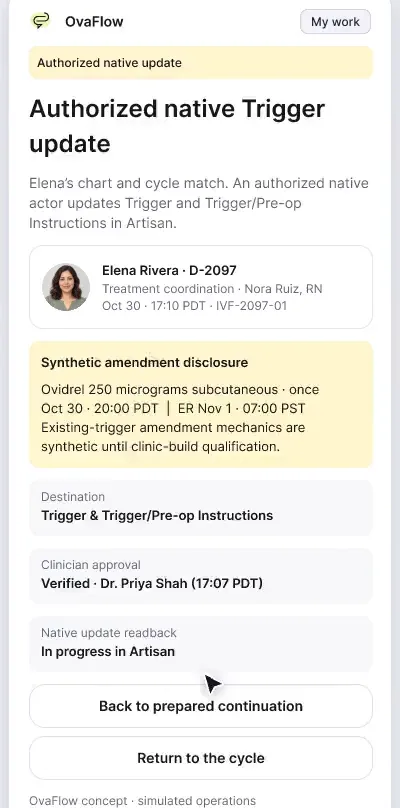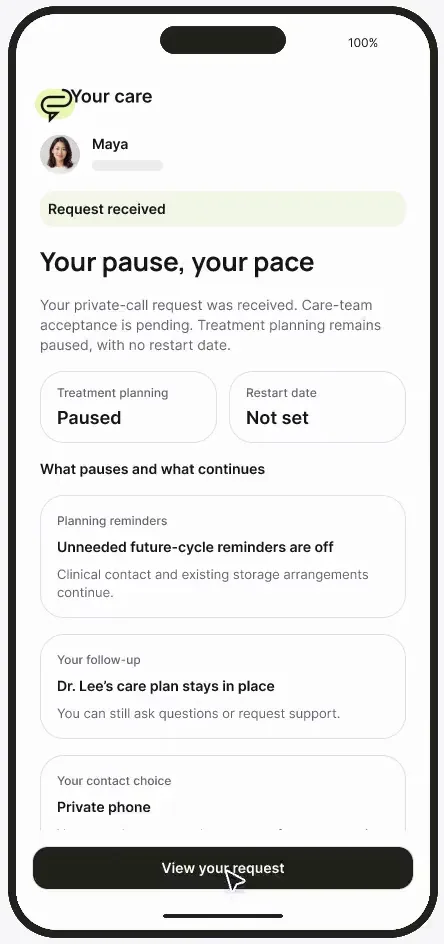
Patient and clinic, side by side
The patient's phone and the clinic's workspace side by side, so each reassuring screen shows the safeguard behind it.
Product preview · Fictional patient data
Walkthrough 12 of 29 · iPhone
An old text link can't send Elena to a superseded injection time. Reporting a late dose is simple and honest, and urgent help is one tap away.
Elena's iPhone: the current instruction, an old link, an honest report, muted recording of the design prototype. Fictional patient data.
Chapter 1 of 6: The current instruction comes first
Recorded from an interactive design prototype. Every patient, clinician and clinic is fictional, EMR screens are modeled reconstructions, and nothing shown is a live connection to any clinic or vendor system.
Clinical & operational context
The patient side of the daily-care story. Elena sees her current signed trigger instruction first, and an older text link opens the current version instead of the old time. She can ask for a call without marking the dose taken, report what actually happened, and see who has her evening callback.
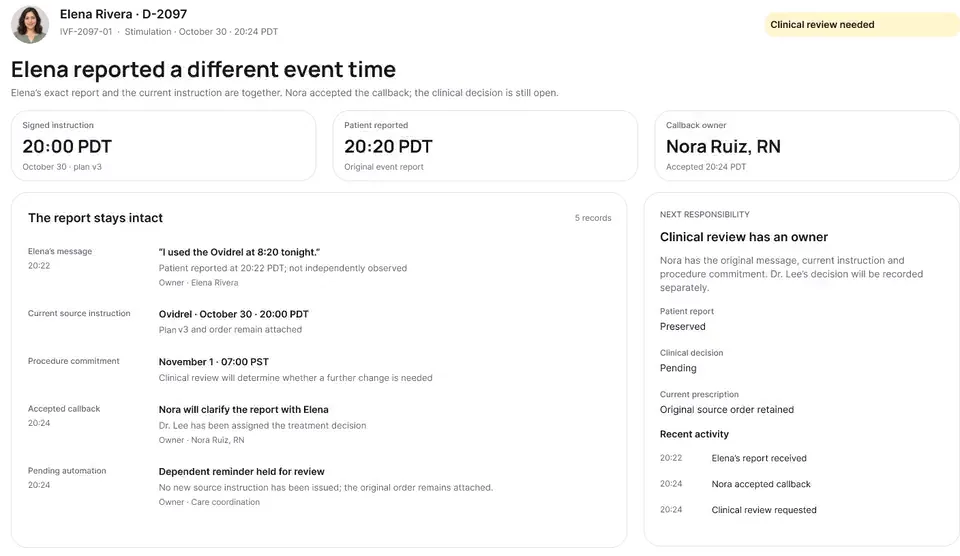
From the patient's perspective, trigger night is often overwhelming: she is managing refrigerated syringes, reading portal notifications on her iPhone, and worrying about making a mistake that could cancel her retrieval. If she taps an email or SMS link from two hours earlier before her physician adjusted her trigger time, or if she is afraid to admit she injected 20 minutes late, the care team loses visibility at the exact moment it matters most.
This iPhone walkthrough shows the same evening from Elena Rivera's hand: her current signed instruction (8:00 PM PDT, version 3) sits prominently at the top in 12-hour patient time with a clear strike-through of the older 8:30 PM PDT version. When she taps an older notification link from earlier in the afternoon, OvaFlow intercepts the stale link and redirects her to version 3. She can request a nursing call without marking the dose taken, honestly report that she took the injection at 8:20 PM PDT on Oct 30, see that Nora Ruiz, RN and then Alex Kim, RN own her callback, and later complete her post-retrieval symptom check-in with direct urgent clinic numbers `(202) 555-0141` and `(202) 555-0140` always in reach.
Elena Rivera
Taps an older v2 link from earlier in the afternoon
Patient companion
Shows 8:00 PM PDT (v3) and retires 8:30 PM PDT (v2)
Elena Rivera
Logs actual injection at 8:20 PM PDT, Oct 30
Care team banner
Shows Alex Kim, RN accepted her evening callback
What Elena Rivera sees on her iPhone when her trigger time moves from 8:30 PM PDT (v2) to 8:00 PM PDT (v3).
Guardrail: Tapping an old notification link never opens a superseded medication instruction.
What to watch for
The patient side of the daily-care story. Elena sees her current signed trigger instruction first, and an older text link opens the current version instead of the old time. She can ask for a call without marking the dose taken, report what actually happened, and see who has her evening callback.
Follow the exact timestamps, UI status changes, and coordination safeguards as the recording plays.
What to watch for: Elena's home card displays tonight's 8:00 PM PDT (Oct 30) trigger instruction in 12-hour time with version 2 (8:30 PM PDT) clearly marked replaced.
Boundary rule: Patient surfaces always use 12-hour AM/PM time with the calendar date.
On-screen narration: Elena's current signed trigger instruction, version 3, opens on her iPhone.
What to watch for: Opening a link from an earlier notification shows a clear notice that version 2 was replaced at 5:10 PM PDT and takes her straight to version 3.
Boundary rule: Stale links can never display an outdated dose or time as active.
On-screen narration: She taps an older text link for 8:30 PM. The superseded instruction doesn't open. She is taken back to the current signed version 3: 8:00 PM PDT Oct 30.
What to watch for: Elena taps 'Ask for a call' to check syringe preparation; her dose button stays unconfirmed.
Boundary rule: Asking a question never marks the medication taken.
On-screen narration: She asks for a quick call from Nora Ruiz, RN to check her Ovidrel syringe.
What to watch for: After injecting slightly late, she logs 8:20 PM PDT on Oct 30 in plain, supportive language.
Boundary rule: The UI encourages honest time reporting without alarming or blaming the patient.
On-screen narration: She reports she injected at 8:20 PM. The 35h 40m interval is kept beside the plan.
What to watch for: Her screen shows who has accepted her callback (Nora Ruiz, RN, then Alex Kim, RN on call).
Boundary rule: Seeing a named nurse reduces repeated anxious portal messages.
On-screen narration: She sees that Alex Kim, RN has accepted her evening callback, and that her doctor's review is still open.
What to watch for: After retrieval, her recovery check-in keeps urgent clinic numbers (202) 555-0141 / (202) 555-0140 and emergency guidance pinned at the top.
Boundary rule: OvaFlow does not triage symptoms; severe symptom choices direct the patient immediately to live clinical contact.
On-screen narration: After retrieval, her recovery check-in shows the clinic's 24/7 line and emergency contacts.
OvaFlow never makes the clinical call in these recordings. Physicians sign, the person taking a handoff accepts it, and the lab keeps its own holds. The companion tracks, checks and stops; staff decide.
In this walkthrough
Every patient, family member, clinician and clinic in these stories is fictional. Names, times and screens come from prototype walkthroughs, not from real care.
 Elena RiveraPatient
Named or shown on screen. An EMR here is a modeled workflow example built for the prototype, not the vendor's own software. OvaFlow is designed to work beside these systems.
Third-party names and logos are trademarks of their respective owners, shown to illustrate systems commonly used in IVF clinics. No affiliation, endorsement or live integration is implied. nAbleIVF, eIVF and Artisan appear as modeled workflow examples.
Where this appears
This recording is part of these pages. Each one explains the step in more depth.
Questions & answers
What clinicians, coordinators, practice leaders, and patients ask when reviewing Walkthrough 12.
Any tap on an older link is intercepted by a full-width notice explaining that her care team signed a newer instruction (version 3, 8:00 PM PDT on Oct 30) and showing the old time crossed out.
Clinician and lab screens use 24-hour time (20:00 PDT) to match medical and operating-room schedules, while patient screens use 12-hour time with AM/PM and the date (8:00 PM PDT, Oct 30) to prevent 24-hour conversion mistakes at home.
No. OvaFlow never triages or diagnoses. It routes check-in answers to the nursing team and keeps direct urgent phone numbers `(202) 555-0141` and `(202) 555-0140` at the top of the screen.
Related
The patient's phone and the clinic's workspace side by side, so each reassuring screen shows the safeguard behind it.
Beside a modeled Artisan view, the companion compares Dr. Priya Shah's approval with the unchanged Artisan fields, stops on Maya's open chart, and won't assume an update it didn't see.
One signed change reaches instructions, the OR, anesthesia and the lab. Later an outside emergency visit for OHSS turns a planned fresh transfer into freeze-all.
Next step
We'll replay this flow against your roles and handoffs, using fictional records. Please don't send patient data.