Product preview · Fictional patient data

OvaFlow

Companion

Beside the chart, never in its way.

Coordination work is spread across the EMR, the portal, the phone and memory. Switching between windows and open browser tabs is where chart context drifts and follow-up steps get dropped.
In the first pilot · 6 prototype walkthroughs

Docked beside the chart, away from Save buttons.Same patient, same task, more room.

The compact OvaFlow rail docked beside a modeled Artisan cycle sheet for Elena Rivera.
Elena Rivera · Tonight’s trigger instruction · Nora Ruiz, RNFictional patient dataModeled workflow example · Artisan

For your team

What changes for your team

The same work, with the source, the owner and the next step in view.

  1. Finding the patient

    TodayEach tool asks you to look the patient up again.

    With OvaFlowThe rail shows the patient, cycle and task that match the chart you have open.

  2. Screen space

    TodayOverlays cover Save buttons and take keyboard focus mid-sentence.

    With OvaFlowThe rail docks beside the chart, clear of Save, and stays out of keyboard focus.

  3. Closing the panel

    TodayClosing a window can feel like finishing the task.

    With OvaFlowDocking or closing leaves open work open. My work brings you back to it.

  4. Switching it off

    TodayTurning a tool off means losing its list.

    With OvaFlowStaff can switch the companion off and keep every task in the full workspace.

  1. 01

    Sits beside the chart

    A 384-pixel rail docks next to the EMR, away from Save and Sign controls, and stays out of keyboard focus while you type in the chart.

  2. 02

    Expands on the same task

    Opening the workspace keeps the same patient, cycle day and task in view, so nothing has to be searched for or copied again.

  3. 03

    Minimizing doesn't finish anything

    Closing or docking the companion leaves open work open under its named owner, and My work brings you right back to it.

  4. 04

    Can be turned off

    Staff can switch the companion off for shared-screen consultations without losing tasks; the full workspace stays available.

Safeguards in play

  • Wrong-chart stopIf the open chart isn't the patient the work belongs to, placement stops and the draft is kept.
  • Proposal is not signedA proposed change stays separate from the current signed instruction until the clinician approves it.

[ Anatomy of the companion ]

Read the screen the way a nurse does.

Five screens from the prototype walkthroughs. Each one points at the line that answers a question a nurse would otherwise have to go and ask.
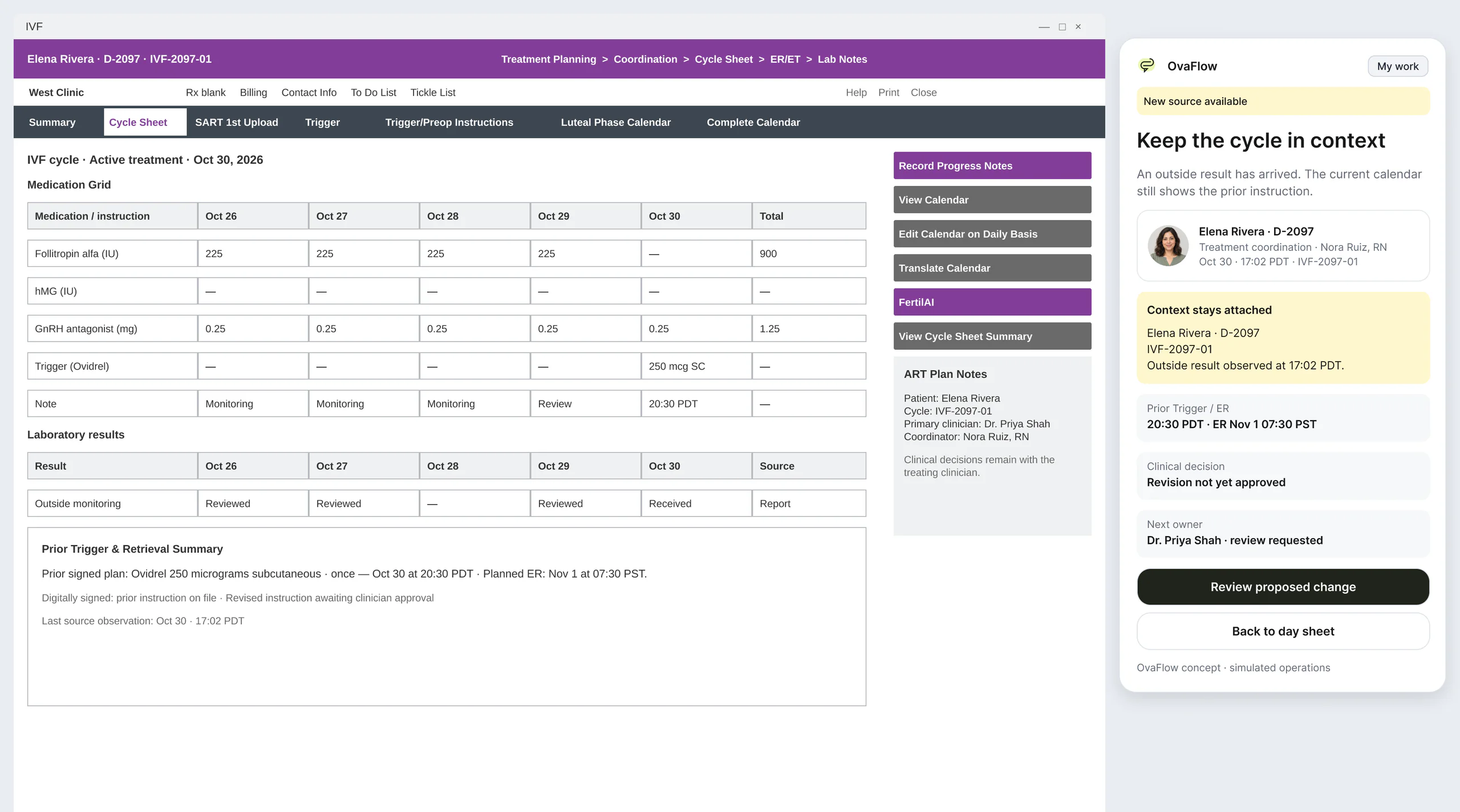
  1. The OvaFlow rail beside a modeled Artisan cycle sheet for Elena Rivera. A highlighted card reads: Context stays attached, outside result observed at 17:02 PDT.
    01 / 05 · ContextThe patient and cycle stay attachedWhen an outside result arrives, the rail keeps Elena's cycle in view and records when the result was observed, so nobody has to find her again.Fictional patient dataArtisanModeled workflow example
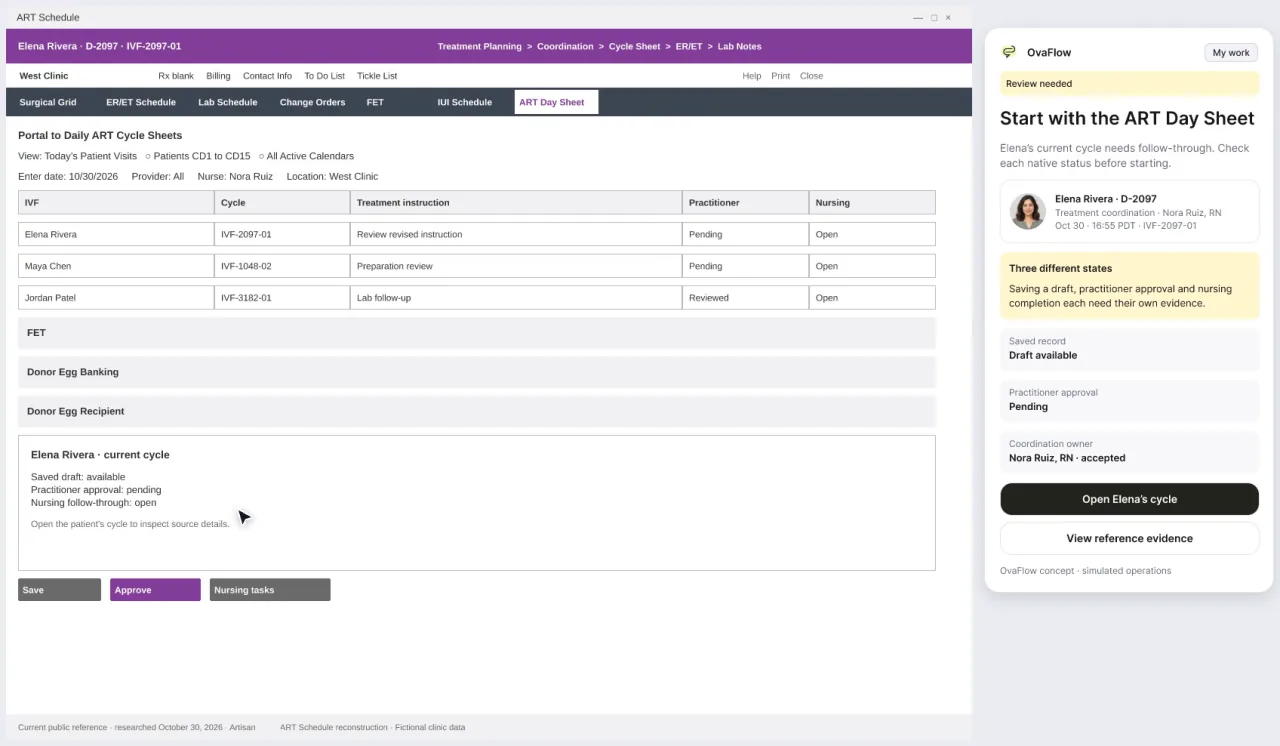
  2. The companion beside a modeled Artisan day sheet. The coordination owner reads Nora Ruiz, RN, accepted.
    02 / 05 · OwnerOne named owner, and how they got itThe owner line says who is responsible and that they accepted. Saving a draft, the practitioner's approval and nursing completion each show their own evidence.Fictional patient dataArtisanModeled workflow example
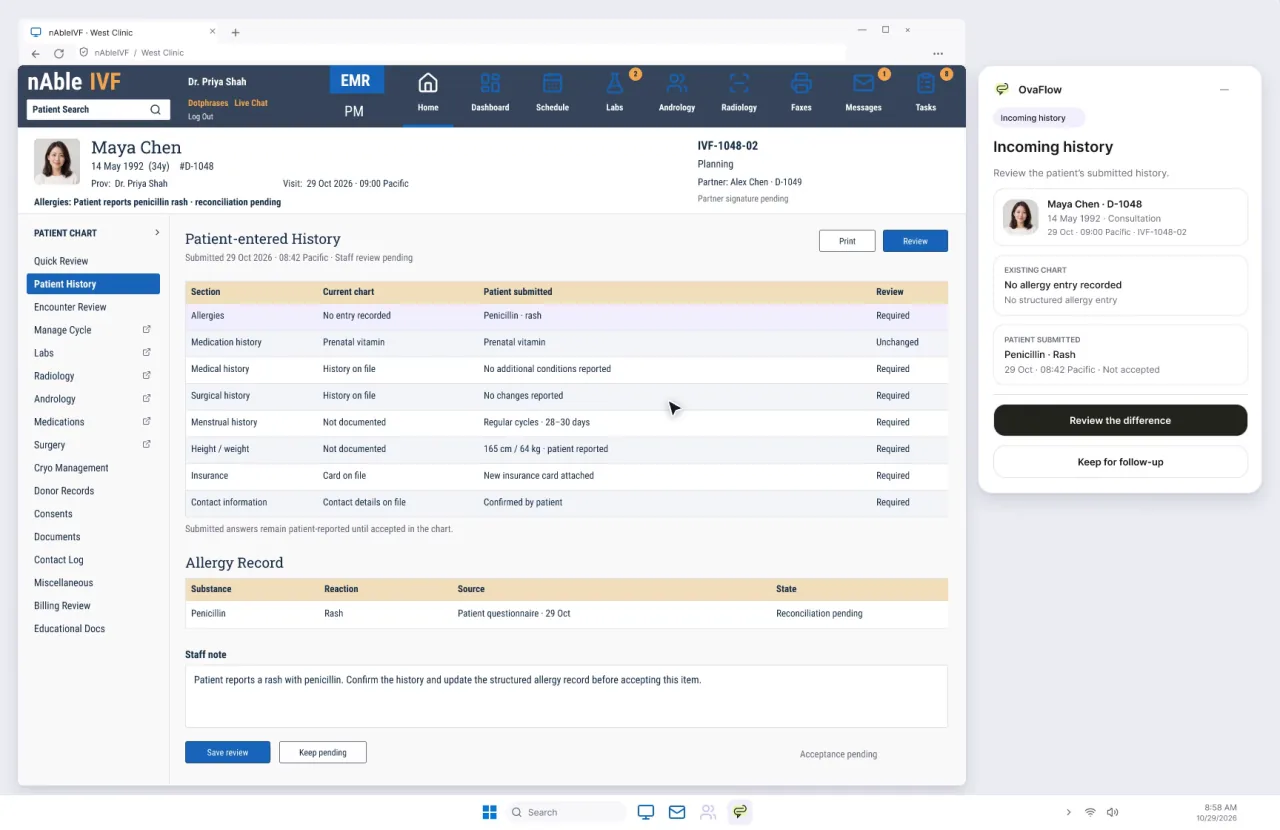
  3. The companion beside a modeled nAbleIVF chart for Maya Chen. The patient-submitted entry reads Penicillin, rash, not accepted.
    03 / 05 · SourcePatient-reported stays patient-reportedMaya's questionnaire says penicillin causes a rash. The companion shows it beside the existing chart entry, marked as not yet accepted, until staff review it.Fictional patient datanAbleIVFModeled workflow example
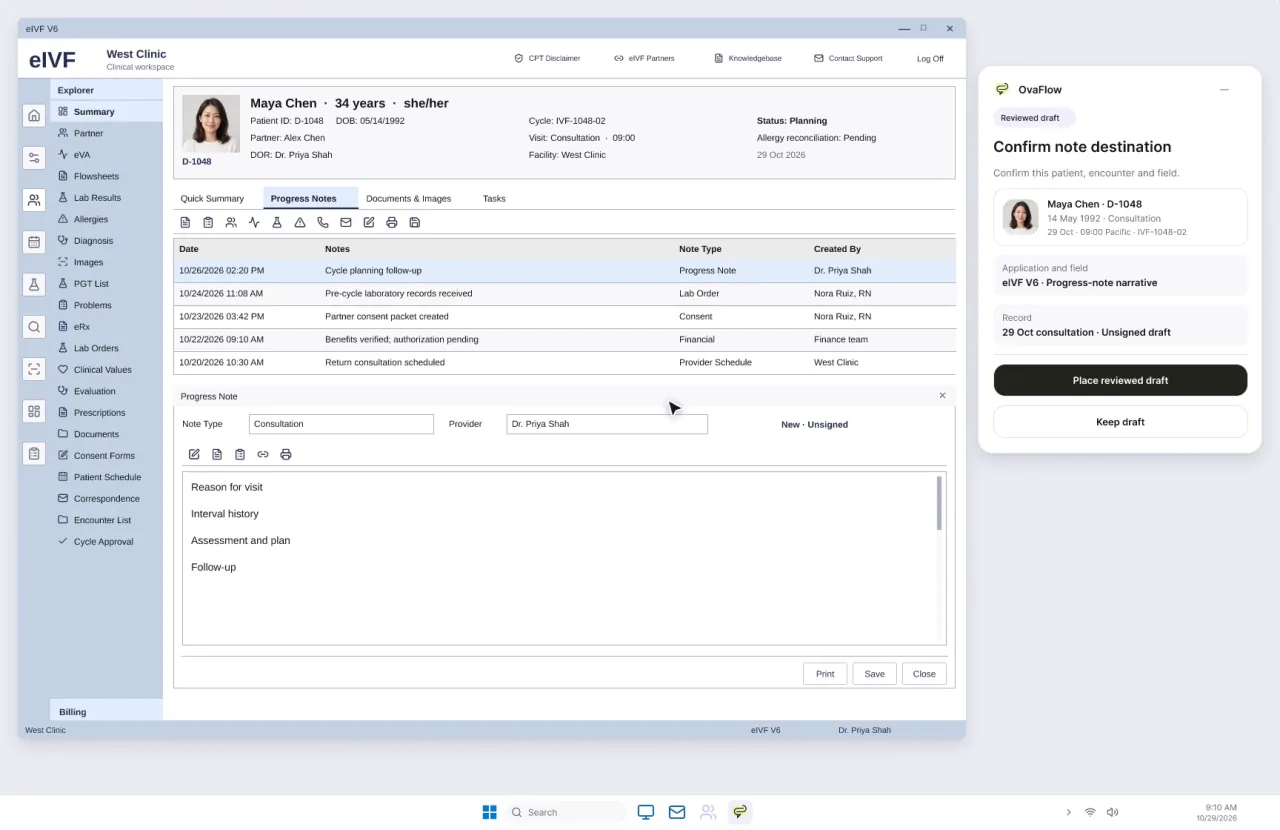
  4. The companion beside a modeled eIVF progress note. It asks staff to confirm the note destination: eIVF V6, progress-note narrative, the empty note field on the left.
    04 / 05 · DestinationConfirm where the words goBefore a reviewed draft is placed, the companion names the application, the field and the record it will land in: here, the progress-note narrative in eIVF, still empty.Fictional patient dataeIVFModeled workflow example
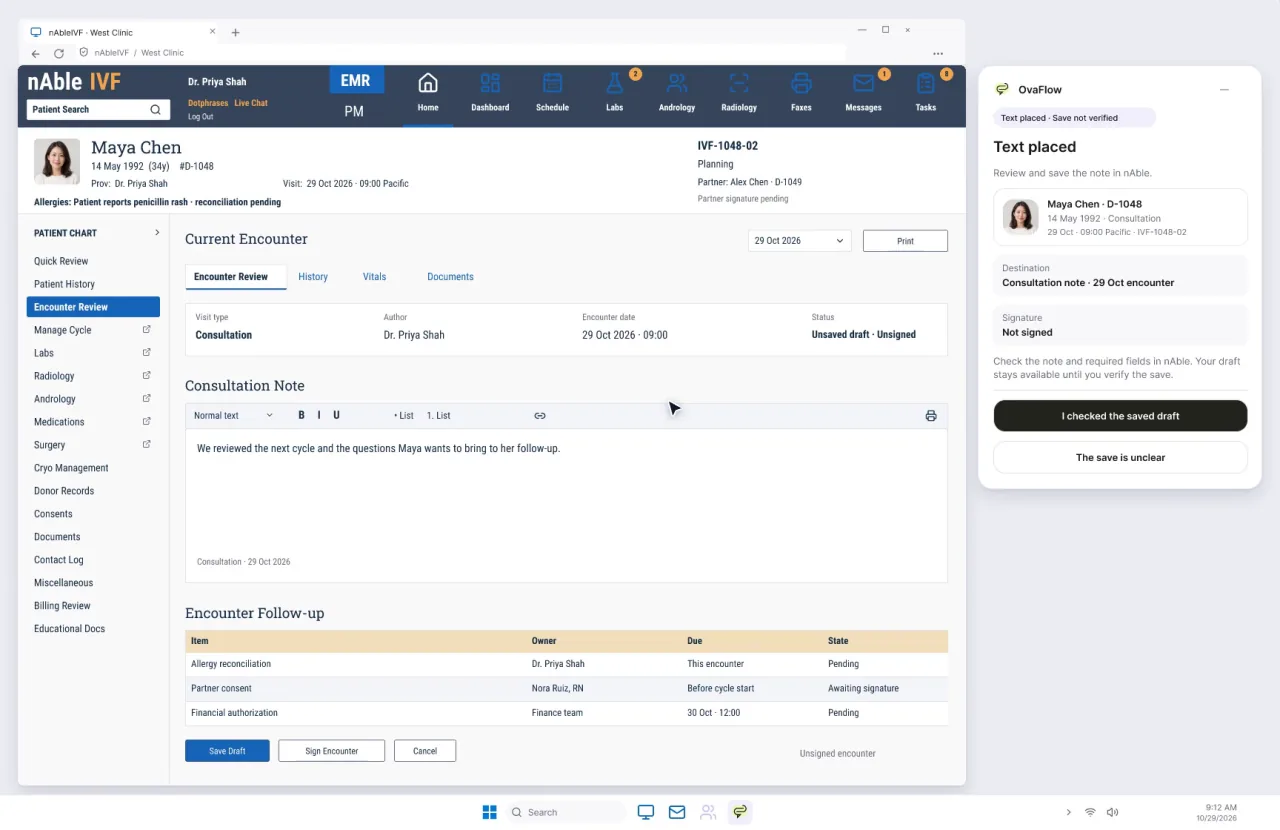
  5. The companion beside a modeled nAbleIVF consultation note. The status chip reads Text placed, save not verified, and the nAbleIVF encounter status still reads Unsaved draft, Unsigned.
    05 / 05 · VerificationPlaced is not savedThe text is in the note, but nAbleIVF itself still reads “Unsaved draft”. The companion says “Save not verified” until someone checks the saved record, and the draft stays available until then.Fictional patient datanAbleIVFModeled workflow example

Screens are prototype recordings beside modeled EMR screens, with fictional patient data.

Working beside the chart

Why switching between EMR tabs and coordination tools causes wrong-chart errors

During morning monitoring review, fertility nurses and coordinators move rapidly between ultrasound flowsheets, hormone results, portal messaging, and surgical scheduling. In randomized clinical trials using the Retract-and-Reorder measure, researchers showed that context switching across open charts and windows causes thousands of wrong-patient electronic orders each year—and that active patient verification right before action reduces wrong-patient events by roughly 40% [1].

Floating widgets that cover EMR Save or Sign buttons, or steal keyboard focus while a clinician is typing a dose, force staff to drag windows out of the way or disable the tool altogether [2]. OvaFlow’s Companion is a narrow rail that docks cleanly to the left or right of the EMR, never intercepts EMR keyboard shortcuts, verifies that the open chart matches the active task, and expands into the full workspace on the exact same patient and cycle day.

Side-by-side desktop layout · Clinic EMR and docked rail

How the narrow companion rail sits beside the open chart without stealing focus

Full EMR chart + docked edge rail
Modeled clinic EMR windowActive keyboard focus stays here

Chart: Elena Rivera · Cycle Day 11 · Stimulation Flowsheet

Signed trigger order (version 3): Ovidrel 250 mcg SC at 20:00 PDT on Oct 30 (signed by Dr. Mira Lee at 17:10 PDT)

Monitoring values: Estradiol 2,840 pg/mL · Lead follicles 19 mm, 18 mm, 18 mm · Retrieval Nov 1 at 07:00 PST

EMR Save button unobstructedEMR Sign button unobstructedZero overlay on chart fields
Docked companion railLeft or right edge

Matched to open chart: Elena Rivera

  • Current owner: Nora Ruiz, RN (4 linked version 3 tasks in view)
  • Two-identifier check: Halts placement if the EMR tab switches to Jordan Patel’s chart
  • Clean consult toggle: Can be turned off for shared-screen visits without closing any task
Expands to full workspace on the same task
Figure 1 · The companion rail docks outside the EMR’s charting area and Save/Sign controls, keeping patient context matched as staff move from chart review to full coordination.

Worked example from the cast

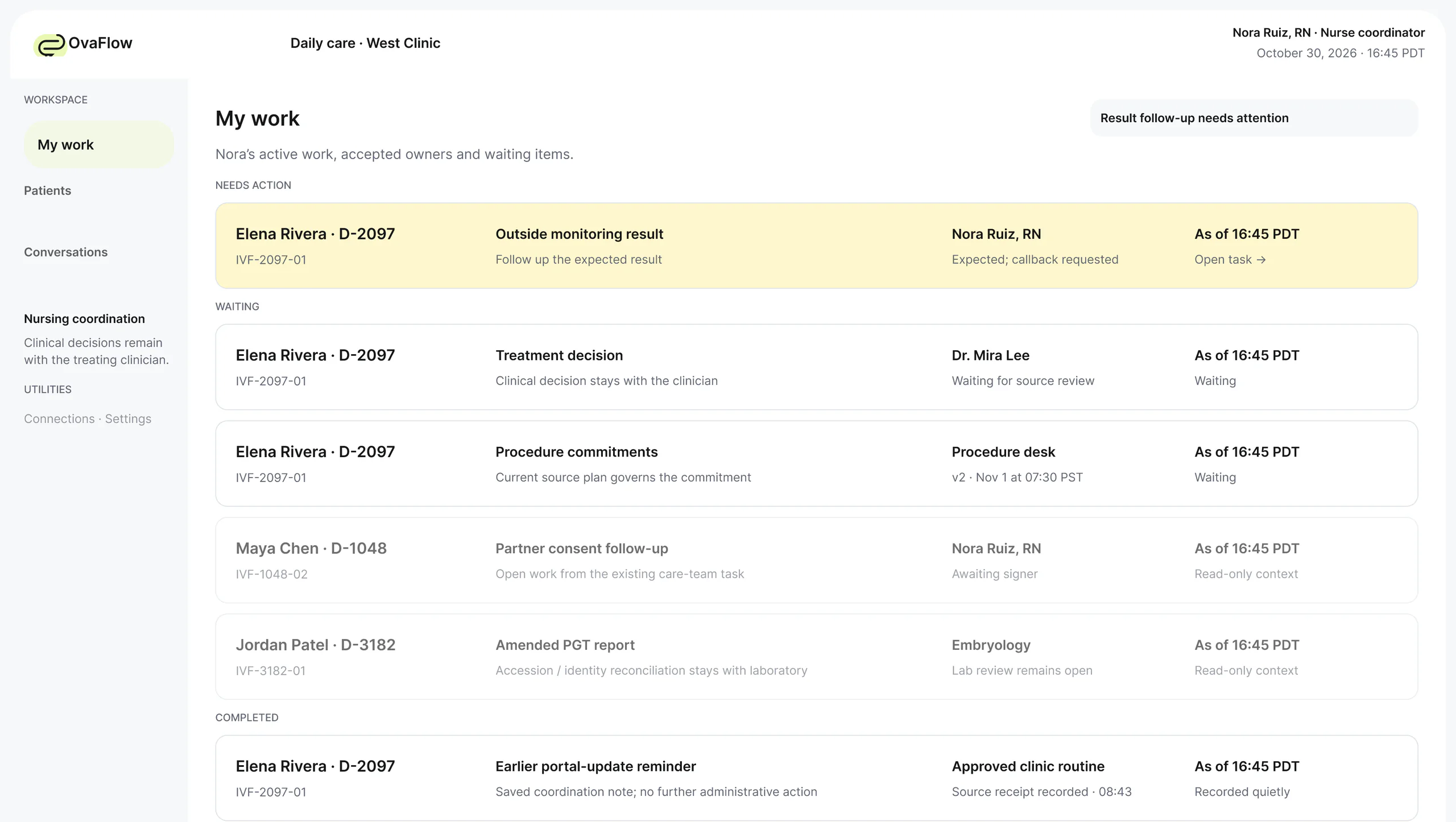
How Nora Ruiz, RN keeps Elena Rivera’s note safe when Jordan Patel’s chart opens

How the docked rail preserves chart alignment, halts a cross-chart paste without losing the draft, and expands into the full workspace.

See Daily Care story →
Step-by-step walkthrough

How Nora Ruiz, RN keeps Elena Rivera’s note safe when Jordan Patel’s chart opens

  1. Step 0116:58 PDT

    Nora Ruiz, RN

    Docked Companion (Right)
    Ready for review in the EMRStages Elena’s Day 11 draft

    While viewing Elena Rivera’s Cycle Day 11 monitoring flowsheet in the EMR, Nora Ruiz, RN prepares the evening instruction draft in the docked companion rail. Keyboard focus stays inside the EMR flowsheet.

  2. Step 0217:02 PDT

    Nora Ruiz, RN

    Clinic EMR + Companion Rail
    Wrong-chart stop activeJordan Patel’s chart is open

    A colleague asks a quick question about Jordan Patel, and Nora switches the EMR tab to Jordan Patel’s chart. Because the open EMR chart (Jordan Patel) no longer matches the prepared draft’s owner (Elena Rivera), the companion immediately halts placement and holds Elena’s draft.

  3. Step 0317:05 PDT

    Nora Ruiz, RN

    Companion → Full Workspace
    Ready for review in the EMROpens workspace on Elena Rivera

    Nora switches the EMR back to Elena Rivera’s chart and clicks Expand. The companion rail opens into the full desktop workspace with Elena’s version 3 amendment, four linked tasks, and draft already in view—with no re-searching.

  4. Step 0417:08 PDT

    Nora Ruiz, RN

    Clinic EMR + Companion Rail
    Lost sight of the EMR · 17:08 PDTMinimizing never closes work

    When the EMR browser window reloads at 17:08 PDT, the rail displays “Observation interrupted · last verified 17:08 PDT” and keeps all open tasks in My work until the chart is observed again.

Figure 2 · Four-step walkthrough showing who holds responsibility, which screen is active, and which status applies at each timestamp.

System boundaries

What OvaFlow handles and what stays with your EMR and clinical team

Clear operational boundaries keep clinical authority, prescribing, and laboratory witnessing inside your clinic’s own systems. See AI & clinical boundaries for full governance rules.

What OvaFlow does here

  • Docks as a narrow rail on the left or right edge without covering EMR Save, Sign, or navigation bars.
  • Preserves active keyboard focus inside the EMR so typing and keyboard shortcuts work normally.
  • Checks that the patient and episode open in the EMR match the task currently selected in the rail.
  • Expands into the full workspace on the exact same patient, task, and scroll position, and turns off cleanly for shared-screen visits.

What OvaFlow never does

  • Never auto-submits, auto-signs, or clicks Save inside the EMR on a user’s behalf.
  • Never treats minimizing or closing the companion rail as completing or dismissing an open task.
  • Never injects text into an EMR window when the patient identity or target field has changed.
  • Never traps focus or blocks access to underlying EMR screens.

Questions & primary sources

Answers for clinicians, practice leaders, and patients

Will the companion rail cover my EMR’s Save button or steal my cursor while I am typing a note?Clinicians & coordinators

No. The companion rail docks outside the EMR’s primary action zone, can be flipped left or right with one click, and leaves keyboard focus in your EMR window until you intentionally click or tab into the companion.

What happens if a physician wants a clean screen while reviewing ultrasound images with a patient in the consult room?Practice leaders & owners

Any user can toggle the companion off in one step during a consultation. Turning the rail off hides the sidecar without closing or dropping any open tasks, which remain in My work and the full workspace.

How does a side-by-side rail help protect my chart during busy morning clinic hours?Patients & families

When nurses have dozens of charts open during morning monitoring, the companion continuously checks that the note or instruction being prepared belongs to the exact person whose chart is open on screen.

Primary clinical & safety references (2 sources)View citations
  1. Adelman JS, Kalkut GE, Schechter CB, et al. (2013). Understanding and preventing wrong-patient electronic orders: a randomized controlled trial. Journal of the American Medical Informatics Association 20(2):305-310. — Validated the Retract-and-Reorder measure of self-caught wrong-patient electronic orders caused by multi-tab switching and showed active ID checks reduced wrong-patient orders by ~40%.
  2. Office of the National Coordinator for Health IT (ONC) (2025). SAFER Guide: Computerized Provider Order Entry with Decision Support. HealthIT.gov Safety Assurance Factors for EHR Resilience. — Details interface safety practices to keep patient identification visible and prevent overlay or workflow disruption during clinical order entry.

See it

Walkthroughs that show it

Recorded from an interactive design prototype. Every patient, clinician and clinic is fictional, and EMR screens are modeled reconstructions.

Prototype walkthrough · Fictional patient data

Next step

Put the companion beside your EMR.

We'll open the modeled workspace next to an EMR screen and walk one of your shifts through it. Fictional records only; please don't send patient data.