Lab & pharmacy core: witnessing, prior auth, delivery and readiness
From duplicate barcodes to cold-chain delivery and the patient's own “received”, every handoff to the clinic's own system has an owner and a confirmation.
Product preview · Fictional patient data
Walkthrough 11 of 29 · Desktop
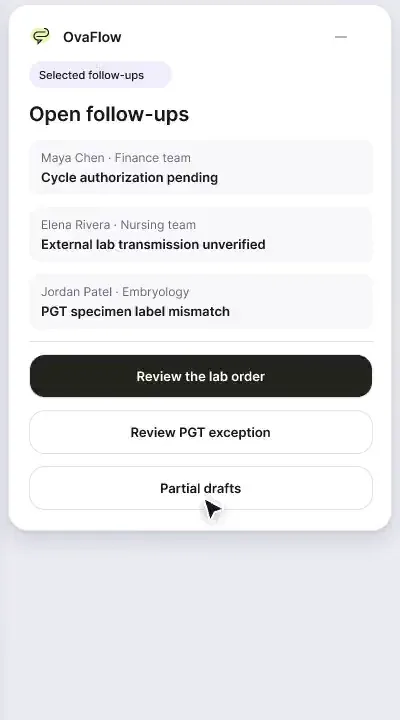
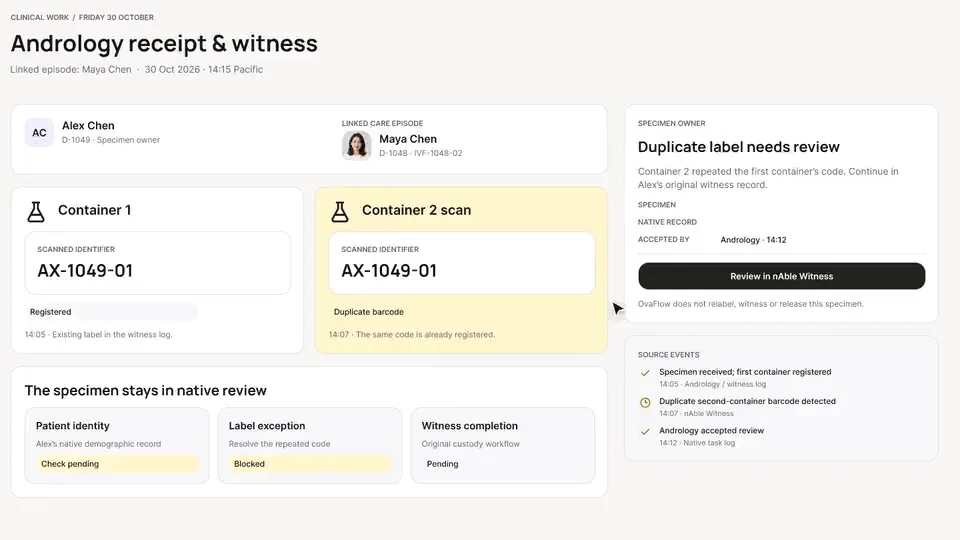
Accession holds, amended PGT reports, cryo tank signals and pharmacy change requests land in one queue, each with a named owner.
Lab & specialty pharmacy: accession hold, amended PGT, cryo signal, muted recording of the design prototype. Fictional patient data.
Chapter 1 of 6: One queue for lab and pharmacy
Recorded from an interactive design prototype. Every patient, clinician and clinic is fictional, EMR screens are modeled reconstructions, and nothing shown is a live connection to any clinic or vendor system.
Clinical & operational context
A single operations queue for the lab and specialty pharmacy. An outside lab accession is corrected and confirmed, an amended PGT report gets a documented physician review, a cryo tank signal is followed up, and a pharmacy change request goes to the prescriber.
Behind every retrieval and transfer sits a tight web of embryology, andrology, genética/PGT, cryostorage, and specialty pharmacy signals. In many clinics, a corrected specimen accession hold, an amended PGT report from a reference genetics lab, a liquid-nitrogen cryotank alarm check, and a specialty pharmacy substitution request arrive through separate faxes, portals, and spreadsheets — making it hard for nursing and lab leaders to see whether tomorrow's procedure list is truly ready.
This walkthrough brings those cross-departmental signals into one operational queue: resolving a specimen accession hold with documented verification, flagging an amended PGT report so the superseded version cannot be used for transfer selection, logging a cryotank monitoring signal with an assigned lab owner, routing a specialty pharmacy medication change request back to the prescribing clinician, and checking procedure-day readiness across permissions and outcomes.
Embryology lab
Reconciles specimen accession hold in lab system
OvaFlow safeguard
Flags amended PGT report; retires version 1
Embryology on-duty
Accepts tank signal check and logs verification
Dr. Mira Lee
Reviews specialty pharmacy change in clinic EMR
How accession holds, amended PGT reports, cryotank signals, and pharmacy clarifications route to the right clinical or laboratory owner.
Guardrail: Amended PGT reports immediately mark prior versions superseded, and pharmacy formulation changes require clinician sign-off in the EMR.
What to watch for
A single operations queue for the lab and specialty pharmacy. An outside lab accession is corrected and confirmed, an amended PGT report gets a documented physician review, a cryo tank signal is followed up, and a pharmacy change request goes to the prescriber.
Follow the exact timestamps, UI status changes, and coordination safeguards as the recording plays.
What to watch for: Lab, genetics, cryostorage, and specialty pharmacy items affecting active cycles appear in one shared queue.
Boundary rule: OvaFlow coordinates follow-up ownership across teams without replacing the laboratory information system.
On-screen narration: The lab and specialty pharmacy operations hub opens.
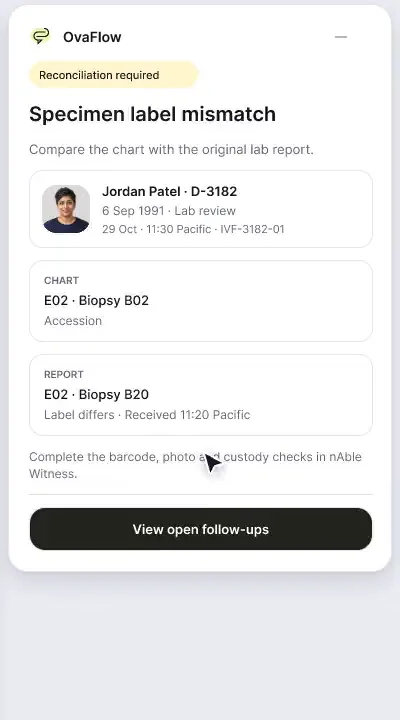
What to watch for: An accession hold on a specimen stays blocked until both identifiers and collection details are reconciled.
Boundary rule: No specimen moves past an accession hold without recorded laboratory verification.
On-screen narration: An outside lab accession hold for Jordan Patel needs correction. The reference lab confirms it received the corrected accession.
What to watch for: When an amended PGT report arrives, version 1 is marked superseded and embryology + REI review are reopened.
Boundary rule: Transfer planning cannot proceed on an outdated genetics report version.
On-screen narration: An amended PGT report needs a documented clinician review. The physician's review of the amended report is recorded.
What to watch for: A cryostorage tank telemetry signal creates an immediate, owned check for the on-duty embryologist.
Boundary rule: Cryo alerts require explicit acceptance and documented inspection in the lab's log.
On-screen narration: A cryostorage tank signal needs lab follow-up. The source is resolved and the tank is confirmed stable.
What to watch for: A specialty pharmacy substitution or clarification request routes to the prescribing clinician.
Boundary rule: Coordinators and pharmacies cannot alter a medication order without physician approval in the EMR.
On-screen narration: A specialty pharmacy change request for Elena is routed to the prescriber. The pharmacy acknowledges canceling the superseded prescription.
What to watch for: Role-based permissions and procedure readiness gates confirm every department has signed off.
Boundary rule: Each role only approves the gates within its clinical or laboratory scope.
On-screen narration: Related family members keep separate chart permissions. Clinical and financial cycle readiness are checked side by side. A cycle outcome draft is reconciled against the clinical records. The outcome report is confirmed ready for registry submission. Back to the lab operations overview.
OvaFlow never makes the clinical call in these recordings. Physicians sign, the person taking a handoff accepts it, and the lab keeps its own holds. The companion tracks, checks and stops; staff decide.
In this walkthrough
Every patient, family member, clinician and clinic in these stories is fictional. Names, times and screens come from prototype walkthroughs, not from real care.
 Jordan PatelPatient
 Elena RiveraPatient
Named or shown on screen. An EMR here is a modeled workflow example built for the prototype, not the vendor's own software. OvaFlow is designed to work beside these systems.
 Clinic workstation OS
Systems a clinic running this workflow often uses. They do not appear in this recording.
 Electronic lab witnessing
 Electronic witnessing (RI Witness) & PGT genetics
 Electronic witnessing & embryology lab technology
 Automated cryostorage & monitoring
 PGT & reproductive genetics lab
 PGT & embryo genomics lab
 Outside reference lab
 Outside reference & genetic lab
 E-prescribing network
 Specialty fertility pharmacy
 Specialty fertility pharmacy (formerly Alto Pharmacy)
Third-party names and logos are trademarks of their respective owners, shown to illustrate systems commonly used in IVF clinics. No affiliation, endorsement or live integration is implied. nAbleIVF, eIVF and Artisan appear as modeled workflow examples.
Where this appears
This recording is part of these pages. Each one explains the step in more depth.
Questions & answers
What clinicians, coordinators, practice leaders, and patients ask when reviewing Walkthrough 11.
No. Physical barcode or RFID witnessing happens inside the laboratory's own system. OvaFlow surfaces open holds, amended reports, and handoffs between the lab and the clinical care team.
OvaFlow marks the earlier report superseded, reopens the clinical and embryology readiness gates, and alerts the assigned REI and embryologist before warming.
Only the prescribing clinician inside the clinic's EMR e-prescribing module; nursing and pharmacy coordinators track the follow-up once signed.
Related
From duplicate barcodes to cold-chain delivery and the patient's own “received”, every handoff to the clinic's own system has an owner and a confirmation.
A note isn't done until it's saved, a cycle doesn't start with prior authorization unresolved, dose changes go to eIVF's own e-prescribing, and a PGT label mismatch stops the review.
A patient-reported penicillin rash is surfaced against the chart, a monitoring note is confirmed saved rather than assumed, and a specimen label mismatch stops review.
Next step
We'll replay this flow against your roles and handoffs, using fictional records. Please don't send patient data.