Product preview · Fictional patient data

OvaFlow

iPhone

On call, seeing is not accepting.

A clinician iPhone app concept: the evening and weekend on-call handoff queue, in-room visit capture with documented patient consent, and line-by-line review of voice drafts recorded on Apple Watch before anything reaches the desk.

Design prototype
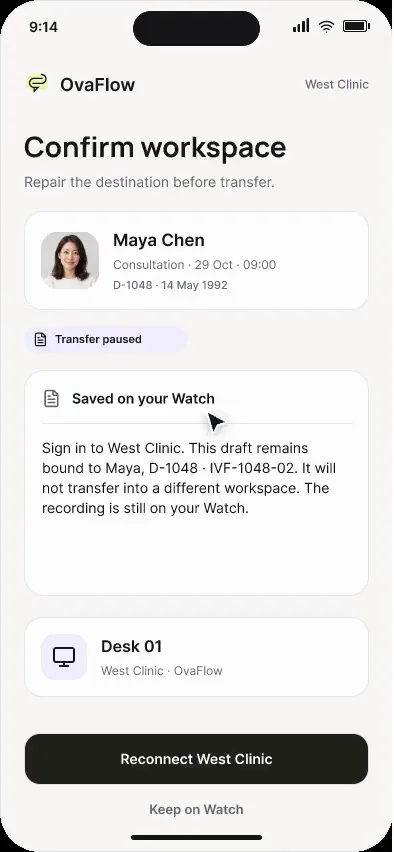
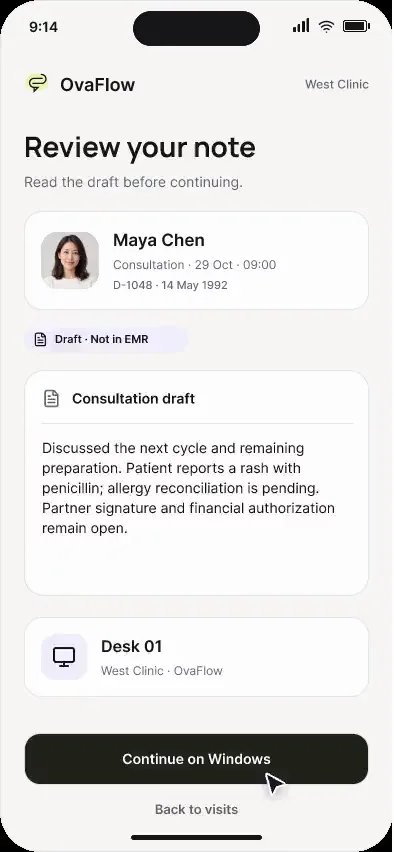
iPhone reviewing a draft recorded on Apple Watch, with the missing segment marked. Fictional patient data.
iPhone in-room capture: patient and consent confirmed before the microphone starts. Fictional patient data.
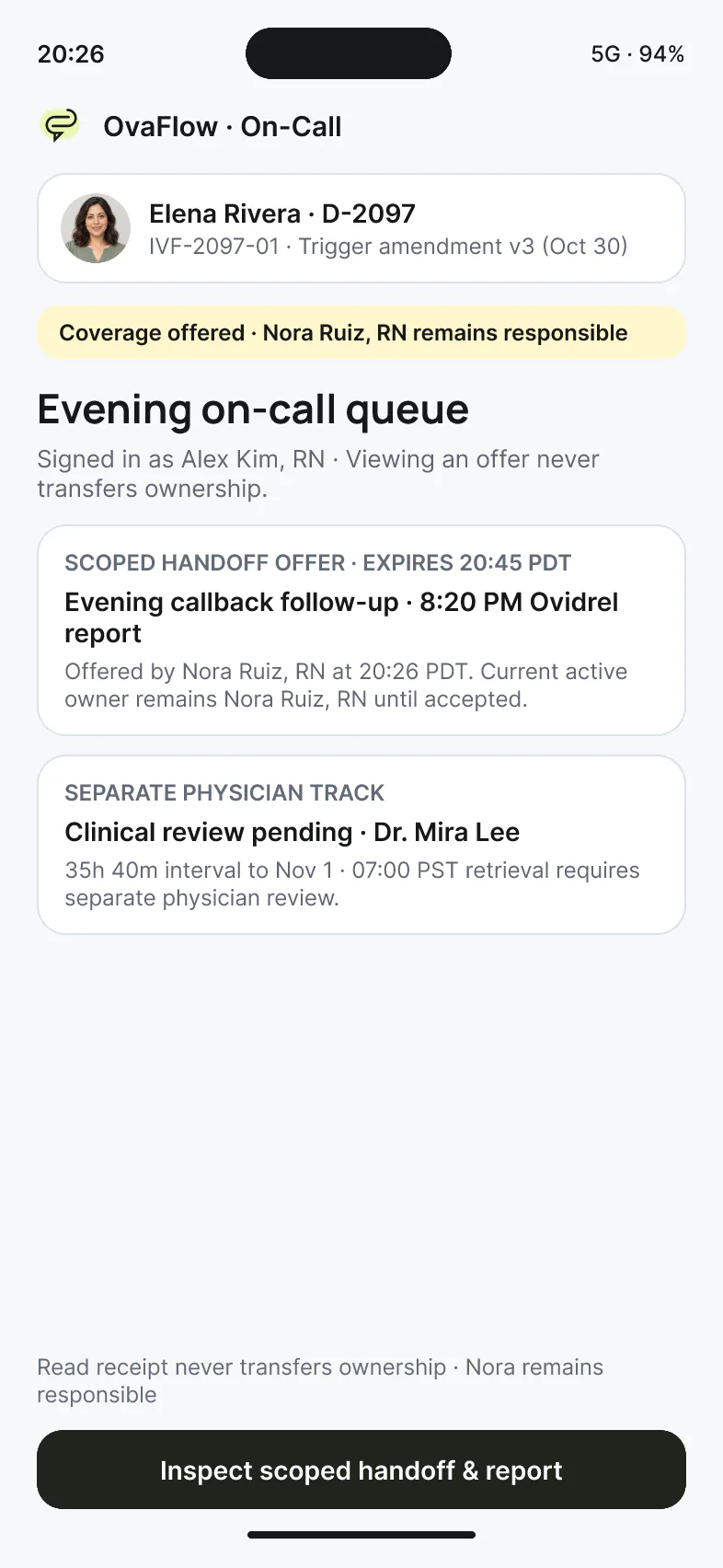
On-call iPhone queue: an evening callback offered while Nora Ruiz, RN remains responsible. Fictional patient data.
Design prototype · Fictional patient data

What it's for

Three jobs, in your pocket.

The on-call queue and in-room capture, in your pocket. On-call nurses and physicians away from the desk.

  1. On-call queue

    Opening an offer never accepts it; declining requires a reason and keeps the original owner responsible until another nurse accepts.

  2. In-room capture

    Patient identity and verbal consent come before the microphone turns on, with a live waveform, one-tap exam pause, and queued transfer to the desk.

  3. Watch companion

    Review wrist voice drafts, inspect clearly marked audio gap brackets from interrupted captures, and repair the target workspace destination.

On call

A handoff that changes hands only on accept.

Step through the on-call phone. Each step is a state from the recorded design prototype.

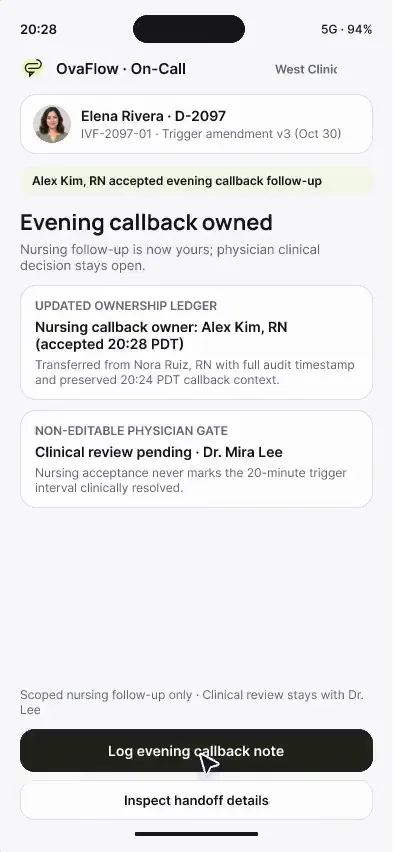
On-call iPhone (design prototype): an evening callback goes from offered to explicitly accepted, then a note is logged. Fictional patient data. Now showing step 1: Seeing an offer is not accepting it
  1. Alex Kim, RN opens the evening on-call queue. The callback is offered, and Nora Ruiz, RN remains responsible until Alex explicitly accepts.

  2. Alex accepts the evening nursing callback. Dr. Mira Lee's clinical review stays open and can't be edited from the phone.

  3. The callback note is recorded and shared with the care team, without writing to EMR schedule fields. Clinical review is still pending.

Device anatomy & visibility matrix

Clinician iPhone anatomy: on-call triage, consented room capture & Watch recovery

Designed for the moments a nurse coordinator or REI physician is away from the desk—answering evening on-call escalations, capturing an in-room consult with consent, or repairing a voice draft transferred from Apple Watch.

Design prototype · 393×852 clinician iPhone for on-call handoffs, room capture & Watch draft repair

Worked clinician iPhone trace: evening decline, scoped accept & room capture

The clinician iPhone on-call, room-capture and Watch-recovery walkthroughs show how ownership and consent stay explicit away from the desk.

  1. 20:26 PDT (24h)On-call nurse A

    Zone 01 · On-call offer (Viewing ≠ accepting)

    Opens Elena Rivera's evening trigger follow-up offer while handling another urgent call. Reads the context and taps Decline (“In active urgent callback”).

    Screen boundary

    Seeing the offer did not transfer ownership; declining requires a reason and keeps Nora Ruiz, RN as owner until reassigned.

  2. 20:28 PDT (24h)Alex Kim, RN

    Zone 02 · Order vs. report & scoped accept

    Reviews Elena's 20:00 PDT signed order beside her 8:20 PM PDT actual-use report (received 20:22 PDT) and taps Accept for the nursing check-in at 20:28 PDT.

    Screen boundary

    Scoped accept moves only the nursing callback to Alex Kim, RN; clinical review of the 20-minute variance stays with Dr. Mira Lee.

  3. 11:05 (24h)Dr. Mira Lee, MD

    Zone 03 · Consented room capture & offline retention

    In an exam room with weak signal, confirms patient identity and consent, records the visit summary, pauses for the ultrasound exam, and finishes while offline.

    Screen boundary

    Audio and draft stay retained on the iPhone until the desk workstation reconnects.

  4. 14:22 (24h)Dr. Mira Lee, MD

    Zone 04 · Paired Apple Watch gap repair

    Opens a note transferred from Apple Watch where a 4-second interruption occurred; inspects the marked gap bracket and repairs the destination chart before sending to the desk.

    Screen boundary

    Gaps are highlighted for human repair, never smoothed over by guesswork.

Clinician iPhone screen flow (393×852 viewport). Opening an offer never accepts it; declining requires a reason; accepting the 20:28 PDT nursing check-in keeps physician order authority with Dr. Mira Lee; and room capture requires verbal consent before the microphone opens.
Visibility table, explicit boundaries & glossaryWhat shows where on the clinician iPhone & what never happens on iPhone for cliniciansSub-surface visibility table, what iPhone for clinicians does and never does, and related safeguard terms.
What shows where on the clinician iPhone
Sub-surface / stateWhat is shownWhat is hidden or redactedAllowed actionStays at the desk or EMR
On-call queue listOpen handoff offers, urgency window, current responsible owner, and time remaining before escalation.Opening an item to read the context never triggers an implicit “accepted” receipt.Inspect the offer details before deciding whether you have capacity to take it.Modifying the underlying medication order or surgical retrieval schedule.
Handoff offer detail (Elena Rivera trigger check)Signed v3 order (20:00 PDT) side by side with Elena's verbatim report (8:20 PM PDT) and daylight-saving note.Superseded v2 (20:30 PDT) is marked historical and cannot be used as the target reference.Accept scoped nursing follow-up, or Decline with a required reason so Nora Ruiz, RN keeps ownership.Physician clinical disposition on whether the 20-minute delay alters retrieval timing.
In-room visit capture (Maya Chen consult)Patient identity header, verbal consent toggle, live audio waveform, and one-tap exam pause button.Microphone button is disabled until the clinician confirms the patient and consent step.Record consented room audio, pause during physical exam, and queue draft for the desk.Placing the reviewed note into the EMR encounter and clicking Save.
Offline / poor-signal hallway stateLocal retention badge (“Saved on iPhone · waiting for desk sync”) with exact capture timestamp.Never claims the draft is visible to the care team until sync completes.Continue reviewing transcript locally; sync resumes automatically when back on clinic Wi-Fi.Chart publication and team queue closure.
Paired Apple Watch recovery viewTransferred wrist voice note with any interrupted audio segment bracketed as an explicit gap.Does not auto-fill or guess words across a dropped Bluetooth or microphone gap.Listen to the segment, repair the target patient/workspace destination, and send to desk.Final clinician edit and EMR sign-off at the workstation.

Designed to do on iPhone for clinicians

What belongs on this screen

  • Lets on-call staff inspect handoff offers without accidentally taking ownership just by opening the screen.
  • Requires a documented reason on decline so the original owner knows the task still needs coverage.
  • Places the signed order and the patient's verbatim report side by side during evening triage.
  • Enforces patient confirmation and consent before turning on the room microphone, and retains drafts offline.

Explicit boundary

What never happens on iPhone for clinicians

  • Never treats a notification tap or screen view as accepting a clinical handoff.
  • Never transfers physician clinical sign-off authority when a nurse accepts a callback task.
  • Never edits EMR flowsheets, signs trigger orders or transmits e-prescriptions from the phone.
  • Never hides or auto-completes missing audio segments from a paired Apple Watch recording.

Questions

Common questions about iPhone for clinicians

Frequently asked questions4 questions on iPhone for clinicians privacy, boundaries and rollout timing
Why is “view is not accept” such a central rule on the clinician iPhone?

In standard messaging apps, once an on-call nurse opens a message, the sender sees “Read” and assumes the task is handled—even if the reader was in the middle of another emergency. On the OvaFlow iPhone concept, opening an offer leaves the original owner responsible until the receiving clinician explicitly taps Accept.

What does a “scoped accept” mean during an after-hours trigger check?

When Elena Rivera reports taking her trigger shot at 8:20 PM PDT instead of 8:00 PM PDT, two distinct responsibilities exist: calling Elena back to support her (nursing scope) and deciding whether the 20-minute difference affects the retrieval schedule (physician scope). Accepting the nursing callback never marks the physician review complete.

What happens if clinic Wi-Fi drops while recording an in-room visit on iPhone?

The recording continues locally on the iPhone and saves to on-device storage with an explicit “Waiting for desk” status. Once connection returns, the draft transfers to the clinician's desktop queue for EMR placement.

Is the clinician iPhone app part of the first clinic pilot?

No. The clinician iPhone surface is a design prototype demonstrating how the same task, handoff and capture rules extend off the desk in a later, separately justified phase.

Platform standards & referencesPublic platform documentation cited on this page (2 verified sources)Apple Human Interface Guidelines, WidgetKit, ActivityKit, watchOS, Windows UIA and Citrix ICA documentation.
  1. [3]

    Apple Developer Documentation · WidgetKit — Home Screen, Lock Screen & Smart Stack Privacy Redaction (verified 2026-11-03)

    Apple framework documentation for glanceable widgets and privacy-sensitive Lock Screen redaction.

  2. [4]

    Apple Developer Documentation · ActivityKit & Human Interface Guidelines — Live Activities and Dynamic Island (verified 2026-11-03)

    Design and system rules for Compact, Minimal and Expanded Dynamic Island and Lock Screen Live Activity views.

In the walkthroughs

What you can watch it do.

Design prototype

Separate iPhone and Watch apps would be a later, separately justified step on the same product model.

  1. View is not accept on the on-call queue
  2. Order and patient report side by side
  3. A scoped accept that leaves clinical review with the physician
  4. Consent before the microphone
  5. Drafts that wait for an offline desk
  6. Paired Apple Watch gap inspection and destination repair

Walkthroughs

iPhone for clinicians, recorded.

Recordings of the interactive design prototype with fictional patients. Open one to play it with chapters and captions.

Next step

Take the queue off the desk.

We'll walk the iPhone design through the moments your team is away from a workstation. Fictional records only; please don't send patient data.