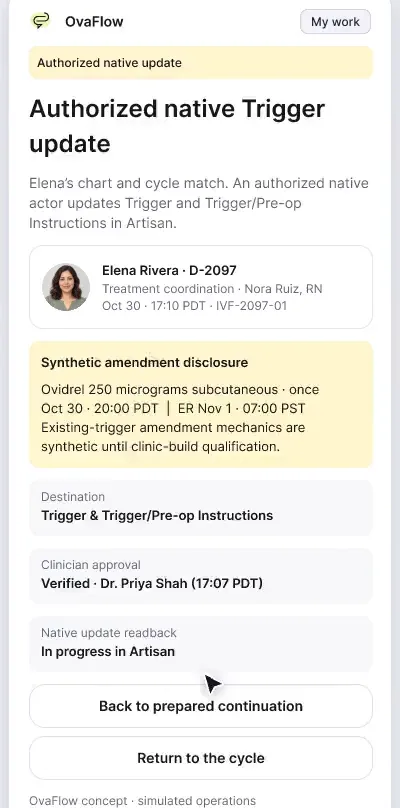
Elena's iPhone: the current instruction, an old link, an honest report
An old text link can't send Elena to a superseded injection time. Reporting a late dose is simple and honest, and urgent help is one tap away.
Product preview · Fictional patient data
Walkthrough 24 of 29 · Presentation
The patient's phone and the clinic's workspace side by side, so each reassuring screen shows the safeguard behind it.
Patient and clinic, side by side, muted recording of the design prototype. Fictional patient data.
Chapter 1 of 8: Elena: the current instruction
Recorded from an interactive design prototype. Every patient, clinician and clinic is fictional, EMR screens are modeled reconstructions, and nothing shown is a live connection to any clinic or vendor system.
Clinical & operational context
A narrated storyboard that pairs each patient screen with the clinic view behind it. Elena's trigger, her honest report, her recovery check-in and her move to an obstetric team; then Maya's chosen pause, a private support request and her return when she's ready.
When evaluating clinic software, clinicians and practice leaders rarely get to see what the nurse does at the workstation and what the patient sees on her iPhone at the exact same second. Looking at only one side hides how a signed trigger change retires an older instruction on the patient's phone, how a patient's 8:20 PM report lands on the nursing board, or how a paused patient's screen stays quiet while the clinic team prepares a private support callback.
This dual-panel storyboard places the patient's iPhone companion and the clinic's coordination workspace side by side across two complete stories: first, Elena Rivera's trigger amendment (version 3, 8:00 PM PDT on her phone / 20:00 PDT on the clinician board), her question call that does not mark the dose taken, her 8:20 PM PDT injection report, her post-retrieval recovery check-in with urgent clinic phone lines, and her eventual graduation to obstetric care; second, Maya Chen's chosen pause, her confidential support request that does not restart cycle reminders, and her return on her own timing.
Clinic and Elena
20:00 PDT signed on board updates 8:00 PM PDT on iPhone
Elena and Nora
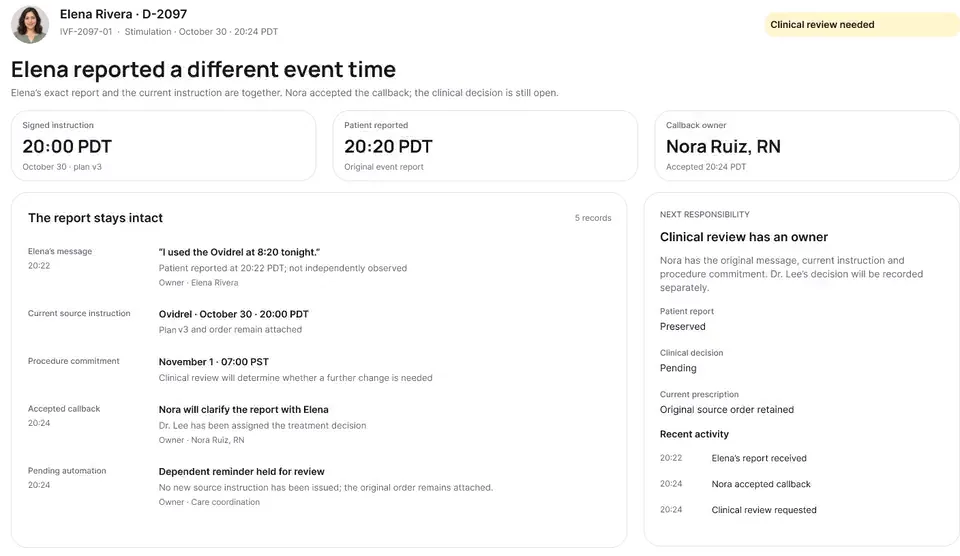
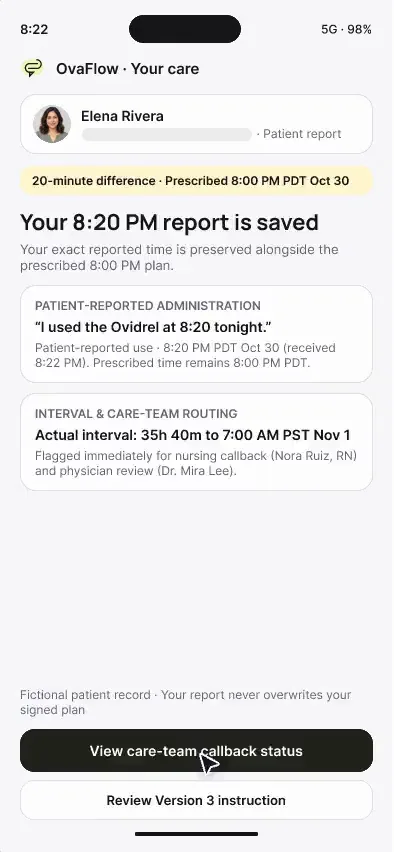
Elena logs 8:20 PM PDT and opens two rows on clinic board
Elena and OB team
Discharge owner stays visible until OB accepts
Maya and clinic
Maya requests private call while her pause stays quiet
Watching Elena Rivera's and Maya Chen's iPhone screens alongside the nursing workspace at the same moment.
Guardrail: Patient screens show only verified, published instructions in 12-hour time, while unverified drafts stay clinic-side.
What to watch for
A narrated storyboard that pairs each patient screen with the clinic view behind it. Elena's trigger, her honest report, her recovery check-in and her move to an obstetric team; then Maya's chosen pause, a private support request and her return when she's ready.
Follow the exact timestamps, UI status changes, and coordination safeguards as the recording plays.
What to watch for: Compare the clinician's 20:00 PDT signed v3 order on the right with Elena's 8:00 PM PDT (Oct 30) card on the left.
Boundary rule: Only verified published instructions appear on the patient side.
On-screen narration: Side by side: Elena's phone shows version 3 (Ovidrel 250 micrograms, subcutaneous, 8:00 PM PDT Oct 30), and the clinic view shows the source behind it. The full signed clinic instruction and retrieval timing open.
What to watch for: Elena taps 'Ask for a call' on the left; on the right, a callback row opens while her dose status stays unconfirmed.
Boundary rule: Both sides agree that a question is not a completed injection.
On-screen narration: Elena asks for a quick call before her dose, without marking it taken.
What to watch for: Elena logs 8:20 PM PDT on her phone; the clinic board immediately splits nursing callback from Dr. Mira Lee's review.
Boundary rule: Honest patient reporting feeds directly into structured clinical review.
On-screen narration: Elena's honest 8:20 PM report is saved. The care team confirms they received it while the physician's review continues.
What to watch for: Elena's post-retrieval check-in displays urgent clinic phone numbers on the left while routing her responses to nursing on the right.
Boundary rule: Neither side performs automated symptom triage.
On-screen narration: After retrieval, a recovery symptom update goes to Nora Ruiz, RN. The clinic's 24/7 line and emergency contacts are shown.
What to watch for: During OB graduation, Elena sees her named fertility discharge nurse while the clinic tracks OB record acceptance.
Boundary rule: The patient always knows who to call until her first OB visit.
On-screen narration: Elena's care moves on to her obstetric team.
What to watch for: Switching to Maya Chen, her phone shows a calm paused state while the clinic board suppresses routine task timers.
Boundary rule: Paused episodes stay quiet on both surfaces.
On-screen narration: Side by side: Maya's treatment pause, “Your pause, your pace”. Maya explores support options during her pause.
What to watch for: Maya requests a confidential call on her phone; the clinic receives the private callback flag without reactivating her cycle.
Boundary rule: Support requests never trigger automated cycle checklists.
On-screen narration: She saves a private phone-call request, and routine prompts stay off. Her pause stays active, with the private request pending. Back to the pause view.
What to watch for: When Maya chooses to return, both sides resume from her preserved history without starting from scratch.
Boundary rule: Return to care happens only by explicit patient and clinician action.
On-screen narration: Maya lets the clinic know she's ready for another planning conversation.
OvaFlow never makes the clinical call in these recordings. Physicians sign, the person taking a handoff accepts it, and the lab keeps its own holds. The companion tracks, checks and stops; staff decide.
In this walkthrough
Every patient, family member, clinician and clinic in these stories is fictional. Names, times and screens come from prototype walkthroughs, not from real care.
 Elena RiveraPatient
 Maya ChenPatient
Where this appears
This recording is part of these pages. Each one explains the step in more depth.
Questions & answers
What clinicians, coordinators, practice leaders, and patients ask when reviewing Walkthrough 24.
No. The patient companion updates only after the clinician has signed the order and the clinic has verified the publication.
Elena's story shows high-tempo active cycle coordination (trigger change, retrieval, graduation), while Maya's story shows how the same system knows when to stop nudging and protect a patient's pause.
Her named fertility clinic discharge nurse remains listed with direct contact numbers until the obstetric practice confirms receipt.
Related
An old text link can't send Elena to a superseded injection time. Reporting a late dose is simple and honest, and urgent help is one tap away.
Beside a modeled Artisan view, the companion compares Dr. Priya Shah's approval with the unchanged Artisan fields, stops on Maya's open chart, and won't assume an update it didn't see.
One signed change reaches instructions, the OR, anesthesia and the lab. Later an outside emergency visit for OHSS turns a planned fresh transfer into freeze-all.
Next step
We'll replay this flow against your roles and handoffs, using fictional records. Please don't send patient data.