Product preview · Fictional patient data

OvaFlow

Integrations

Beside the EMR, never instead of it.

OvaFlow is designed to sit next to the chart a clinic already uses. The fertility EMR keeps the system-of-record chart, orders, prescriptions and signatures. OvaFlow keeps the signed source, the named owner and the next step in view across labs, pharmacies and patient channels, and checks the chart before it calls anything done.

Modeled workflow exampleTested in your clinic first

Third-party names and logos are trademarks of their respective owners, shown to illustrate systems commonly used in IVF clinics. No affiliation, endorsement or live integration is implied. nAbleIVF, eIVF and Artisan appear as modeled workflow examples.

Four layersOne screen, four layersThe EMR, the companion beside it, and the two rules that decide when work is done.

[ Architecture ]

One screen, four layers.

Scroll to take the screen apart. What looks like one window is the clinic's EMR, a companion beside it, and two rules that decide when work is really done.

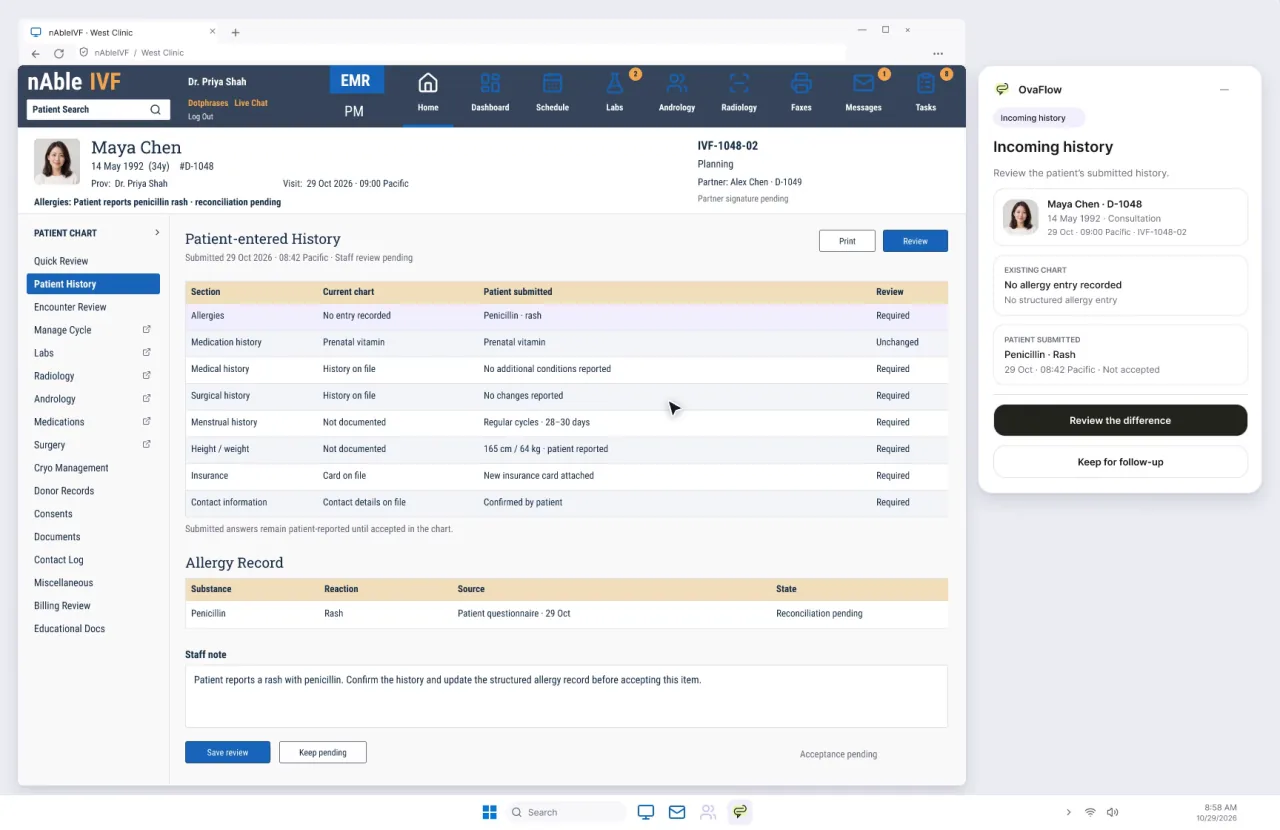
  1. Your EMR stays the system of recordCharts, orders, signatures and saves happen in the EMR, exactly as they do today. This one is a modeled nAbleIVF screen.
  2. The OvaFlow companion docks beside itIt reads the signed source and prepares drafts for staff to review. It does not edit the chart on its own.
  3. A check in the EMR before anything is donePlaced is not saved. Work closes only when the chart itself shows the change, and an interrupted view stays unverified.
  4. One owner and a next stepEvery open item names who holds it and what comes next. A handoff moves only when someone accepts it.
A modeled nAbleIVF chart for fictional patient Maya Chen showing patient-entered history beside the OvaFlow companion panel, which asks staff to review the difference. Fictional patient data.
Fictional patient dataModeled workflow exampleFrame from a prototype walkthrough beside a modeled EMR screen.

Route order

No “connected” switch. A route per operation.

Each thing OvaFlow does beside an EMR is decided on its own, using the first route the clinic and vendor permit. Switch a route off to see where an operation lands.

  1. Permitted structured APIOnly where the clinic's EMR license and the vendor allow a documented interface (such as HL7 v2 or FHIR R4) for that exact operation.
  2. Approved browser extensionReads context and prepares reviewed drafts inside the clinic's managed Microsoft Edge or Google Chrome browser, next to the open chart.
  3. Supported UI AutomationOn Windows workstations, inspects named window and field controls through Microsoft's operating-system accessibility framework without stealing keyboard focus.
  4. Bounded visual fallbackNarrow, explicitly tested and mostly read-only screen inspection when structured controls are absent. Never a quiet background workaround.
  5. Human continuationOvaFlow prepares the source and draft beside the chart, and a qualified person finishes and saves it in the EMR. A first-class designed mode, not a failure.Always available

This operation would usePermitted structured API

Standards, protocols & worked trace

How fertility software actually exchanges information

Hospital EHRs and specialty IVF systems use different generations of healthcare standards side by side. Understanding what each layer carries explains why a clinical companion must qualify operations individually rather than claiming a single universal plug.

Worked scenario · West Clinic (fictional patient Elena Rivera)

How one 30-minute trigger change moves across five clinic systems without losing its signed source

Oct 30, 2026 (16:45–20:28 PDT) across the Nov 1 daylight-saving change to 07:00 PST retrieval · Every clinical save and signature stays in the source system.

System of recordCompanion checkHeld until verifiedConfirmed on readback
  1. Step 01 · 16:45 PDTHL7 v2.x ORU result

    Reference lab feed → Fertility EMR

    Actor: Automated lab interface

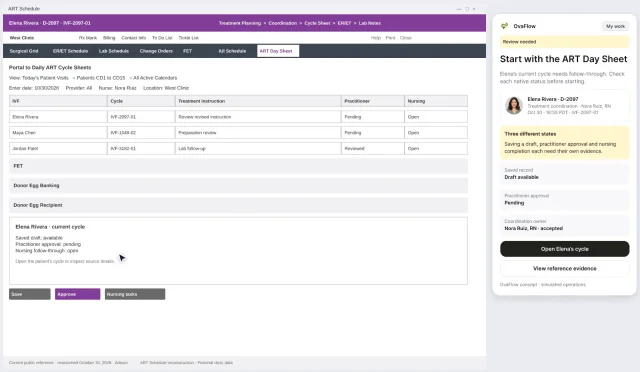
    Elena Rivera's Day 10 afternoon estradiol (2,980 pg/mL) and progesterone (0.9 ng/mL) post to the West Clinic cycle flowsheet.

    Verification rule

    Expected-result timer clears; Dr. Mira Lee is notified to review trigger timing.

  2. Step 02 · 17:10 PDTAttending signature in EMR

    Fertility EMR (Signed source)

    Actor: Dr. Mira Lee, MD

    Signs hCG trigger instruction v3 for 20:00 PDT on Oct 30 (superseding v2 at 20:30 PDT) so egg retrieval stays aligned 36 hours later at 07:00 PST on Nov 1 across the daylight-saving change.

    Verification rule

    Version v2 is marked superseded; four linked follow-up tasks open with named owners.

  3. Step 03 · 17:14 PDTEMR schedule change order

    OR & embryology lab schedule

    Actor: Nora Ruiz, RN → Lab

    Submits the retrieval schedule change order in the EMR and checks that the embryology lab acknowledges the 07:00 PST maturity window.

    Verification rule

    Lab schedule task stays open in amber until embryology records acknowledgment.

  4. Step 04 · 17:22 → 20:22 PDTPortal release + patient check-in

    Patient portal & Elena's phone

    Actor: Nora Ruiz, RN → Elena Rivera

    Nora releases v3 (8:00 PM PDT) to the portal while older links to v2 (8:30 PM) are blocked. Elena reports taking her trigger shot at 8:20 PM PDT (received 20:22 PDT).

    Verification rule

    Shown as patient self-reported at 8:20 PM PDT until evening nursing follow-up.

  5. Step 05 · 20:26 → 20:28 PDTExplicit handoff acceptance

    Evening on-call nursing handoff

    Actor: Nora Ruiz, RN → Alex Kim, RN

    Nora offers the 20-minute trigger offset callback to on-call nurse Alex Kim, RN at 20:26 PDT. Alex explicitly accepts at 20:28 PDT.

    Verification rule

    Ownership moves only on explicit acceptance at 20:28 PDT; clinical order authority stays with Dr. Lee.

One rule across all five steps: Preparing a draft or opening a message never closes a clinical task. Each step closes only when the receiving chart, lab schedule, patient portal or on-call nurse records confirmation.
Standards reference & glossaryHL7 v2.x, FHIR R4, SMART on FHIR, Surescripts eRx & Windows UI AutomationHow hospital and specialty IVF standards complement one another beside the chart.
HL7 v2.x [1]

Event-driven lab and registration messages

Across reference labs (Quest Diagnostics, Labcorp) and hospital interfaces, HL7 Version 2 messages carry patient registration (ADT), specimen orders (ORM) and structured immunoassay or endocrine results (ORU). Amendment flags arrive here, but complex embryology cohorts and multi-follicle diagrams rarely fit flat segments.

HL7 FHIR R4 & SMART [2][3]

Modular resources and OAuth 2.0 context launch

Fast Healthcare Interoperability Resources (FHIR) and the SMART App Launch Framework let hospital EHRs such as Epic launch external tools with patient and encounter context. Fertility EMRs adopt APIs selectively, so API access is always Rung 01 when licensed—and never assumed where absent.

Surescripts & Specialty eRx [4]

Prescribing, RxChange and cold-chain dispensing

Electronic prescriptions, pharmacy clarification requests (RxChange) and cancellation messages (CancelRx) travel between the clinic's EMR prescribing module and specialty fertility pharmacies. OvaFlow surfaces open clarifications and patient delivery confirmations without ever transmitting prescriptions itself.

Workstation UIA & Browser Rail [5][6]

Beside-the-chart observation and human continuation

When an operation lives inside a web-based flowsheet or a Windows desktop window, an approved browser extension or Microsoft Windows UI Automation inspects the open chart header and target field so staff can review, place and read back saves without losing custody across Citrix or browser timeouts.

Public references & technical standardsExternal vendor & standards documentation cited on this page (6 verified sources)Retrieved 2026-11-03 · No vendor affiliation, endorsement or live connection.
  1. [1]

    HL7 International · HL7 Version 2.x (V2) Messaging Standard Product Brief (verified 2026-11-03)

    Clinical messaging standard governing ADT registration, ORM order and ORU observation result exchanges.

  2. [2]

    HL7 International · FHIR Overview (Fast Healthcare Interoperability Resources) (verified 2026-11-03)

    Modular healthcare resource definitions and RESTful API exchange architecture.

  3. [3]

    HL7 International · SMART App Launch Framework Implementation Guide (verified 2026-11-03)

    Open specification for launching clinical applications alongside an EHR session with OAuth 2.0 context.

  4. [4]

    Surescripts, LLC · E-Prescribing Network Capabilities (NewRx, RxChange, CancelRx) (verified 2026-11-03)

    Electronic prescription routing, change request and cancellation messaging between prescribers and pharmacies.

  5. [5]

    Microsoft Learn · UI Automation Overview (Win32 & .NET Accessibility Framework) (verified 2026-11-03)

    Operating-system accessibility framework for programmatic inspection of Windows desktop controls.

  6. [6]

    Citrix Documentation · ICA Policy Settings — Client Clipboard Redirection (verified 2026-11-03)

    Virtual desktop policy controls governing clipboard transfer between host endpoints and remote sessions.

Ecosystem

The systems IVF clinics already run

Shown with each owner's own logo where one is available; others appear as plain names. OvaFlow is designed to work beside them, and none of them is affiliated with OvaFlow. Open a system to see what stays there and what OvaFlow keeps in view.

Showing 30 of 30 systemsShowing 17 of 30 systems

EMR

Where the clinic documents: the chart, orders, signatures and every save.

Lab & genetics

Accessioning, results, amended reports and the lab's own determinations.

Witnessing & cryo

Witness records, specimen custody, cryostorage inventory and tank monitoring.

Pharmacy & eRx

Prescription routing, dispensing and delivery.

Benefits & payers

Benefit eligibility, authorizations and reimbursement.

Education modules and signed consent.

Messaging & calls

The channel itself: messages, templates, delivery and calls.

Clinic workstation platforms

The workstation, browser and remote desktop the clinic manages.

Devices

The phone and watch people already carry.

Run something else?

Tell us which systems your clinic uses, and we will show what testing in your clinic would involve.

Request a walkthrough

Third-party names and logos are trademarks of their respective owners, shown to illustrate systems commonly used in IVF clinics. No affiliation, endorsement or live integration is implied. nAbleIVF, eIVF and Artisan appear as modeled workflow examples.

Walkthroughs

Watch it beside each EMR

Recorded from an interactive design prototype. Every patient, clinician and clinic is fictional.

Questions

What clinical and IT teams ask first

Frequently asked questions8 questions on EMR safety, HL7/FHIR, Citrix and pilot testing
Does OvaFlow replace our EMR?

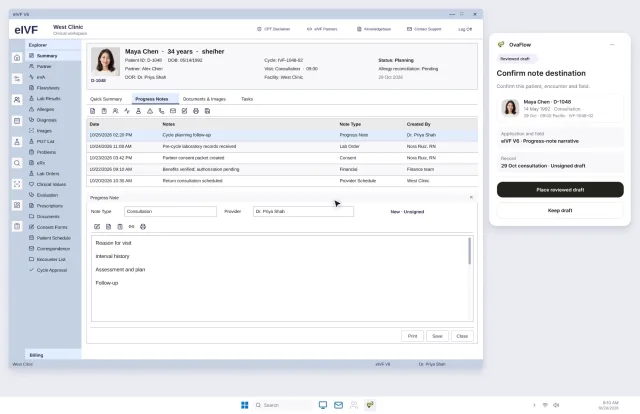
No. OvaFlow is designed to sit beside the fertility EMR your team already documents in. Physicians, nurses and embryologists keep working in their system of record. The EMR screens on this site are modeled reconstructions with fictional patients, not live clinic connections or vendor endorsements.

How does it avoid duplicate entries or silent overwrites?

Preparing a draft never marks it as saved or sent. Switching to another patient's chart pauses drafting immediately so text can't cross between patients. If the view is interrupted before the chart confirms a change, the item is held for a person to inspect instead of being tried again in the background.

Is any EMR “supported” today?

No EMR is marked as broadly supported, and no off-the-shelf connection is claimed. Each operation would be tested on a clinic's own licensed EMR build and workstations, after a formal privacy review and signed agreements.

Why show other vendors' logos at all?

They are the systems IVF clinics commonly run—fertility EMRs, reference and PGT genetics labs, electronic witnessing systems, automated cryostorage, e-prescribing networks, specialty pharmacies, fertility benefit managers and patient channels—so they show where OvaFlow would sit in a real day. Showing them implies no affiliation, endorsement or live connection.

Why doesn't a single FHIR API cover everything an IVF clinic does?

General hospital EHR standards such as HL7 FHIR R4 and SMART on FHIR cover demographics, problems, medications and standard diagnostic reports well, while HL7 v2 messages commonly carry lab orders (ORM) and results (ORU). However, daily fertility coordination spans multi-follicle ultrasound flowsheets, minute-specific trigger amendments across daylight-saving transitions, embryo cohort biopsy lineage, two-person lab witnessing and specialty-pharmacy cold-chain delivery checks that often live across several specialized tools. OvaFlow therefore qualifies each operation individually along a five-rung route ladder where human continuation is always available.

What happens when a trigger time is amended late in the afternoon?

In a fertility cycle, moving a trigger injection by even thirty minutes touches the signed EMR order, the retrieval room and anesthesia schedule, the embryology lab's 36-hour maturity window, the patient portal instruction, and the evening on-call nursing handoff. OvaFlow keeps all of those downstream follow-ups linked to the new signed version, blocks older links from showing superseded times, and tracks each follow-up separately until the receiving person or system confirms it.

How does OvaFlow behave on Citrix or locked-down Windows workstations?

Many clinics publish their EMR or lab applications through Citrix virtual desktops where IT policies restrict clipboard redirection or browser extensions. When clipboard transfer is blocked or a browser session times out, OvaFlow holds the reviewed draft attached to the patient's task rather than losing it or pasting blindly into an unverified window.

How can a clinic evaluate OvaFlow safely without touching live patient charts?

Evaluation starts with the recorded walkthroughs and clickable sandbox using fictional records (Elena Rivera, Maya Chen, Jordan Patel, Avery and Sam), followed by a seven-step pilot qualification process on a test environment of the clinic's own licensed EMR build—including intentional failure drills—before any operation is used on a clinical shift.


Your EMR, your build

See how OvaFlow would sit beside your EMR.

Walk through the modeled nAbleIVF, eIVF or Artisan examples with our team, and what testing in your clinic would involve on its own EMR build.