Product preview · Fictional patient data

OvaFlow

Privacy & data

Show only what each moment needs.

This public site is a product preview built on fictional data. How data would be handled in a clinic is a deployment decision, made with the clinic before any real information is involved.

Examples use fictional patient data
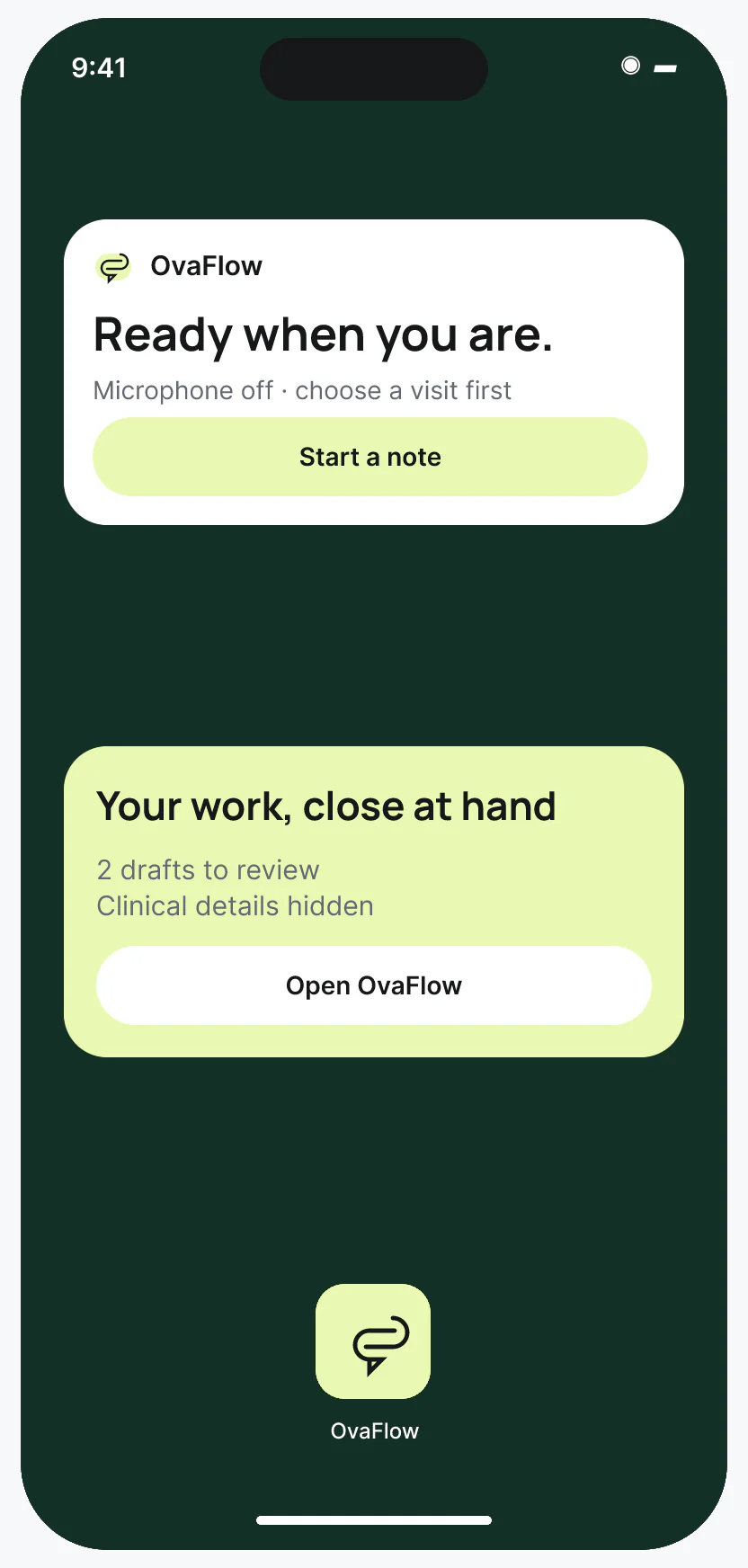
iOS widgets, Lock Screen Live Activity and Dynamic Island (design prototype), each designed to hide clinical details at a glance.

Design prototype · Fictional patient data

At a glance

Counts and states on the lock screen. Names stay inside.

Anything a passer-by could see shows only what the moment needs: a generic status, a count, a way back into the app. Patient details wait behind unlock.

  1. Home Screen widgets start a confirmed note or open drafts. Patient details stay inside the app.
  2. The Lock Screen shortcut shows no patient details and asks to unlock first.
  3. A Live Activity shows recording status with clinical details hidden.
  4. The Dynamic Island keeps a generic recording status and a direct way back to the app.

Least exposure

The more public the screen, the less it says.

One piece of work, followed from the Lock Screen into the app. Each surface is designed to show only what that moment needs. By default, names and clinical details wait behind unlock, and then appear only for staff whose role and task need them.

  1. Anyone nearby

    Lock Screen shortcut

    Patient name
    Hidden
    The work
    Hidden
    Clinical details
    Hidden
    What it shows
    A prompt to unlock first
  2. Anyone who sees the Home Screen

    Home Screen widget

    Patient name
    Hidden
    The work
    2 drafts to review
    Clinical details
    Hidden
    What it shows
    A count and a way into the app
  3. A glance during a visit

    Live Activity and Dynamic Island

    Patient name
    Hidden
    The work
    Recording
    Clinical details
    Hidden
    What it shows
    A generic status and a way back
  4. Signed-in staff, right role and task

    Inside the app

    Patient name
    Elena Rivera
    The work
    Visit note draft
    Clinical details
    Shown when the role and task need it
    What it shows
    Access checked again on every read and action

Design prototype · Fictional patient data

By design

Designed to show only what's needed

  1. Permissions combine role, relationship to the patient and the specific task, rather than a blanket “care team” rule.
  2. Access is checked when someone reads or acts, not only at sign-in.
  3. Lock Screen and lowered-wrist views hide patient names by default.
  4. Private requests are kept out of shared threads.
  5. Routine support is designed to use minimal information.

Plain facts

This site, and a deployment

Today

On this site

  • Every patient, clinician and clinic is fictional.
  • The walkthroughs and sandbox contain no real patient information.
  • Please don't submit patient information through any form here.
  • How inquiries are handled is described in the intake disclosure below and in the privacy policy.

First

Before a clinic deployment

  • Each operation tested in the clinic first
  • A formal security and privacy review
  • Signed agreements with the clinic
  • Retention and deletion decisions agreed with the clinic

Who sees what

Role, relationship, and active task

In assisted reproduction, two adults in the same household—or a donor, gestational carrier and intended parents—do not automatically share one chart or one consent boundary [1, 2, 3].

Checked on every view

How role, relationship, and active task decide what opens

Least-exposure model
  1. Factor 01 · Role
    Clinical or patient roleREI physician, nurse coordinator, embryologist, financial coordinator, or patient.
  2. Factor 02 · Relationship
    Relationship in the episodeEgg source, sperm source, gestational carrier, or intended parent—each on their own chart.
  3. Factor 03 · Active task
    Permitted task scopeReviewing a draft note, checking a trigger time, or verifying an attempt-scoped consent.

Result: Search results, notifications, exports, and model inputs are filtered by all three factors—never a blanket household rule.

In practice

How separate charts and private requests stay separate

Avery & Sam · Separate medical charts across two transfer attempts

Clinical context: Avery and Sam are intended parents who each have their own biological, gestational, and legal role and their own medical chart [2].

OvaFlow boundary: Sharing a family plan never merges their private clinical records or portal permissions, and a consent form filed under the wrong chart is held until relocated.

Marriage or shared billing never merges two separate patient medical records.

Maya Chen · Confidential callback & chosen treatment pause

Clinical context: Maya requests a confidential callback and later chooses to pause treatment after an unsuccessful embryo transfer attempt.

OvaFlow boundary: Keeps Maya's private callback separate from any shared household thread, stops routine reminders at once during the pause, and hides clinic details on her phone's Lock Screen.

Private support requests never leak into shared household threads or Lock Screen banners.

Public preview vs. non-covered digital health norms (16 CFR Part 318)

Regulatory context: For consumer and non-covered health software, the FTC Health Breach Notification Rule (16 CFR Part 318) treats unauthorized third-party data sharing as a reportable breach [1].

OvaFlow boundary: This public preview site processes fictional personas only, warns visitors never to submit patient health information, and avoids third-party ad-tracker leakage.

No compliance status or formal attestation is claimed on this preview site; clinic deployments require formal review and signed agreements first.

Hallway & Lock Screen minimization (NIST privacy principles)

Operational context: Clinicians and coordinators receive alerts on mobile phones and watches in public corridors [3].

OvaFlow boundary: Lock Screen, Home Screen widgets and lowered-wrist Apple Watch faces strip patient names and clinical values by default.

Identifiable clinical details require device unlock plus an active role-and-task check.

Common questions

Questions clinics ask about privacy & data

Why isn't a single 'Care Team' or 'Household' permission enough for fertility care?

In reciprocal IVF, donor-gamete cycles, gestational carrier arrangements, or cycles where a patient requests confidential emotional support, two people linked to the same family-building episode have different legal and clinical boundaries. OvaFlow evaluates access using three factors on every read and action: the person's role, their specific relationship to the patient, and the active task.

What privacy rules apply to health apps outside traditional covered-entity scope?

In the United States, digital health tools outside traditional health-plan or covered-entity scope are subject to federal consumer-protection and breach-notification standards, including the FTC Health Breach Notification Rule (16 CFR Part 318), which prohibits unauthorized disclosures of identifiable health data (including via third-party tracking pixels). OvaFlow's public preview processes zero patient data, and any future clinic deployment is scoped under formal clinic agreements first.

Why do Lock Screen widgets and Apple Watch glances hide patient names by default?

Clinicians and nurses check mobile devices in hallways, elevators and shared workspaces. Following data-minimization principles, glanceable surfaces show only task counts or generic states ('2 drafts to review') until the device is unlocked by an authorized user.

What happens if someone accidentally types medical details into the public '/contact' form?

The public contact form is strictly for business and evaluation walkthrough inquiries and warns visitors not to enter patient health information. Our intake disclosure on `/trust` and `/contact` explains exactly how public inquiries are handled.

See it

Watch it hold in a walkthrough

Recordings of the interactive design prototype, with fictional patients and staff.

Privacy & data

Bring your privacy lead.

Data handling for a clinic is decided with the clinic, before any real information is involved.