Executive overview: three modeled EMRs, the design map and research
Four fictional patient examples across three modeled EMRs, a map of 300+ designed product states, and the research behind each boundary.
Product preview · Fictional patient data
For practice leaders
Your EMR stays the system of record. OvaFlow is designed to sit beside it, test each operation one by one, recover when a workstation fails and run routines only under rules your team releases.
Who this is for
Medical directors, practice executives, operations, IT, privacy and quality leads.
[ How it sits beside the EMR ]
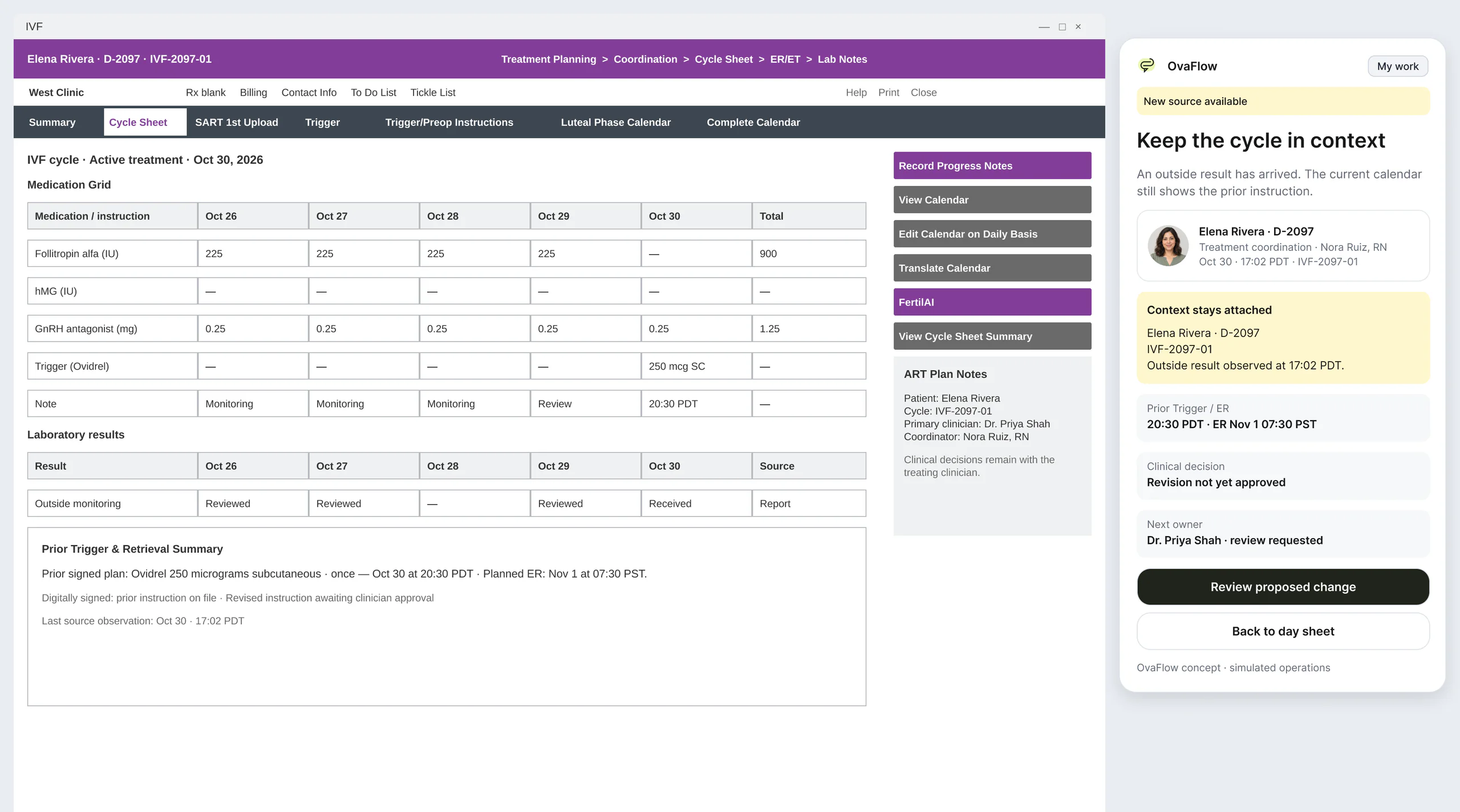
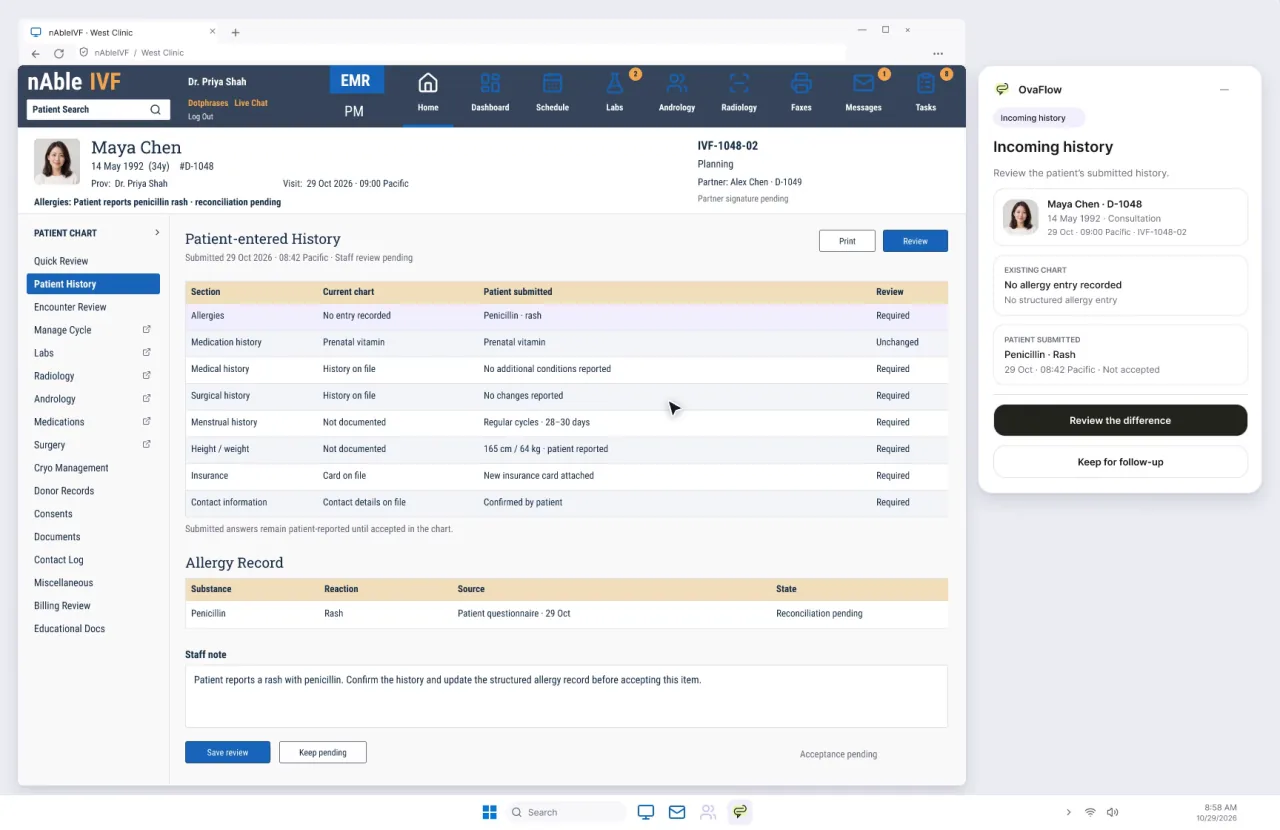
Scroll to take one screen apart. Your EMR stays the system of record; OvaFlow adds a companion, a check in the EMR itself and one named owner beside it.
What gets in the way
Each one, and exactly how OvaFlow is designed to answer it. Work changes hands only when someone accepts it.
Background automations with no pause and no trail.
An always-on workspace where routines run under your rules, pause quickly and re-check the chart before resuming.
Workstation sleep, a revoked microphone or a protected remote window stalling work silently.
A recovery catalog for the ways a workstation can fail.
Drift across several vendors and unverified assumptions about each one.
Each EMR operation tested in your clinic first, one at a time, rather than a single “connected” flag.
Departing staff leaving work without an owner.
Downtime reconciliation and successor acceptance when someone leaves.
A shift with OvaFlow
Drawn from the prototype walkthroughs. Times are from the fictional demonstration day.
Medical directors, practice executives, and quality/IT leads have to know that background automations can be paused in one click, that EMR downtime paper notes are reconciled before queues resume, that departing staff leave zero orphaned tasks, and that protocol guidelines and assistive models only change under explicit medical-director sign-off [1, 2, 3, 4].
Active clinic episodes across daily care, lab, pharmacy, and third-party tracks
Dashboards show a single green 'Connected' badge while a specific portal write or lab feed is silently failing on two workstations.
Shows each EMR operation tested in your clinic one at a time, plus live workstation and connection health
Per-operation status · Verified trailQuality lead shares a workstation screen during a multidisciplinary case review
Background scripts keep popping up unrelated patient names or mutating queues while a screen is projected.
One-click 15-minute pause halts background routines and re-checks the chart before resuming
Paused 15 min · Chart re-checked on resumeWorkstation sleep, revoked mic permission, or 40-minute EMR outage with paper notes
Paper phone logs from an outage never make it back into the live queue, or automated reminders fire on stale pre-outage state.
Workstation recovery catalog + line-by-line downtime reconciliation before automated queues resume
Paper notes reconciled · Queue verifiedA coordinator departs or goes on leave with 18 open cycle follow-ups
Deactivating a user account leaves expected results and callbacks assigned to an inbox nobody checks.
Holds departing staff's open work on a reassignment ledger that moves only as each successor accepts
Successor accepted · Zero orphaned tasksUpdated clinical guideline revision (e.g., ESHRE v2.3) or assistive model release arrives
Two clinics use conflicting PDF revisions of the same protocol, or a vendor pushes an unreviewed model update overnight.
Pins one authoritative reference revision and holds any model update behind a Medical Director gate
Medical Director gate · Operational scope onlyWorked governance case · West Clinic (Multi-Site Episode Overview & Outage Recovery)
Walk through West Clinic's practice-wide executive overview: how leadership verifies individual EMR operations, pauses routines during a shared-screen huddle, reconciles paper notes after an outage, and gates protocol/model updates.
Why this moment matters in an IVF clinic
ONC SAFER Contingency Planning guidance requires structured reconciliation of paper downtime forms back into the electronic record before routine operations resume [2]. Likewise, ESHRE's September 22, 2026 v2.3 Ovarian Stimulation update—where page 195 reinstated the biosimilar section under a cover still labeled 'UPDATE 2025'—illustrates why a practice must track exact revision metadata rather than cover-page dates [4].
Rather than claiming blanket compatibility, OvaFlow tracks each specific chart operation (read context, stage draft, verify save, check portal log) as it is tested in your clinic's own environment, alongside a recovery catalog for workstation sleep, revoked microphone permissions, or remote-window drops.[1][3]
Before a shared-screen case review begins, staff pause workspace automations for 15 minutes with one click. When the timer ends or is resumed early, OvaFlow re-checks the live EMR chart state before taking any next step.[3]
After a brief EMR outage, paper phone logs and verbal confirmations are reconciled item by item into the live queue before automated reminders restart. When a team member leaves the practice, their open items move only as each named successor accepts them.[1][2]
When two protocol documents disagree or a guideline is revised (such as ESHRE Ovarian Stimulation v2.3 vs. v2.0), the Medical Director pins one authoritative reference revision. Any assistive model update waits in quarantine until the Medical Director approves it within operational scope.[3][4]
Each EMR operation is tested in your clinic one at a time, and protocol or assistive model updates wait for the Medical Director's approval.
Administrative access never allows signing clinical orders or reading restricted private counseling threads.
How OvaFlow sits beside your EMR across active clinic episodes while keeping administrative access separate from clinical signing.
Prototype walkthroughs
Recorded from the interactive design prototype with fictional patient data. Open one to play it here with chapters and captions.
Routine follow-through runs under rules your team sets, pauses on request, and re-checks the open chart before it resumes.
Fourteen designed recovery states, from an unplugged headset to a blocked remote-desktop clipboard, each keeping the draft and the right patient.
Shipping clearance isn't clinical clearance, a bounced email isn't abandonment, and a model update waits for the medical director.
Common questions & sources
How OvaFlow handles edge cases, clinical authority, and source-system boundaries for this role.
Your EMR remains the system of record for charts, orders, billing, and portal publishing. OvaFlow adds a companion panel and full workspace beside the EMR that stages drafts, checks active patient identity, verifies saves, and tracks handoff acceptance across roles.[3]
Instead of flipping a single 'integration on' switch, each specific operation—such as verifying a draft save or reading back a portal send—is tested against your clinic's actual EMR configuration, permissions, and workstations before it is enabled.
When observation of the EMR is interrupted, OvaFlow displays the last verified timestamp and refuses to guess what changed. Once systems return, staff step through a downtime reconciliation checklist to merge paper notes before automated queues resume.[2]
Next step
Inspect the practice-wide episode overview, 15-minute screen-share pause, downtime paper reconciliation, and per-operation clinic testing.