
Product preview · Fictional patient data

OvaFlow

Modeled workflow example

Beside a modeled eIVF chart

Modeled from eIVF V6 reference screens with fictional patients. The note, the prescription and the consent all stay in eIVF; OvaFlow keeps the open items and their owners in view.

Modeled workflow exampleTested in your clinic first
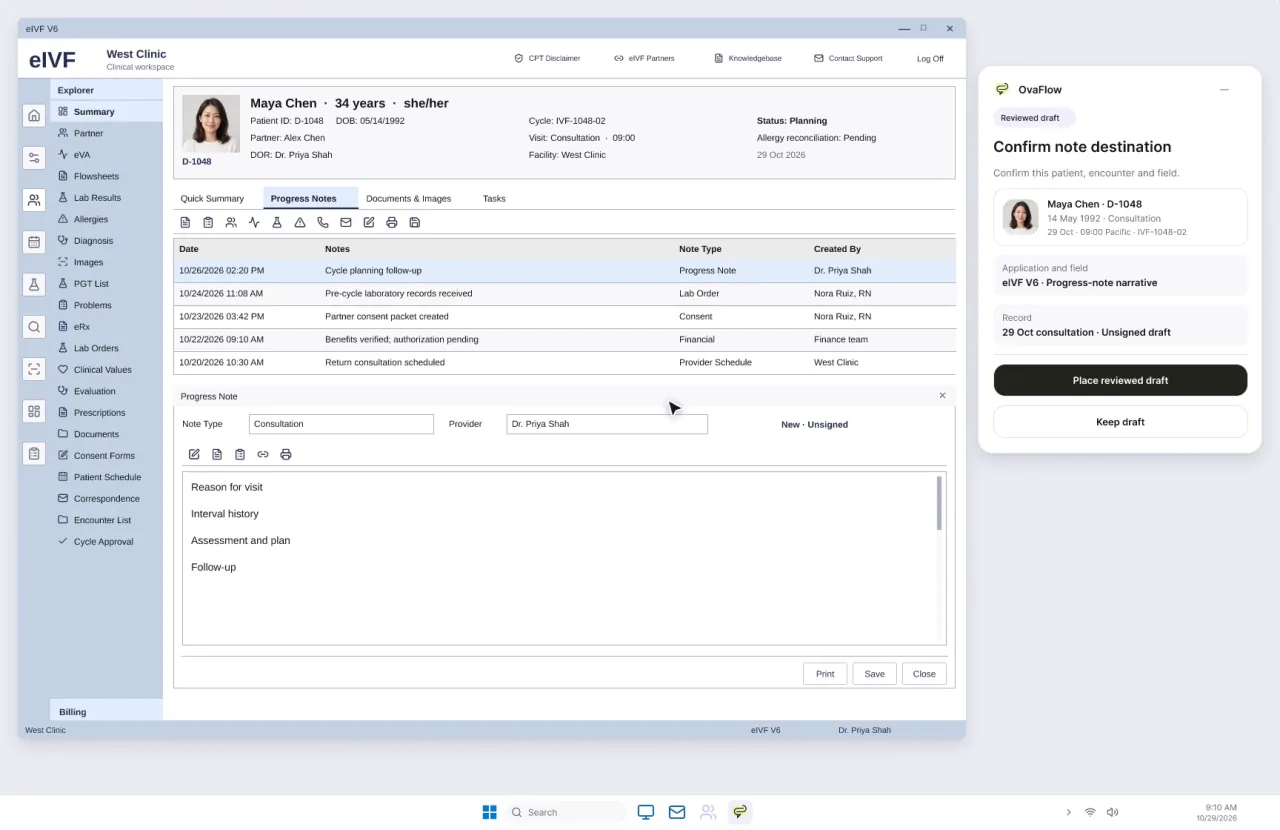
A modeled eIVF V6 progress-note editor for fictional patient Maya Chen, new and unsigned, with the OvaFlow companion beside it asking staff to confirm the note destination before placing a reviewed draft. Fictional patient data.
  1. Destination confirmed
  2. Ready for native review
  3. Native update not yet verified
  4. Saved, then checked
Fictional patient dataModeled workflow example

From the eIVF walkthrough

Four lanes, and the start stays conditional

Before a cycle starts, clinical review, lab review, consent and financial authorization each close on their own, in eIVF, with their own owner. OvaFlow shows which lane is holding the start. It never clears one.

Maya Chen

Cycle IVF-1048-02

Planned cycle · Not cleared
  1. ClinicalClinician review: openClinician review pending
  2. LaboratoryResults available: doneReview: openResults available · Review pending
  3. ConsentPartner signature: openPartner signature pending
  4. FinancialBenefits verified: doneAuthorization: openPayment: openAuthorization pending

Start remains conditional

Financial authorization

Next owner
Finance team · West Clinic
Due
30 Oct · 12:00 Pacific
In eIVF
Benefits verified. Authorization pending. Payment not verified.

Clinical review stays open on its own lane.

Fictional patient dataFrom the eIVF (V6 reference) walkthrough. Fictional patient and clinic.

What was modeled

What the eIVF walkthroughs show

Modeled from an eIVF V6 reference layout. Where a note lands and how readiness is checked would be tested against a clinic's own licensed eIVF environment.

  1. Where the note goes, then a save check

    Before any text is placed for Maya Chen, the physician confirms the note's exact destination in eIVF V6. The note is placed and saved in eIVF, then checked there before the task closes.

    Watch it ineIVF: note save, financial blocker, e-prescribing handoff, PGT stop
  2. A financial item holds cycle start

    An unresolved medication prior authorization stays visible on the cycle readiness gate before stimulation starts, with the financial coordinator named as its owner alongside clinical workup items.

  3. Dose changes go to the clinic's own e-prescribing

    A dictated follitropin dose change is handed to eIVF's own e-prescribing module for Dr. Mira Lee to review, sign and route. OvaFlow does not send prescriptions.

  4. A PGT label mismatch stops review

    When the trophectoderm biopsy label on an incoming PGT result differs from the chart's embryo cohort label, embryo review stops until embryology and clinical staff reconcile the specimen identifier.

Check in the EMR

Checked in the EMR, never assumed saved

  • A draft is not a save, and a save is not done until the chart shows it.
  • If the view drops, the status says so. Nothing is retried in the background.
  • Switching to another patient's chart stops the work until the right chart is open.

A note isn't done until eIVF shows it

In the modeled consultation, the companion never treats a placed note as a saved one.

  1. Destination confirmedThe physician confirms which note and which chart the text belongs to.
  2. Ready for native reviewThe note is ready. A person places it and saves it in eIVF.
  3. Native update not yet verifiedUntil the saved note is read back, the item stays open.
  4. Saved, then checkedThe note is seen in eIVF. The follow-ups stay open with their owners.

Status wording matches the product exactly. Times and names are fictional.

Stays in the EMR

Done by people, in eIVF

OvaFlow can prepare, compare and remind. These steps stay with qualified staff in the system of record.

  • Physician note sign-off
  • Electronic prescriptions, in eIVF's own e-prescribing
  • Consent execution
  • Specimen reconciliation and witnessing
  • Financial authorization decisions
  • Embryology cohort grading and disposition

eIVF · Public reference profile & swimlane trace

How eIVF is documented publicly—and how OvaFlow sits beside it

eIVF, Inc. publicly documents eIVF as an integrated fertility EMR and practice management suite spanning clinical charting, embryology and andrology labs, financial management, e-prescribing and patient portal workflows [1]. Our walkthroughs model an eIVF V6 reference layout with fictional patients; no vendor affiliation or live connection is claimed.

Swimlane boundary · eIVF V6 (modeled reference)

How note placement, financial readiness, e-prescribing and PGT checks work beside a modeled eIVF V6 chart

Fictional patient Maya Chen · Clinical sign-off, prescribing, prior-authorization clearance and embryo reconciliation remain in eIVF.

Lane 1: In eIVF V6 (modeled reference)Lane 2: Beside chart in OvaFlowLane 3: Staff action & readback
  1. Step 01 · 09:10Destination checked

    Confirm chart & note type first

    In eIVF V6 (modeled reference)

    eIVF V6 progress note template selector (Initial REI Consultation · Maya Chen), editor and Save control [1].

    In OvaFlow companion

    Prompts Dr. Mira Lee to confirm the exact chart and note destination before placing any text.

    How the step closes

    Holds status at “Text placed, save not verified” until Save is clicked and read back in eIVF.

  2. Step 02 · 09:16Held by finance owner

    Financial prior-auth holds cycle start

    In eIVF V6 (modeled reference)

    Clinical workup checklist, consent logs and insurance authorization records in eIVF [1].

    In OvaFlow companion

    Shows clinical readiness (complete) beside gonadotropin prior authorization (pending) on one readiness gate.

    How the step closes

    Cycle start remains held with the financial coordinator named as owner until prior auth clears.

  3. Step 03 · 09:22Prescriber signs in eIVF

    Dose change handed to eIVF eRx

    In eIVF V6 (modeled reference)

    Formulary selection, follitropin dose calculation, prescriber signature and Surescripts routing in eIVF [1][2].

    In OvaFlow companion

    Captures dictated dosing intent during review and stages a handoff prompt to eIVF's e-prescribing window.

    How the step closes

    Dr. Mira Lee reviews, signs and transmits the prescription inside eIVF; OvaFlow never sends eRx.

  4. Step 04 · 09:28Hard stop · Reconcile ID

    Hard stop on PGT biopsy mismatch

    In eIVF V6 (modeled reference)

    Embryo cohort table (biopsy ID B-402A) and transfer disposition orders in eIVF [1][3].

    In OvaFlow companion

    Compares incoming genetics report (biopsy ID B-402B) against the chart's embryo record and halts review.

    How the step closes

    Transfer planning is blocked until embryology and the physician reconcile the biopsy lineage in eIVF.

Why three separate lanes matter: Preparing or placing text in Lane 2 never marks a clinical step complete. Every step waits for Lane 1 (eIVF V6 (modeled reference)) and Lane 3 (staff verification) to confirm the record.
Boundary matrix & documented capabilitiesWhat stays in eIVF vs. what OvaFlow keeps in view & public eIVF capabilitiesSide-by-side table of what stays in eIVF versus what OvaFlow keeps in view.
Publicly documented eIVF capabilities
  • Progress notes, consultation templates and cycle readiness checklists for reproductive endocrinology teams [1].
  • Integrated electronic prescribing that routes to national pharmacy networks [1][2].
  • Embryology, andrology and cryostorage laboratory documentation modules with PGT tracking [1].
  • Financial coordinator tools for insurance benefit verification, prior authorizations and cycle billing packages [1].
  • Patient portal for cycle schedules, educational tasks and electronic consents [1].

What stays in eIVF vs. what OvaFlow keeps in view

Clinical sign-off, prescribing, financial clearance and embryo reconciliation remain in eIVF.

Clinical workflowStays in eIVF (system of record)Kept in view by OvaFlowWhy the boundary matters
Progress & consult notesNote template selection, text editor, Save button and attending signature in eIVF [1].Target-field destination check before placement and readback verification after Save.Prevents placing a consult summary into the wrong encounter type or leaving an unsigned draft forgotten.
Cycle start readinessClinical checklist items, consent logs and billing/authorization fields [1].Unified readiness gate showing clinical, consent and prior-authorization owners side by side.Stops a patient from starting injectable medications before coverage or required consents are cleared.
Medication prescribing (eRx)Formulary selection, dose calculation, clinician signature and Surescripts transmission [1][2].Captures dictated dosing intent and routes the physician to complete the order in eIVF.Prescriptions require licensed prescriber execution inside the clinic's own e-prescribing workflow.
PGT & embryo cohort reviewEmbryo grading table, biopsy identifiers and transfer disposition orders [1][3].Compares incoming genetics report identifiers against chart embryo IDs and halts on any discrepancy.Protects against acting on a genetics result whose sample identifier has not been reconciled.

Questions

Common questions about eIVF & OvaFlow

Frequently asked questions4 questions on clinical authority, verification and pilot boundaries
Is OvaFlow affiliated with eIVF, Inc.?

No. eIVF is a trademark of eIVF, Inc. Our walkthroughs use a modeled eIVF V6 reference layout with fictional records to demonstrate how OvaFlow is designed to work beside a clinic's chart.

Does OvaFlow transmit prescriptions or dose changes through eIVF?

Never. When a physician dictates a medication or dose change, OvaFlow keeps the note context in view and hands the task to the physician to complete and sign inside eIVF's own e-prescribing module.

How does the readiness gate treat financial prior authorizations?

Clinical readiness (labs, ultrasound, infectious-disease workup) and financial readiness (benefit verification, medication prior authorization) appear side by side with separate named owners. Neither one can mark the other complete.

What happens when a PGT report biopsy label does not match the chart?

Review stops immediately. OvaFlow flags the exact identifier mismatch between the outside genetics report and the chart's embryo record and holds transfer planning until qualified staff resolve it in the EMR.

Public references & technical standardsExternal vendor & standards documentation cited on this page (3 verified sources)Retrieved 2026-11-03 · No vendor affiliation, endorsement or live connection.
  1. [1]

    eIVF, Inc. · eIVF — Fertility EMR, Lab, Portal & Practice Management Suite (verified 2026-11-03)

    Public documentation of eIVF clinical charting, embryology lab, financial tools, patient portal and e-prescribing.

  2. [2]

    Surescripts, LLC · E-Prescribing Network Routing and Prescription Change Workflows (verified 2026-11-03)

    National e-prescribing standards for electronic prescription routing, RxChange and CancelRx messages.

  3. [3]

    ASRM Practice Committee · Comprehensive Guidance for Human Embryology, Andrology, and Endocrinology Laboratories (verified 2026-11-03)

    Clinical and laboratory governance guidance on specimen identification, biopsy lineage and result reconciliation.

Walkthroughs

Every walkthrough with eIVF

nAbleIVF and eIVF (V6 reference) appear as modeled workflow examples. Each operation is tested in the clinic first.

  • Prototype walkthrough · Fictional patient data

    eIVF: note save, financial blocker, e‑prescribing handoff, PGT stop

    A note isn't done until it's saved, a cycle doesn't start with prior authorization unresolved, dose changes go to eIVF's own e-prescribing, and a PGT label mismatch stops the review.

    0:27DesktopeIVF · Modeled workflow example

  • Prototype walkthrough · Fictional patient data

    Workstation failure and recovery catalog

    Fourteen designed recovery states, from an unplugged headset to a blocked remote-desktop clipboard, each keeping the draft and the right patient.

    0:26DesktopnAbleIVF and eIVF · Modeled workflow examples

  • Prototype walkthrough · Fictional patient data

    Executive overview: three modeled EMRs, the design map and research

    Four fictional patient examples across three modeled EMRs, a map of 300+ designed product states, and the research behind each boundary.

    0:20PresentationnAbleIVF, eIVF and Artisan · Modeled workflow examples · Artisan not yet checked against a real clinic build

Third-party names and logos are trademarks of their respective owners, shown to illustrate systems commonly used in IVF clinics. No affiliation, endorsement or live integration is implied. nAbleIVF, eIVF and Artisan appear as modeled workflow examples.

Run eIVF?

Walk through the eIVF example with us.

We'll show the modeled workflow, then talk through what testing it on your clinic's own build would involve.