Daily care: a changed trigger, the wrong chart and an unknown outcome
A late estradiol result, a newly signed trigger time, the wrong chart caught before publishing, and a lost confirmation checked rather than blindly resent.
Product preview · Fictional patient data
Walkthrough 3 of 29 · Desktop
Beside a modeled Artisan view, the companion compares Dr. Priya Shah's approval with the unchanged Artisan fields, stops on Maya's open chart, and won't assume an update it didn't see.
Artisan: trigger approval, the wrong chart and an interrupted view, muted recording of the design prototype. Fictional patient data.
Chapter 1 of 9: A modeled Artisan reference
Recorded from an interactive design prototype. Every patient, clinician and clinic is fictional, EMR screens are modeled reconstructions, and nothing shown is a live connection to any clinic or vendor system.
Clinical & operational context
A modeled Artisan reconstruction, a separate clinic example from the daily-care story, with the compact companion docked beside it. A proposed trigger change stays “Awaiting clinician approval” until Dr. Priya Shah approves at 17:07 PDT, and the Artisan fields are left untouched. When the workstation drops after the save in Artisan, the status says so plainly instead of guessing.
Many fertility clinics work inside web-based IVF electronic medical records such as Artisan, switching rapidly between a clinic-wide Day Sheet and individual patient Cycle Sheets across browser tabs. When a coordinator or nurse prepares a cycle update while multiple patient tabs are open, or when a browser tab refreshes mid-save, staff can easily lose track of whether a change was actually committed to the right patient's Cycle Sheet.
This walkthrough models a 384 px OvaFlow companion docked beside a modeled Artisan reference screen (1056 px). While reviewing Elena Rivera's cycle, a staff proposal is routed to Dr. Priya Shah and approved at 17:07 PDT while the modeled Artisan field remains unchanged until staff place it. When the nurse attempts to place the update while Maya Chen's chart is active in the browser, OvaFlow stops. After switching back to Elena's Cycle Sheet, the companion loses sight of the EMR window during placement, marks the state 'Observation interrupted', and resolves it only by reading the saved value back from the modeled Artisan Cycle Sheet.
Dr. Priya Shah
Approves proposal at 17:07 PDT (EMR still unchanged)
Nora Ruiz, RN
Attempts placement while Maya Chen's chart is open
OvaFlow safeguard
Window focus drops mid-save
Nora Ruiz, RN
Reads saved field back from Artisan screen
How the 384 px companion checks chart identity and verifies persistence against a modeled Artisan Cycle Sheet.
Guardrail: Losing sight of the EMR window triggers 'Observation interrupted' until the companion reads the saved record back.
What to watch for
A modeled Artisan reconstruction, a separate clinic example from the daily-care story, with the compact companion docked beside it. A proposed trigger change stays “Awaiting clinician approval” until Dr. Priya Shah approves at 17:07 PDT, and the Artisan fields are left untouched. When the workstation drops after the save in Artisan, the status says so plainly instead of guessing.
Follow the exact timestamps, UI status changes, and coordination safeguards as the recording plays.
What to watch for: See the modeled Artisan interface on the left (1056 px) and the 384 px OvaFlow companion on the right.
Boundary rule: Artisan is a modeled third-party EMR shown to illustrate how OvaFlow is designed to work beside it.
On-screen narration: The walkthrough opens with Artisan's public help-guide references and a note that this is a modeled reconstruction that has not yet been checked against a real Artisan clinic build.
What to watch for: The clinic Day Sheet lines up with the companion's active task list.
Boundary rule: OvaFlow does not replace the EMR's Day Sheet; it tracks who owns the next follow-up.
On-screen narration: The ART Day Sheet opens with the compact 384-pixel OvaFlow companion beside it. The Day Sheet evidence opens read-only. The evidence view closes.
What to watch for: Opening Elena Rivera's Cycle Sheet pairs her active cycle banner with the companion header.
Boundary rule: Patient context is checked continuously against the visible EMR header.
On-screen narration: Elena Rivera's Cycle Sheet opens.
What to watch for: A proposed schedule update is queued for clinician approval before anything touches the EMR.
Boundary rule: OvaFlow never writes unapproved proposals into the clinic's chart.
On-screen narration: A proposed trigger change is shown as “Awaiting clinician approval”. Dr. Priya Shah's unsigned proposal can be inspected without changing any Artisan field. The proposal view closes.
What to watch for: Dr. Priya Shah approves at 17:07 PDT; the companion explicitly notes the Artisan field is still unchanged.
Boundary rule: Clinician approval in the companion is never confused with a completed EMR save.
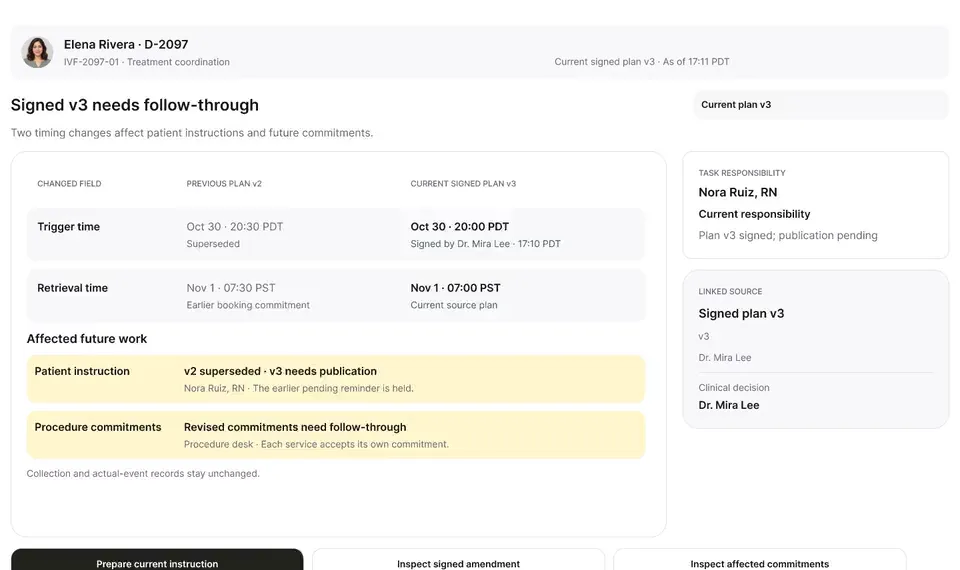
On-screen narration: Dr. Priya Shah approves at 17:07 PDT. The companion compares the approved 20:00 with the Artisan field, which still reads 20:30.
What to watch for: The approved values are formatted for staff review before placement.
Boundary rule: A staff member remains in control of placing updates into the EMR.
On-screen narration: The authorized continuation is prepared and shown as ready for staff review in the clinic's system.
What to watch for: When Maya Chen's chart is open in the EMR tab, OvaFlow halts placement immediately.
Boundary rule: Cross-patient chart mismatches trigger a hard stop before any field is touched.
On-screen narration: Maya Chen's Cycle Sheet is open in the browser, so continuation stops. Back on Elena's chart, the modeled Artisan trigger update is reviewed.
What to watch for: During placement on Elena's chart, window visibility drops and the status changes to 'Observation interrupted'.
Boundary rule: If OvaFlow loses sight of the EMR mid-action, it never assumes the save finished.
On-screen narration: The workstation drops after the save in Artisan. OvaFlow shows that it lost sight of the EMR and that the EMR update is not yet confirmed, and nothing is repeated. My work still shows Dr. Priya Shah's 17:07 PDT approval under Completed. Back to the reconciliation task.
What to watch for: The companion re-reads Elena's Cycle Sheet and verifies the saved value before marking the step complete.
Boundary rule: Readback from the EMR screen is required to clear an interrupted observation.
On-screen narration: The Artisan Trigger & Pre-op instructions and egg retrieval schedule are read back to confirm the update.
OvaFlow never makes the clinical call in these recordings. Physicians sign, the person taking a handoff accepts it, and the lab keeps its own holds. The companion tracks, checks and stops; staff decide.
In this walkthrough
Every patient, family member, clinician and clinic in these stories is fictional. Names, times and screens come from prototype walkthroughs, not from real care.
 Elena RiveraPatient
 Maya ChenPatient
Named or shown on screen. An EMR here is a modeled workflow example built for the prototype, not the vendor's own software. OvaFlow is designed to work beside these systems.
Artisan: Rebuilt from public help articles; how an existing instruction is edited is our own stand-in.
Systems a clinic running this workflow often uses. They do not appear in this recording.
 Microsoft EdgeManaged browser
 Google ChromeManaged browser
Third-party names and logos are trademarks of their respective owners, shown to illustrate systems commonly used in IVF clinics. No affiliation, endorsement or live integration is implied. nAbleIVF, eIVF and Artisan appear as modeled workflow examples.
Where this appears
This recording is part of these pages. Each one explains the step in more depth.
Questions & answers
What clinicians, coordinators, practice leaders, and patients ask when reviewing Walkthrough 3.
No. It shows a modeled Artisan interface in our design prototype to demonstrate how OvaFlow is designed to work beside a clinic's EMR.
So coordinators never mistake a physician's approval inside the coordination queue for a completed entry inside the EMR Cycle Sheet.
Re-establishing sight of the matching patient's Cycle Sheet and reading the saved value back from the screen.
Related
A late estradiol result, a newly signed trigger time, the wrong chart caught before publishing, and a lost confirmation checked rather than blindly resent.
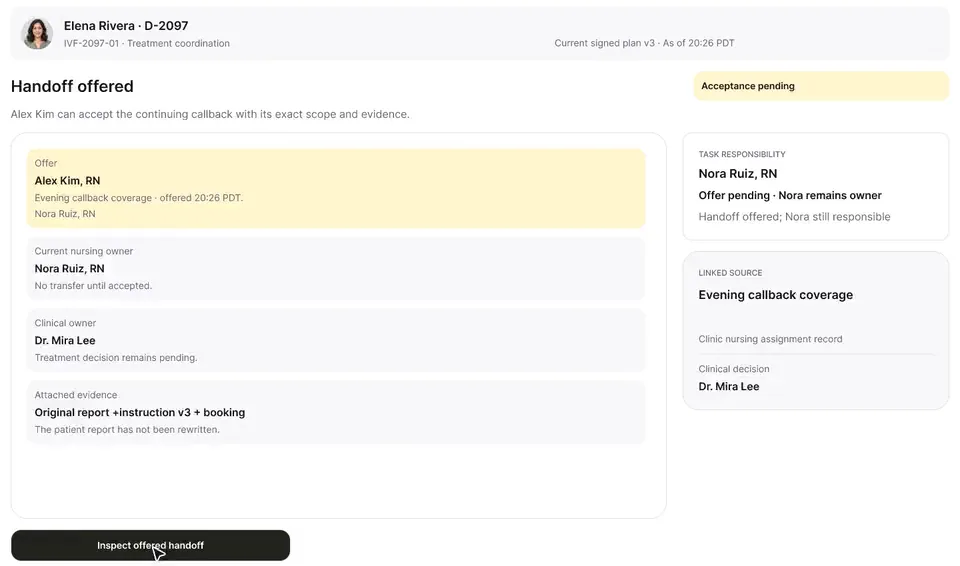
Elena says she injected at 8:20, not 8:00. Her words are kept as she said them, the signed instruction stays as signed, and the evening callback changes hands only when Alex accepts it.
Next step
We'll replay this flow against your roles and handoffs, using fictional records. Please don't send patient data.