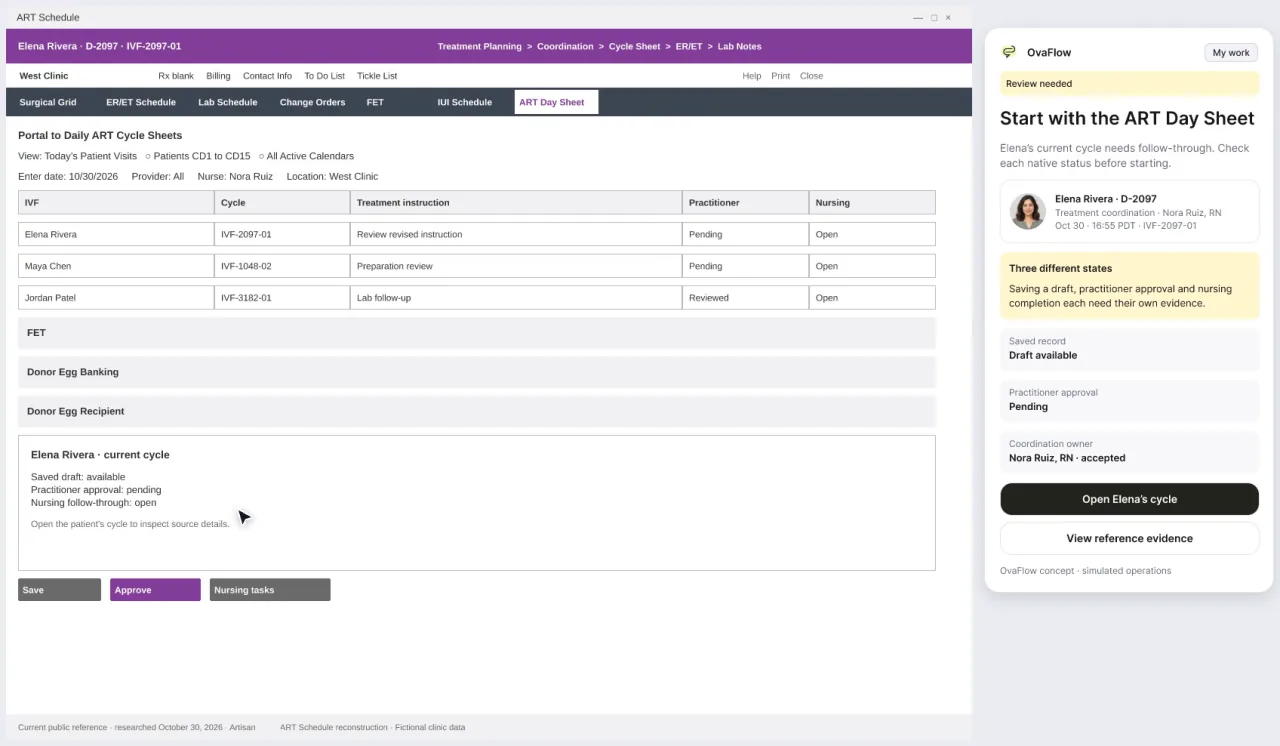
Reconstructed from Artisan's public reference articles, with fictional patients. It shows a trigger approval, a wrong-chart stop and a view that drops mid-check, and how none of them is ever assumed done.The Artisan walkthrough replays Elena's trigger change as its own modeled example, with Dr. Priya Shah approving. That is why its names and times differ from the daily-care story.
ArtisanModeled workflow exampleNot yet checked against a real clinic build
Fictional patient dataModeled workflow exampleNot yet checked against a real clinic build
[From the Artisan walkthrough]
Switch charts and everything stops
The trigger update is prepared for Elena Rivera. If Maya Chen's chart is the one open when staff continue, OvaFlow blocks the step, keeps Elena's prepared update and says which chart it expected.
The approved trigger update is ready. A person continues it in Artisan.
The open chart doesn't match. The step is blocked and not attempted. Elena's update is kept.
Staff return to Elena's chart, it is rechecked, and the update continues in Artisan.
Fictional patient dataFrom the Artisan walkthrough. Fictional patients and clinic.
[What was modeled]
What the Artisan walkthroughs show
Reconstructed from Artisan's public reference articles on trigger and retrieval scheduling, schedule change orders and staff messaging. No clinic build was available. How an existing trigger is edited or regenerated, and what follows from it, is synthetic until checked on a licensed clinic build.
01
Trigger & Pre-op, compared read-only
Dr. Priya Shah's 17:07 PDT approval moving Elena Rivera's trigger from 20:30 PDT to 20:00 PDT is compared read-only with the unchanged 20:30 field in the EMR. OvaFlow leaves the EMR's own fields alone.
When Maya Chen's chart is open on the workstation instead of Elena Rivera's, placement stops immediately and holds the draft until Elena's chart is in front of staff.
03
Interrupted, not assumed done
At 17:08 PDT the workstation view drops right after the save in Artisan. The status says so plainly, and the Artisan record is read back at 17:11 PDT before anything closes.
04
Portal, lab and handoff, tracked apart
Saving a trigger in the chart doesn't tell the patient or the lab. The portal release, the embryology lab's schedule change order and the evening nursing handoff are each tracked on their own.
Chloe Park, RN reads the staff message at 17:22 PDT. Nora Ruiz, RN stays responsible for the evening trigger follow-up until Chloe explicitly accepts at 17:25 PDT.
[Check in the EMR]
Checked in the EMR, never assumed saved
A draft is not a save, and a save is not done until the chart shows it.
If the view drops, the status says so. Nothing is retried in the background.
Switching to another patient's chart stops the work until the right chart is open.
An interrupted view stays unverified
In the modeled trigger amendment, the companion loses sight of the chart after the save. It says so, and waits for a read-back.
01Awaiting clinician approvalThe proposed change waits for the physician. The EMR's own fields stay as they are.
02Approved by Dr. Priya Shah · 17:07 PDTThe approval is compared with the unchanged field in the EMR.
03Observation interrupted · last verified 17:08 PDTThe workstation drops after the save. OvaFlow does not guess what happened.
04Artisan record read back · 17:11 PDTThe chart is read again. Only what it shows is treated as done.
Status wording matches the product exactly. Times and names are fictional.
[Stays in the EMR]
Done by people, in Artisan
OvaFlow can prepare, compare and remind. These steps stay with qualified staff in the system of record.
Practitioner approval of the trigger
Editing or regenerating Trigger/Pre-op Instructions
Surgical schedule changes
Change order submission and the lab's acknowledgment
Distribution to the patient portal
Staff messaging and explicit handoff acceptance
[Artisan · Public reference profile & swimlane trace]
How Artisan is documented publicly—and how OvaFlow sits beside it
Artisan Medical Solutions, LLC publicly documents Artisan as a cloud-based fertility EMR and practice management platform covering ART cycle calendars, trigger and retrieval scheduling, cryostorage inventory and patient portal communications [1]. Because no real clinic Artisan build was available to us, our Artisan walkthroughs were reconstructed from Artisan's public reference articles and carry an explicit qualification banner.
How trigger approval, wrong-chart protection, an interrupted view and nursing handoff behave beside a modeled Artisan chart
Reconstructed from Artisan public reference articles (not yet tested on a live clinic build) · Standalone modeled example with fictional patient Elena Rivera and Dr. Priya Shah.
Lane 1: In Artisan (public-reference model)Lane 2: Beside chart in OvaFlowLane 3: Staff action & readback
Step 01 · 17:07 PDTRead-only compare
Read-only compare against 20:30 field
In Artisan (public-reference model)
Artisan ART Cycle Day Sheet and Trigger/Pre-op Instruction fields (still showing 20:30 PDT) [1].
↓
In OvaFlow companion
Compares Dr. Priya Shah's 17:07 PDT approval (20:00 PDT) read-only against the unchanged 20:30 field in Artisan.
↓
How the step closes
OvaFlow never overwrites the EMR's instruction template; staff update the field in Artisan.
Step 02 · 17:07 PDTWrong-chart hard stop
Wrong-chart stop holds Elena's draft
In Artisan (public-reference model)
Patient banner and MRN header inside the active browser tab (Maya Chen's chart is open) [1][2].
↓
In OvaFlow companion
Detects that Maya Chen's chart is focused while Nora Ruiz, RN is working on Elena Rivera's trigger update.
↓
How the step closes
Hard stop: placement is blocked and Elena's draft is held until Elena Rivera's chart is active.
Step 03 · 17:08 → 17:11 PDTRead back at 17:11 PDT
Interrupted view waits for readback
In Artisan (public-reference model)
Database commit of the updated 20:00 PDT record on the Artisan ART Day Sheet [1].
↓
In OvaFlow companion
At 17:08 PDT the workstation view drops right after Save; status turns amber (“Observation interrupted”).
↓
How the step closes
No blind retry. At 17:11 PDT Nora restores the view and reads back the saved 20:00 PDT record in Artisan.
Step 04 · 17:22 → 17:25 PDTAccepted at 17:25 PDT
Portal, lab & RN handoff tracked apart
In Artisan (public-reference model)
Portal publish control, lab schedule change order form and internal staff messaging in Artisan [1].
↓
In OvaFlow companion
Tracks portal release, lab acknowledgment and evening RN handoff as three independent checklist items.
↓
How the step closes
Chloe Park, RN reading the message at 17:22 PDT leaves Nora as owner; Chloe clicking Accept at 17:25 PDT moves ownership.
Why three separate lanes matter: Preparing or placing text in Lane 2 never marks a clinical step complete. Every step waits for Lane 1 (Artisan (public-reference model)) and Lane 3 (staff verification) to confirm the record.Boundary matrix & documented capabilitiesWhat stays in Artisan vs. what OvaFlow keeps in view & public Artisan capabilitiesSide-by-side table of what stays in Artisan versus what OvaFlow keeps in view.
Publicly documented Artisan capabilities
ART Cycle Day Sheets and stimulation calendars with follicular ultrasound and hormone tracking [1].
Practitioner approval queues for trigger timing, pre-operative instructions and protocol amendments [1].
Surgical schedule management and laboratory schedule change orders [1].
Patient portal distribution for medication instructions, calendars and financial statements [1].
Built-in staff messaging, task assignment and SART registry reporting [1].
What stays in Artisan vs. what OvaFlow keeps in view
Every Artisan workflow shown here is reconstructed from public reference articles and must be checked against a real clinic build before use.
Clinical workflow
Stays in Artisan (system of record)
Kept in view by OvaFlow
Why the boundary matters
Trigger & pre-op instructions
Practitioner approval, editing or regenerating Trigger/Pre-op Instructions in Artisan [1].
Read-only comparison between the signed approval and the current field value.
Prevents an unverified script from overwriting a clinic's custom instruction template.
Active chart identity check
Patient banner, MRN and cycle identifier inside the open Artisan tab [1].
Continuous patient-context verification that halts placement if another chart is in front of staff.
Eliminates cross-patient copy-paste errors when nurses juggle multiple monitoring tabs.
Interrupted save recovery
Database commit of the ART Day Sheet and instruction record [1].
Holds “Observation interrupted” state on connection drop until a fresh readback confirms the chart.
Avoids both silent failure (thinking a save happened when it didn't) and blind retry (double entry).
Portal, lab & nursing handoffs
Portal publish button, lab schedule change order form and internal staff messaging [1].
Tracks portal release, lab acknowledgment and explicit RN handoff acceptance (17:22 read vs. 17:25 accept) as three independent items.
Saving a chart field never guarantees the patient saw the change or the evening nurse took ownership.
[Questions]
Common questions about Artisan & OvaFlow
Frequently asked questions4 questions on clinical authority, verification and pilot boundaries
Why does every Artisan card carry “Not yet checked against a real clinic build”?
Because we built our Artisan walkthroughs from Artisan Medical Solutions' public help and reference articles rather than a live licensed clinic environment. In particular, how an existing Trigger/Pre-op Instruction is edited or regenerated in our prototype is our own synthetic stand-in until a clinic tests it on its own Artisan build.
Why do the names and times in the Artisan walkthrough differ from the daily-care story?
In the main daily-care story, Dr. Mira Lee signs Elena Rivera's trigger amendment at 17:10 PDT and Alex Kim, RN accepts the evening handoff. The Artisan walkthroughs replay Elena's trigger amendment as a self-contained modeled example where Dr. Priya Shah approves at 17:07 PDT and Chloe Park, RN accepts the handoff at 17:25 PDT.
What happens at 17:08 PDT when the companion loses sight of the Artisan screen?
Instead of assuming the save worked or re-submitting the form in the background, OvaFlow displays “Observation interrupted” with the last verified timestamp (17:07 PDT) and waits for staff to re-open the chart and read back the saved record at 17:11 PDT.
Why doesn't Chloe Park reading the staff message at 17:22 PDT transfer ownership?
A read receipt only proves a message was opened on a screen—not that the receiving nurse has capacity or has agreed to take the clinical follow-up. Nora Ruiz, RN remains the named owner until Chloe Park explicitly clicks Accept at 17:25 PDT.
Public references & technical standardsExternal vendor & standards documentation cited on this page (2 verified sources)Retrieved 2026-11-03 · No vendor affiliation, endorsement or live connection.
Technical reference for inspecting window focus, patient banners and control states without stealing keyboard input.
[Walkthroughs]
Every walkthrough with Artisan
Artisan appears as a modeled workflow example built from public references. It has not yet been checked against a real Artisan clinic build, and how an existing instruction is edited is our own stand-in. These walkthroughs replay Elena's trigger change as a separate modeled clinic example, with Dr. Priya Shah as the approving physician; times are fictional.
Beside a modeled Artisan view, the companion compares Dr. Priya Shah's approval with the unchanged Artisan fields, stops on Maya's open chart, and won't assume an update it didn't see.
0:29DesktopArtisan · Modeled workflow example · Not yet checked against a real clinic build
Saving a trigger doesn't tell the patient or the lab. Portal distribution, the lab change order and a message that was read but not accepted are each tracked separately.
0:21DesktopArtisan · Modeled workflow example · Not yet checked against a real clinic build
Four fictional patient examples across three modeled EMRs, a map of 300+ designed product states, and the research behind each boundary.
0:20PresentationnAbleIVF, eIVF and Artisan · Modeled workflow examples · Artisan not yet checked against a real clinic build
Third-party names and logos are trademarks of their respective owners, shown to illustrate systems commonly used in IVF clinics. No affiliation, endorsement or live integration is implied. nAbleIVF, eIVF and Artisan appear as modeled workflow examples.
[Run Artisan?]
Walk through the Artisan example with us.
We'll show the modeled workflow, then talk through what testing it on your clinic's own build would involve.