Product preview · Fictional patient data

OvaFlow

Patient phone

Tonight's instruction first. Help that reaches a person.

A patient companion concept: the current signed instruction pinned first, a simple way to report what actually happened without faking on-time completion, care-team status in plain words, and recovery check-ins that point directly to the clinic's 24/7 line and 911.

Planned after the pilot
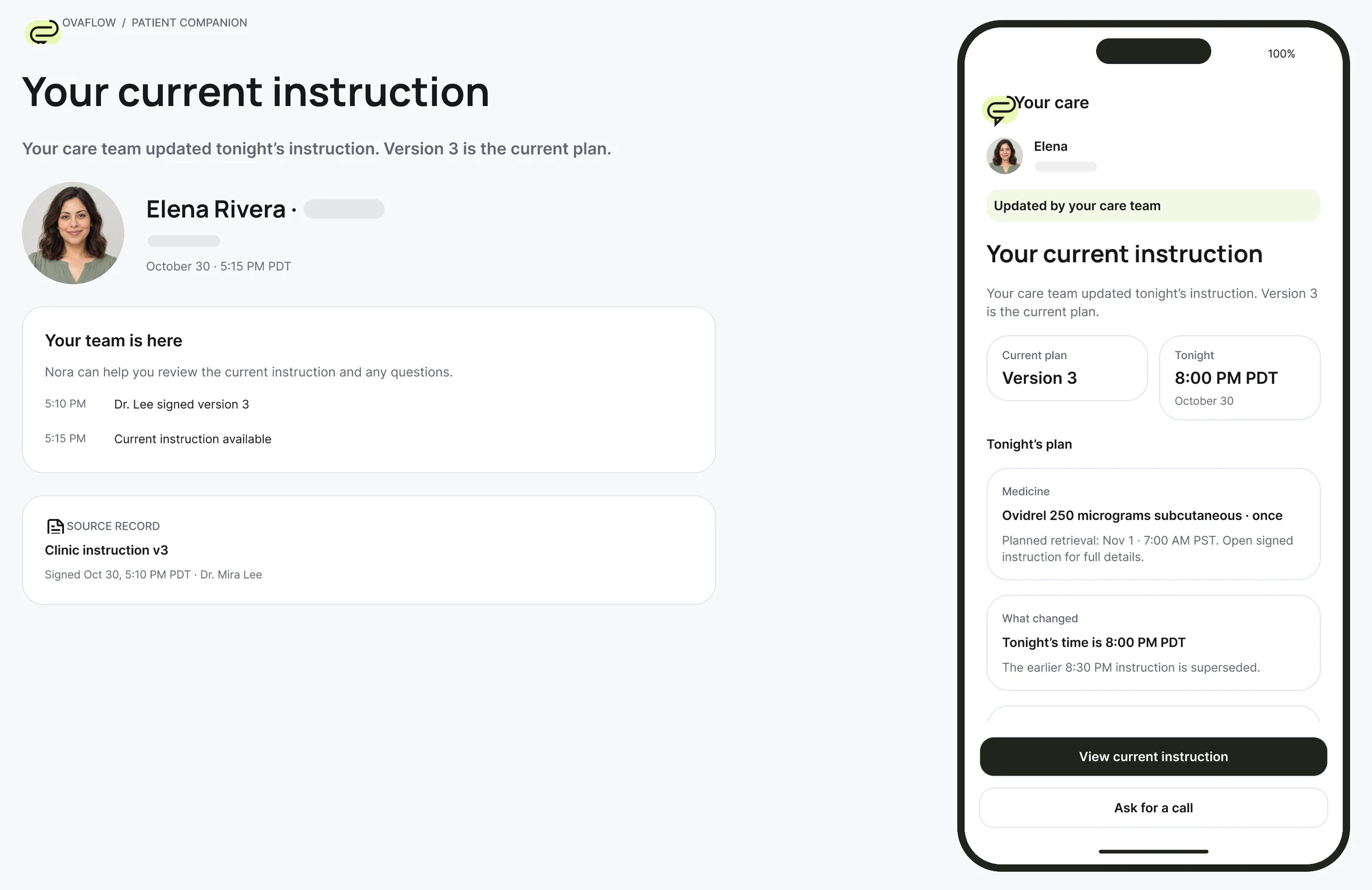
Dual-panel patient companion storyboard (prototype walkthrough): plain-language explanation on the left, the patient's phone on the right. Fictional patient data.
  1. Your current instruction: the care team updated tonight's plan, and Version 3 is the current one.
  2. A quick call would help: Elena asks Nora to talk through the instructions.
  3. Your report is saved exactly as entered. The care team will review the difference in timing.
Prototype walkthrough · Fictional patient data

What it's for

Plain words, current facts.

The current instruction first, honest reporting, and help that reaches a person. Patients and the people supporting them through a cycle.

  1. Current instruction

    Older links from text messages or email open a superseded notice and redirect straight to the current signed version instead of an outdated time.

  2. Honest reporting

    Ask for a nurse call without marking the dose taken, or record the exact clock time a dose was taken so the care team and lab see the truth.

  3. Your pause, your pace

    Routine cycle reminders stop during a patient-chosen pause, and reaching out for private counseling never restarts automated nudges.

Elena's phone

Four screens, each with a safeguard behind it.

Trigger night and the morning after retrieval, on the patient's phone, with a fictional patient and clinic.

  1. Tonight's signed instruction comes first.

    The first thing Elena sees is the version her doctor signed, with the time, the medication and the planned retrieval in one place.

    In the clinicBehind it: version 3, signed by Dr. Mira Lee at 17:10 PDT. Nothing unsigned reaches this screen.

    OvaFlow · Your care
    Elena RiveraWest Clinic · Your care team
    Active signed Version 3 · 5:10 PM PDT Oct 30
    Tonight's trigger instructionSigned by Dr. Mira Lee. Version 3 replaces the earlier 8:30 PM PDT Oct 30 timing.
    Medication & planned retrievalOvidrel 250 micrograms subcutaneous · once · 8:00 PM PDT Oct 30Planned egg retrieval: 7:00 AM PST Nov 1. Clocks fall back 1 hour at 2:00 AM Nov 1, so this is 36 hours after your shot.
    MedicationOvidrel 250 micrograms subcutaneous · once · 8:00 PM PDT Oct 30
    Tonight and after
    1. 8:00 PM PDT Oct 30Your injection, once
    2. After you injectReport your injection time
    3. 7:00 AM PST Nov 1Planned egg retrievalClocks fall back 1 hour at 2:00 AM Nov 1, so this is 36 hours after your shot.
    Your care team
    Nora Ruiz, RNNurse coordinator · West Clinic
    On-call: (202) 555‑0141Clinic: (202) 555‑0140
    Step A: Elena's phone shows Tonight's trigger instruction. Fictional patient data.
  2. An old link can't send her to the old time.

    Elena taps a reminder text from before the change. Instead of the 8:30 PM instruction, she sees that it was replaced, and a way back to the current one.

    In the clinicBehind it: older links are locked from action and always point to the current signed version.

    OvaFlow · Your care
    Elena RiveraOlder reminder link
    Superseded by signed Version 3 (5:10 PM PDT Oct 30)
    Do not use Version 2You opened an older reminder link. Stale instructions are locked from action.
    Inactive historical version (v2)Old time: 8:30 PM PDT Oct 30 · replaced at 5:10 PM
    Current signed plan (v3)Active: tonight, 8:00 PM PDT Oct 30 · Ovidrel 250 micrograms subcutaneous
    What changed today
    1. Earlier textVersion 2 · 8:30 PM PDT Oct 30
    2. 5:10 PM PDTDr. Mira Lee signed Version 3 · 8:00 PM
    Questions about the change
    Nora Ruiz, RNNurse coordinator · West Clinic
    Step B: Elena's phone shows Do not use Version 2.
  3. What she reports is kept as she said it.

    Elena injected at 8:20 PM, not 8:00 PM. She says so in her own words, and the app shows her who is calling back.

    In the clinicBehind it: the report never rewrites the signed plan. Alex Kim, RN accepted the evening callback at 20:28 PDT; Dr. Mira Lee's review stays open.

    OvaFlow · Your care
    Elena RiveraEvening follow‑up
    Evening callback accepted · Clinical review pending
    Your injection report is savedYou reported 8:20 PM PDT Oct 30. Your exact time is kept alongside the prescribed 8:00 PM PDT Oct 30 plan.
    Patient-reported administration“I used the Ovidrel at 8:20 tonight.”Reported 8:20 PM PDT Oct 30 · received 8:22 PM PDT Oct 30.
    Accepted nursing follow‑upAlex Kim, RN accepted evening callback follow‑upAccepted at 8:28 PM PDT Oct 30.
    Timing review
    Dr. Mira LeeReview pending
    Step C: Elena's phone shows Your injection report is saved.
  4. After retrieval, help reaches a person.

    Her recovery check-in goes to nursing. For anything severe, the screen points to the clinic's on-call line and 911, never to automated advice.

    In the clinicBehind it: the symptom note is routed to Nora Ruiz, RN. Automated chat never triages emergencies.

    OvaFlow · Your care
    Elena RiveraNov 2 · Recovery
    Recovery update with Nora Ruiz, RN · 11:08 AM PST Nov 2
    Recovery update & urgent routesYour symptom note is with nursing. Automated chat never triages emergencies.
    West Clinic urgent contactsOn-call: (202) 555‑0141Clinic: (202) 555‑0140For severe pain or belly swelling, weight gain over 2 lb in a day, peeing much less, vomiting, heavy bleeding, fever or shortness of breath, call on-call or 911.Clinic-provided guidance
    Your nurse after retrieval
    Nora Ruiz, RNPost-procedure follow-up
    Step D: Elena's phone shows Recovery update & urgent routes.

Maya's phone

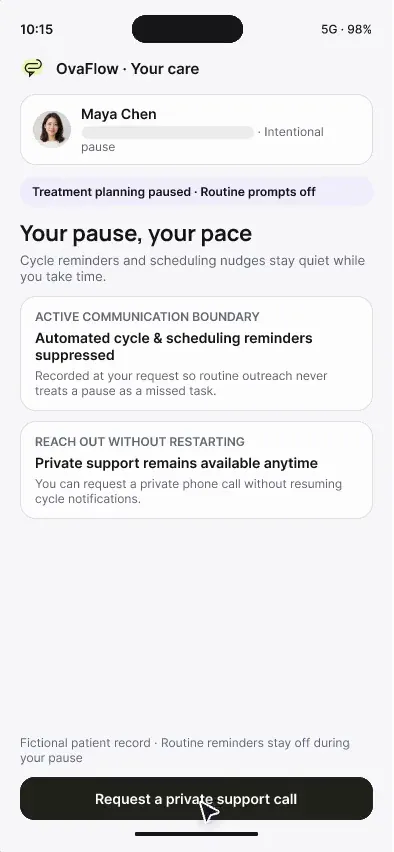
Your pause, your pace.

When a patient chooses to pause, routine reminders stop. Asking for a private call doesn't restart treatment.

Maya Chen's phone shows her chosen treatment pause and a pending private call request. Fictional patient data.
Patient phone · After the pilot
  1. “Your pause, your pace”

    Maya’s treatment pause screen opens on her phone. Routine prompts that no longer fit are stopped.

  2. A private call, on her terms

    She asks for a private call with a clinician. Lock Screen previews stay off and her pause stays in place.

  3. Nothing restarts by accident

    She is back on her pause overview with the call request pending. Returning to treatment is her decision with her care team.

Device anatomy & visibility matrix

Patient companion anatomy: current signed instruction first, honest reporting & human help

When a trigger time changes at 5:10 PM or cramping starts after egg retrieval, a patient's phone must never show an outdated link, force a false “taken on time” tap, or reply with a chatbot.

Planned after the first pilot · Responsive mobile web in 12-hour AM/PM time with dates & timezone offsets

Worked patient companion trace: Elena Rivera's trigger night & Maya Chen's pause

The patient companion walkthroughs show both sides of the screen: what Elena Rivera and Maya Chen see on their phones (in 12-hour AM/PM time with dates), and what the care team sees at the desk.

  1. Oct 30 · 5:22 PM PDTElena Rivera

    Zone 01 · Stale-link redirect to signed v3

    Taps the link from her earlier afternoon message (which pointed to v2 at 8:30 PM PDT). The patient companion blocks the outdated version, explains that Dr. Mira Lee signed an updated time at 5:10 PM PDT, and opens v3 (Oct 30, 8:00 PM PDT) for her Nov 1, 7:00 AM PST retrieval.

    Screen boundary

    Patients can never accidentally confirm a superseded trigger time from an old message link.

  2. Oct 30 · 8:05 PM PDTElena Rivera

    Zone 02 · Call request kept separate from dose log

    Has a question about mixing the trigger vial and taps “Ask for a nurse call”. The screen sends the callback request to the on-call nurse while keeping the dose status as “Not yet taken”.

    Screen boundary

    Asking a question never marks a medication dose as completed.

  3. Oct 30 · 8:20 PM PDTElena Rivera → Alex Kim, RN

    Zone 03 · Verbatim actual-use report (received 20:22 PDT)

    Completes the injection at 8:20 PM PDT and logs “Oct 30, 8:20 PM PDT” with a short note. On the clinic side, her 8:20 PM PDT report and the 8:00 PM PDT signed order appear side by side with both reported (20:20) and received (20:22) timestamps.

    Screen boundary

    Honest reporting preserves the exact 20-minute difference instead of coercing it into “8:00 PM taken”.

  4. Nov 1 · 2:15 PM PSTElena Rivera & Maya Chen

    Zone 04 · Recovery line (202) 555-0141 & chosen pause

    After retrieval on Nov 1, Elena's recovery check-in places the clinic's 24/7 line (202) 555-0141 and 911 at the top of the screen. When Maya Chen pauses her cycle and reaches out for private support, her routine reminders stay off.

    Screen boundary

    Urgent symptoms go straight to people and 911; private support never restarts automated nudges.

Patient companion screen flow (393×852 viewport). Superseded 8:30 PM links redirect to the current signed v3 instruction (Oct 30, 8:00 PM PDT) with daylight-saving context for Nov 1, 7:00 AM PST retrieval; asking for a nurse call stays separate from logging Elena's 8:20 PM PDT dose; and recovery check-ins route straight to (202) 555-0141 and 911.
Visibility table, explicit boundaries & glossaryWhat shows where on the Patient companion & what never happens on Patient companionSub-surface visibility table, what Patient companion does and never does, and related safeguard terms.
What shows where on the Patient companion
Sub-surface / stateWhat is shownWhat is hidden or redactedAllowed actionStays at the desk or EMR
Opened from an older SMS or email link (stale-link block)Amber notice: “This 8:30 PM instruction was replaced at 5:10 PM PDT” + automatic redirect to current v3.The Confirm button on superseded version v2 (8:30 PM) is permanently removed.Read and confirm only the current signed v3 instruction (Oct 30, 8:00 PM PDT).Physician signature and amendment audit history in the clinic EMR.
Pinned tonight's instruction card (Elena Rivera v3)Medication name, dose, target time (Oct 30, 8:00 PM PDT), signer (Dr. Mira Lee), and Nov 1, 7:00 AM PST retrieval window.Internal clinic task codes and raw laboratory flowsheet numbers are translated into plain words.Confirm receipt, view step-by-step preparation notes, or ask a question.Protocol dosing calculations and OR anesthesia scheduling.
Dose reporting & question controls (8:20 PM PDT)Two separate buttons: “Ask for a call from the care team” and “Log when I took this dose”.Requesting a nurse call never checks the “Dose taken” box in the background.Log the exact clock time taken (“Oct 30, 8:20 PM PDT — 20 min after target”) in Elena's own words.Clinician evaluation of whether the 20-minute variance changes retrieval timing.
Post-retrieval recovery check-inPlain symptom check-in alongside clickable clinic 24/7 line (202) 555-0141 and 911 emergency banner.Zero automated symptom grading, zero chatbot reassurance, zero algorithmic triage.Call the clinic's 24/7 on-call line (202) 555-0141 or 911 immediately, and notify discharge owner.Post-operative nursing assessment and physician escalation.
Patient-chosen pause & private support mode (Maya Chen)Calm confirmation that routine cycle reminders are paused, plus private counseling contact.Routine stimulation/workup nudges are silenced; private support messages are kept restricted.Message counseling support privately without restarting automated cycle reminders.Care-plan status updates when the patient chooses to resume.

Designed to do on Patient companion

What belongs on this screen

  • Pins the current clinician-signed instruction at the top and blocks older links from showing superseded times.
  • Spells out dates, 12-hour AM/PM times and daylight-saving changes (PDT to PST) in plain language.
  • Separates asking for a nurse call from logging a dose, and records the patient's exact reported clock time.
  • Routes post-retrieval recovery concerns directly to the clinic's 24/7 phone line (202) 555-0141 and 911, and honors a chosen pause.

Explicit boundary

What never happens on Patient companion

  • Never gives automated medical advice, symptom reassurance or dosing instructions.
  • Never overwrites the signed order time when a patient reports taking a dose early or late.
  • Never restarts paused cycle reminders just because a patient messages private counseling support.
  • Never requires patients in the first clinic pilot to change apps (planned after the pilot, web-first).

Questions

Common questions about Patient companion

Frequently asked questions4 questions on Patient companion privacy, boundaries and rollout timing
What happens if a patient clicks an older text message link after their trigger time was changed?

Every instruction link is bound to its version history. If Dr. Mira Lee signs version v3 (Oct 30, 8:00 PM PDT) to replace version v2 (8:30 PM PDT), tapping the older link opens a clear notice that the 8:30 PM time was superseded and displays only the current 8:00 PM PDT instruction.

Why keep the patient's reported dose time separate from the signed order time?

Egg retrieval is timed to the hour (~36 hours after the trigger shot). If a patient takes an 8:00 PM PDT trigger at 8:20 PM PDT, the physician and embryology lab need to see both the 8:00 PM signed target and the patient's honest 8:20 PM report—not a checkbox that pretends it happened at 8:00 PM.

How does the patient companion handle post-retrieval pain, bloating or OHSS warning signs?

It never uses an AI chatbot or automated algorithm to tell a patient their symptoms are fine. Recovery check-ins route immediately to the named discharge owner, display the clinic's 24/7 on-call number (202) 555-0141, and direct emergencies to 911.

When does the Patient companion arrive in the rollout plan?

The Patient companion is planned after the first clinic pilot, delivered as a responsive web experience so no app download is required. During the first pilot, patients continue using the clinic's existing portal and messaging channels.

Platform standards & referencesPublic platform documentation cited on this page (2 verified sources)Apple Human Interface Guidelines, WidgetKit, ActivityKit, watchOS, Windows UIA and Citrix ICA documentation.
  1. [1]

    Electronic Code of Federal Regulations (eCFR) · 47 CFR § 64.1200 — Telephone and Text Messaging Consent & Opt-Out Rules (verified 2026-11-03)

    Federal rules governing patient opt-in and immediate honoring of pause/opt-out requests on messaging channels.

  2. [2]

    EngagedMD, LLC · Fertility Patient Education and Informed eConsent Overview (verified 2026-11-03)

    Public reference for how fertility clinics deliver multimedia patient education and cycle-specific consent modules.

In the walkthroughs

What you can watch it do.

Planned after the pilot

Planned after the pilot. A responsive web patient surface is the default; no app download is required. During the pilot, patients keep using the clinic's existing channels.

  1. Current signed instruction first
  2. Superseded links blocked and redirected
  3. Call requests that don't mark the dose taken
  4. Care-team status in plain words
  5. Recovery check-in with 24/7 contacts and 911, never automated advice
  6. Pause mode and a private channel
  7. Daylight-saving and timezone changes spelled out beside the retrieval window

Walkthroughs

Patient companion, recorded.

Recordings of the interactive design prototype with fictional patients. Open one to play it with chapters and captions.

Next step

See what a patient sees, and what stands behind it.

We'll walk the patient app design alongside the clinic view behind each message. Fictional records only; please don't send patient data.