nAbleIVF: consult capture, pause, save check and a nursing task
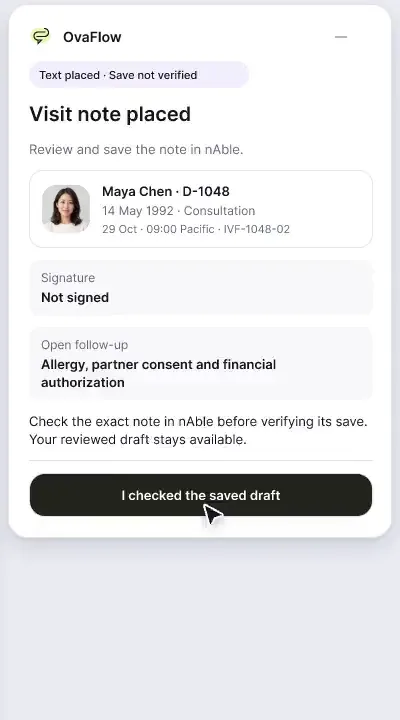
Consult notes captured with consent, paused for private moments, reviewed, then checked as saved rather than assumed.
Product preview · Fictional patient data
Checked in the EMR
A send that was pressed is not a send that happened. OvaFlow checks the clinic's own record before anything is marked complete, and says plainly when it cannot tell.
How it works
Portal publication · Elena Rivera
OvaFlow status
Prepared from Dr. Mira Lee's signed version 3. Nothing has been sent, and Elena has not seen anything.
Clinic portal record (read back)
No published record yet.
Illustration · Fictional patient data
The current instruction or note is prepared from its signed source and waits for a person. On screen it reads “Ready for native review”.
An authorized staff member publishes, signs or saves inside the clinic's own EMR or patient portal.
If confirmation never returns, the status becomes “Publication outcome unknown” and the resend action is held until the EMR is inspected.
Only when one matching record is read back from the EMR for the right patient and revision does the publication task close.
A dropped workstation is a different fact from an unknown send. The status reads “Observation interrupted” with the last time the record was actually seen, and staff check the record in the EMR before relying on it.
Safeguards in play
For your team
A network drop, browser timeout or window change right after pressing Save or Send leaves staff guessing. Guessing wrong means either an unposted instruction or a duplicate send.
TodayPressing Save or Publish is treated as done.
With OvaFlowDone means the EMR shows it.
TodayStaff resend, and the patient gets two versions of tonight's instruction.
With OvaFlowResending is held while the outcome is unknown, and the EMR is checked first.
TodayA dropped workstation and an uncertain send look the same.
With OvaFlow“Observation interrupted” and “Publication outcome unknown” are separate states with separate checks.
TodayPublished is read as “the patient has seen it”.
With OvaFlowA verified publication closes only the publication task. Acknowledgment is tracked on its own.
Checking the clinic’s record
When a nurse or coordinator publishes a cycle instruction or saves a consultation note in a web-based EMR or patient portal, transient Wi-Fi drops, expired browser sessions, or background tab reloads can interrupt the response after the button is clicked. In clinical safety analyses of electronic health record disruptions, uncertainty about whether an order or result actually posted leads staff either to assume it succeeded (leaving the patient with no instruction) or to submit it a second time (creating duplicate or conflicting orders) [1, 2].
OvaFlow separates the lifecycle of every EMR action into verifiable states: “Ready for review in the EMR” (staged, not sent), “Publication outcome unknown” (send attempted, confirmation missing—resend button held), “One matching publication verified” (read back from the EMR for the right patient and revision), and “Lost sight of the EMR” (the screen observation bridge dropped, showing the exact timestamp last seen).
“Publication outcome unknown”
Nora Ruiz, RN clicked publish on Elena’s version 3 instruction, but a network drop prevented confirmation from returning. The message may already be live.
Action held: Repeat sending is blocked so Elena does not get two trigger messages.
Next step: Check the published record in the EMR portal log first.
“Observation interrupted · last verified 17:08 PDT”
No send was in flight, but the EMR browser tab reloaded or the workstation session timed out. Nothing was just submitted.
Plain meaning: Lost sight of the EMR screen after 17:08 PDT.
Next step: Open the live EMR record to see what it shows right now.
“One matching publication verified”
OvaFlow inspects the clinic portal’s own activity log and confirms one matching entry for Elena Rivera and signed version 3 (20:00 PDT).
What closes: Only the portal publication task closes.
What stays open: Procedure room, anesthesia, lab prep, and patient acknowledgment.
Nora Ruiz, RN reviews the prepared version 3 trigger instruction (20:00 PDT) for Elena Rivera. The status clearly states that prepared content has not been published.
Nora clicks publish in the portal, but the clinic network drops before confirmation returns. OvaFlow moves to “Publication outcome unknown” and holds the repeat-send button so Nora does not accidentally send Elena two trigger texts.
Nora clicks “Check the published record in the EMR.” OvaFlow observes the single matching version 3 publication on Elena Rivera’s portal record and updates to “One matching publication verified.”
In a separate consult room where no send was in flight, the EMR tab reloads at 17:08 PDT. OvaFlow shows “Observation interrupted · last verified 17:08 PDT” rather than pretending the screen is still live or confusing it with an unknown send.
System boundaries
Clear operational boundaries keep clinical authority, prescribing, and laboratory witnessing inside your clinic’s own systems. See AI & clinical boundaries for full governance rules.
Questions & primary sources
If the first attempt actually succeeded on the portal server just before the connection dropped, an automatic retry would send the patient two clinical messages—which is especially hazardous during amendment cycles. Inspecting the EMR record first takes seconds and eliminates duplicate sends.
It closes only the publication obligation. Linked tasks—such as procedure room confirmation, anesthesia notification, embryology prep, and evening patient callback—remain open in My work until their own verification evidence arrives.
When clinic Wi-Fi hiccups right as a nurse sends your instruction, the software checks whether the message already posted to your portal before allowing anyone to send it again.
See it
Recorded from an interactive design prototype. Every patient, clinician and clinic is fictional, and EMR screens are modeled reconstructions.
Consult notes captured with consent, paused for private moments, reviewed, then checked as saved rather than assumed.
A patient-reported penicillin rash is surfaced against the chart, a monitoring note is confirmed saved rather than assumed, and a specimen label mismatch stops review.
A note isn't done until it's saved, a cycle doesn't start with prior authorization unresolved, dose changes go to eIVF's own e-prescribing, and a PGT label mismatch stops the review.
Next step
We'll walk through how the prototype checks a change in the EMR, and what it shows while that is still unknown. Fictional records only; please don't send patient data.