
Product preview · Fictional patient data

OvaFlow

Modeled workflow example

Beside a modeled nAbleIVF chart

We rebuilt nAbleIVF screens from reference material and fictional records to show where OvaFlow would sit, and exactly where it stops. Every save still happens in nAbleIVF.

Modeled workflow exampleTested in your clinic first
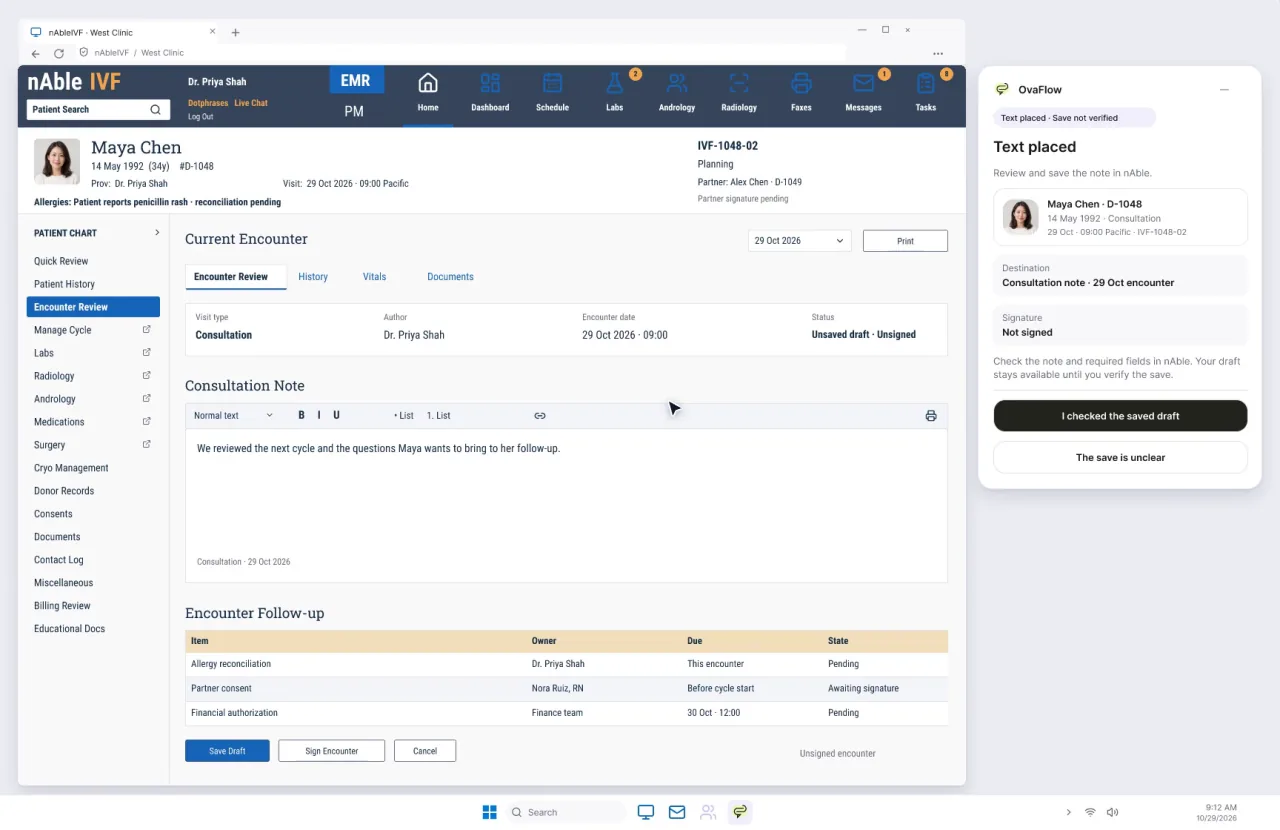
A modeled nAbleIVF encounter for fictional patient Maya Chen. The consultation note has been placed but the encounter is still an unsaved draft, and the OvaFlow companion beside it reads: Text placed, save not verified. Fictional patient data.
  1. Ready for native review
  2. Native update not yet verified
  3. Save Draft confirmed in nAbleIVF
Fictional patient dataModeled workflow example

From the nAbleIVF walkthrough

One transposed digit stops the review

During a PGT review, the biopsy label in the chart and the label on the lab report are compared character by character. When they differ, review stops and the checks move to the people who own them.

Embryology · specimen review · PGT

Jordan Patel

Report received 29 Oct · 11:20 Pacific

  1. EmbryoE01

    ChartE01B01

    ReportE01B01

    Identifiers matchReview pending

  2. EmbryoE02

    ChartE02B02

    ReportE02B20

    Label mismatchOn hold

Reconciliation required

Review stopped on E02

Biopsy B02 in the chart, B20 on the report. The barcode, photo and custody checks happen in nAble Witness, by lab staff. A match on E01 does not complete its review either.

Fictional patient dataFrom the nAbleIVF walkthrough. Fictional patient and clinic.

What was modeled

What the nAbleIVF walkthroughs show

Modeled from reference material for a monitoring flowsheet, patient-entered history and consult notes. The exact licensed nAbleIVF version would be pinned while testing in the clinic.

  1. Allergy history, compared, never copied

    A patient-reported penicillin rash from intake is shown side by side against the chart's allergy list. Staff update the structured allergy record in nAbleIVF so clinical alerts and prescribing checks fire properly. Nothing is saved automatically.

    Watch it innAbleIVF: allergy check, monitoring note, save check, specimen stop
  2. A monitoring note, then a save check

    Elena Rivera's Day 8 monitoring note (lead follicles 16, 15 and 14 mm; estradiol 1,420 pg/mL) is dictated, reviewed and placed. The patient portal message counts as sent only once nAbleIVF's own communication history shows it.

  3. A specimen label mismatch stops review

    When an incoming lab report label differs from the patient's chart identifier, review stops immediately. The barcode, photo and two-person custody checks happen in nAble Witness, by qualified lab personnel.

  4. Consult capture with a Save Draft check

    Maya Chen's new-patient consult is captured with her verbal consent, paused for a private moment, reviewed against the transcript and placed. Placed text stays unverified until Save Draft is confirmed in nAbleIVF.

    Watch it innAbleIVF: consult capture, pause, save check and a nursing task

Check in the EMR

Checked in the EMR, never assumed saved

  • A draft is not a save, and a save is not done until the chart shows it.
  • If the view drops, the status says so. Nothing is retried in the background.
  • Switching to another patient's chart stops the work until the right chart is open.

Placed is not saved

In the modeled consult, dictated text goes into the note. The task stays open until nAbleIVF confirms the draft was saved.

  1. Ready for native reviewOvaFlow prepared the note. A person reviews it and places it in nAbleIVF.
  2. Native update not yet verifiedThe text is in the field, but the chart has not confirmed a save. The task stays open.
  3. Save Draft confirmed in nAbleIVFThe saved draft is seen in the chart. Only now does the task close.

Status wording matches the product exactly. Times and names are fictional.

Stays in the EMR

Done by people, in nAbleIVF

OvaFlow can prepare, compare and remind. These steps stay with qualified staff in the system of record.

  • Physician dosing decisions and order signatures
  • Updates to the structured allergy record
  • Outside-lab requisitions and specimen labels
  • Barcode, photo and custody checks in nAble Witness
  • Every save in the chart
  • Portal message release and delivery history

nAbleIVF · Public reference profile & swimlane trace

How nAbleIVF is documented publicly—and how OvaFlow sits beside it

Nth Technologies, Inc. publicly documents nAbleIVF as a cloud-based fertility EMR and practice management platform purpose-built for reproductive endocrinology clinics [1][2]. No affiliation, endorsement or live connection exists; the walkthroughs on this site use a reconstructed nAbleIVF interface with fictional patients.

Swimlane boundary · nAbleIVF & nAble Witness

How four daily tasks move between a modeled nAbleIVF chart and the companion beside it

Fictional patients Elena Rivera (Day 8 monitoring) and Maya Chen (initial fertility consultation) · Every clinical save and witness check happens in nAbleIVF.

Lane 1: In nAbleIVF & nAble WitnessLane 2: Beside chart in OvaFlowLane 3: Staff action & readback
  1. Step 01 · 08:42Read-only compare

    Allergy banner comparison

    In nAbleIVF & nAble Witness

    Structured allergy table, reaction severity and prescribing interaction checks stay in nAbleIVF [1].

    In OvaFlow companion

    Shows Elena Rivera's intake note reporting a penicillin rash side by side against the chart's allergy banner (read-only).

    How the step closes

    Nora Ruiz, RN enters the coded allergen directly in nAbleIVF so drug-allergy checks fire.

  2. Step 02 · 08:46Held until saved

    Day 8 monitoring note save check

    In nAbleIVF & nAble Witness

    Follicle ultrasound flowsheet (16/15/14 mm), E2 (1,420 pg/mL), progress note editor and Save button in nAbleIVF [1].

    In OvaFlow companion

    Prepares reviewed summary and holds status at “Text placed, save not verified” after placement.

    How the step closes

    Closes only after Nora saves in nAbleIVF and the saved note and portal release log are read back.

  3. Step 03 · 08:51Hard stop · Lab owns

    Specimen label mismatch stop

    In nAbleIVF & nAble Witness

    Data-matrix barcode scan, dish photo capture and two-person verification inside nAble Witness [2][3].

    In OvaFlow companion

    Detects a label mismatch between the incoming specimen report and the open chart and halts review immediately.

    How the step closes

    Handed to andrology and lab staff in nAble Witness; OvaFlow never overrides a witness check.

  4. Step 04 · 10:15Save Draft verified

    Maya Chen consult Save Draft check

    In nAbleIVF & nAble Witness

    Consultation note editor and Save Draft control inside the modeled nAbleIVF encounter [1].

    In OvaFlow companion

    Captures consult after verbal consent, pauses for a private moment, and checks transcript before placement.

    How the step closes

    Dr. Mira Lee clicks Save Draft in nAbleIVF; companion verifies the saved indicator before closing.

Why three separate lanes matter: Preparing or placing text in Lane 2 never marks a clinical step complete. Every step waits for Lane 1 (nAbleIVF & nAble Witness) and Lane 3 (staff verification) to confirm the record.
Boundary matrix & documented capabilitiesWhat stays in nAbleIVF vs. what OvaFlow keeps in view & public nAbleIVF capabilitiesSide-by-side table of what stays in nAbleIVF versus what OvaFlow keeps in view.
Publicly documented nAbleIVF capabilities
  • Cycle monitoring flowsheets combining follicular ultrasound measurements, endometrial lining tracking and serial hormone levels [1].
  • Structured intake histories, allergy lists, problem records and clinical encounter notes with draft and signed states [1].
  • Integrated patient portal for cycle calendars, medication instructions, lab result sharing and two-way care-team messaging [2].
  • nAble Witness electronic laboratory witnessing using data-matrix barcodes and photographic verification across gamete and embryo custody steps [2].
  • Practice scheduling, billing, inventory management and automated SART registry reporting [1][2].

What stays in nAbleIVF vs. what OvaFlow keeps in view

Every system-of-record action remains inside nAbleIVF and nAble Witness.

Clinical workflowStays in nAbleIVF (system of record)Kept in view by OvaFlowWhy the boundary matters
Allergy & medical historyStructured allergy table, reaction severity and prescribing interaction checks [1].Side-by-side comparison of patient-reported intake statements against the chart banner.Prevents silent background writes that could skip the EMR's drug-allergy interaction logic.
Cycle monitoring notesFollicle ultrasound flowsheet, hormone grid, note editor and Save / Sign controls [1].Source-linked draft preparation and post-placement Save Draft readback check.An unsaved browser tab never closes the coordinator's follow-up task.
Patient portal messagingPortal release queue and outbound message history [2].Tracks whether the chart's own communication log shows the instruction was sent.Separates drafting a message from proving the patient received it.
Gamete & embryo witnessingBarcode scan, dish photo capture and two-person sign-off in nAble Witness [2][3].Hard stop on label mismatch and named-owner handoff to the laboratory.Electronic witnessing must never be simulated or overridden by a clinical companion.

Questions

Common questions about nAbleIVF & OvaFlow

Frequently asked questions4 questions on clinical authority, verification and pilot boundaries
Is OvaFlow affiliated with Nth Technologies or nAbleIVF?

No. nAbleIVF and nAble Witness are trademarks of Nth Technologies, Inc. The screens shown in our walkthroughs are modeled workflow reconstructions with fictional patient data, created to illustrate how a companion sits beside a fertility chart.

Why doesn't OvaFlow write allergies directly into the nAbleIVF allergy table?

Structured allergy tables drive clinical decision support and e-prescribing warnings inside the EMR. OvaFlow surfaces patient-reported allergy statements beside the chart so a nurse or physician enters the coded allergen and reaction directly in nAbleIVF.

How does the Save Draft check work in the modeled nAbleIVF consult?

When Dr. Mira Lee places a reviewed consultation summary for Maya Chen into the modeled nAbleIVF note field, OvaFlow sets the status to “Text placed, save not verified” (amber). Only after the clinician clicks Save Draft in nAbleIVF and the saved indicator appears in the chart does the companion mark the documentation step complete.

Does OvaFlow connect to nAble Witness barcodes or cameras?

No. Barcode scanning, dish photography and two-person custody verification stay entirely inside nAble Witness, operated by embryology and andrology staff. OvaFlow only stops clinical review when a report label mismatches the chart and tracks who owns the resolution.

Public references & technical standardsExternal vendor & standards documentation cited on this page (3 verified sources)Retrieved 2026-11-03 · No vendor affiliation, endorsement or live connection.
  1. [1]

    Nth Technologies, Inc. · nAbleIVF — Cloud Fertility EMR & Practice Management Overview (verified 2026-11-03)

    Public overview of nAbleIVF cycle flowsheets, clinical charting, billing and SART reporting.

  2. [2]

    Nth Technologies, Inc. · nAbleIVF Features — Patient Portal, Lab Management & nAble Witness (verified 2026-11-03)

    Public feature documentation covering nAbleIVF portal workflows and nAble Witness barcode and photo verification.

  3. [3]

    ESHRE Guideline Group on Good Practice in IVF Labs · Revised Guidelines for Good Practice in IVF Laboratories (verified 2026-11-03)

    International laboratory standards for continuous specimen traceability and witnessing at critical gamete and embryo steps.

Walkthroughs

Every walkthrough with nAbleIVF

nAbleIVF and eIVF (V6 reference) appear as modeled workflow examples. Each operation is tested in the clinic first.

  • Prototype walkthrough · Fictional patient data

    Workstation failure and recovery catalog

    Fourteen designed recovery states, from an unplugged headset to a blocked remote-desktop clipboard, each keeping the draft and the right patient.

    0:26DesktopnAbleIVF and eIVF · Modeled workflow examples

  • Prototype walkthrough · Fictional patient data

    Executive overview: three modeled EMRs, the design map and research

    Four fictional patient examples across three modeled EMRs, a map of 300+ designed product states, and the research behind each boundary.

    0:20PresentationnAbleIVF, eIVF and Artisan · Modeled workflow examples · Artisan not yet checked against a real clinic build

Third-party names and logos are trademarks of their respective owners, shown to illustrate systems commonly used in IVF clinics. No affiliation, endorsement or live integration is implied. nAbleIVF, eIVF and Artisan appear as modeled workflow examples.

Run nAbleIVF?

Walk through the nAbleIVF example with us.

We'll show the modeled workflow, then talk through what testing it on your clinic's own build would involve.