Always-on clinic workspace: routines people release
Routine follow-through runs under rules your team sets, pauses on request, and re-checks the open chart before it resumes.
Product preview · Fictional patient data
Walkthrough 25 of 29 · Presentation
Four fictional patient examples across three modeled EMRs, a map of 300+ designed product states, and the research behind each boundary.
Executive overview: three modeled EMRs, the design map and research, muted recording of the design prototype. Fictional patient data.
Chapter 1 of 5: The daily-care overview
Recorded from an interactive design prototype. Every patient, clinician and clinic is fictional, EMR screens are modeled reconstructions, and nothing shown is a live connection to any clinic or vendor system.
Clinical & operational context
A presentation hub for clinic leaders. It walks through four fictional patient examples across modeled nAbleIVF, eIVF and Artisan contexts, a map of the designed product states (a design-artifact count, not a measure of running software), and the research that shaped each boundary.
Practice leaders, medical directors, and clinic operations executives evaluating OvaFlow need a birds-eye view of what the prototype covers, how it sits beside existing clinic EMRs (nAbleIVF, eIVF, Artisan), how many failure and recovery states have been explicitly designed across the 29 recordings, and what clinical and safety literature grounds each boundary.
This executive overview walkthrough steps back from individual task rows to present the architecture of the prototype: the daily-care coordination overview, four worked examples across the three modeled EMR contexts, the map of more than 300 designed clinical and operational states across the 10-stage IVF journey, the longitudinal reference stories (Elena Rivera, Maya Chen, Jordan Patel, Avery & Sam), and the primary clinical and health-IT safety references behind every guardrail.
Clinic EMRs
Charts, orders, e-prescribing, and lab witnessing stay in EMR/LIS
OvaFlow companion
Tracks what changed, who owns it, and whether it landed
10-stage coverage
300+ designed states across desktop, iPhone, and Watch
Clinic rollout
Every workflow is tested in the clinic's environment before rollout
How OvaFlow sits beside the clinic's EMR to track signed changes, single accepted owners, and verified outcomes across 300+ designed states.
Guardrail: OvaFlow is a non-prescribing coordination companion prototype; clinical records and orders stay in the clinic's EMR.
What to watch for
A presentation hub for clinic leaders. It walks through four fictional patient examples across modeled nAbleIVF, eIVF and Artisan contexts, a map of the designed product states (a design-artifact count, not a measure of running software), and the research that shaped each boundary.
Follow the exact timestamps, UI status changes, and coordination safeguards as the recording plays.
What to watch for: The executive summary frames the five daily coordination questions OvaFlow answers beside the chart.
Boundary rule: OvaFlow coordinates follow-through; it never replaces the EMR or makes clinical decisions.
On-screen narration: The executive overview opens on the daily-care story.
What to watch for: Four concrete workflows are compared across modeled Artisan, nAbleIVF, and eIVF contexts.
Boundary rule: All vendor screens are modeled workflow examples with no implied vendor endorsement.
On-screen narration: Four fictional patient examples across three modeled EMRs: eIVF, nAbleIVF and Artisan.
What to watch for: The state map displays how normal, warning, stop, and recovery states are organized across the 10 stages of care.
Boundary rule: Edge cases and failure modes are first-class citizens of the design prototype.
On-screen narration: An index of the designed product states opens (design-artifact count: 300+). The index scrolls across every designed state.
What to watch for: Reference patient journeys connect individual 40-second recordings into multi-week clinical arcs.
Boundary rule: All patient and staff personas are 100% fictional.
On-screen narration: Reference journeys across clinical, lab and care coordination work. Further care-coordination and patient journeys come into view.
What to watch for: Each guardrail traces back to published reproductive medicine and health-IT safety guidance.
Boundary rule: Boundaries are grounded in clinical literature rather than marketing claims.
On-screen narration: Interaction research, turned into companion behavior. Evidence for each of the three modeled EMRs, drawn from public vendor documentation. Windows focus and input restrictions, and how verification works. Platform constraints for Apple Watch, Windows Phone Link and WhatsApp Business.
OvaFlow never makes the clinical call in these recordings. Physicians sign, the person taking a handoff accepts it, and the lab keeps its own holds. The companion tracks, checks and stops; staff decide.
In this walkthrough
Named or shown on screen. An EMR here is a modeled workflow example built for the prototype, not the vendor's own software. OvaFlow is designed to work beside these systems.
 Modeled workflow exampleFertility EMR & practice management
 Modeled workflow exampleFertility EMR & practice suite
 Patient education & eConsent
 Patient messaging channel
 Clinic workstation OS
eIVF: V6 reference.
Artisan: Rebuilt from public help articles; how an existing instruction is edited is our own stand-in.
Third-party names and logos are trademarks of their respective owners, shown to illustrate systems commonly used in IVF clinics. No affiliation, endorsement or live integration is implied. nAbleIVF, eIVF and Artisan appear as modeled workflow examples.
Where this appears
This recording is part of these pages. Each one explains the step in more depth.
Questions & answers
What clinicians, coordinators, practice leaders, and patients ask when reviewing Walkthrough 25.
No. OvaFlow is a coordination companion designed to work beside the EMR an IVF clinic already uses, keeping signed changes, single accepted owners, and verified follow-ups visible across the team.
Every patient name, chart number, phone number, and staff persona is fictional, and all third-party EMR interfaces shown are modeled workflow examples built for the design prototype.
Each walkthrough is tagged honestly to indicate which workflows are scoped for the initial clinic pilot versus subsequent phases.
Related
Routine follow-through runs under rules your team sets, pauses on request, and re-checks the open chart before it resumes.
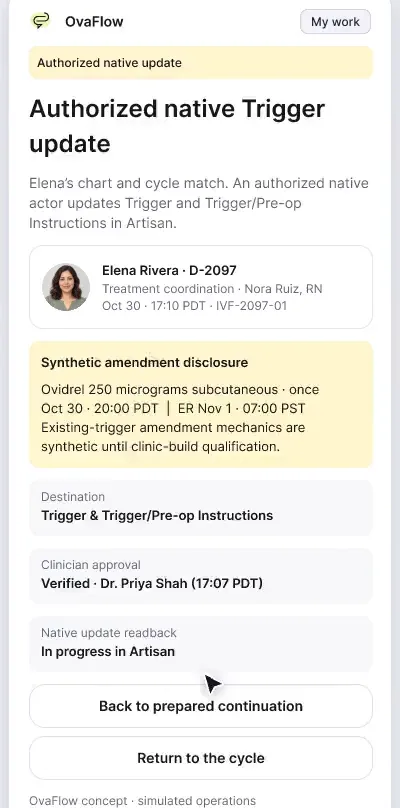
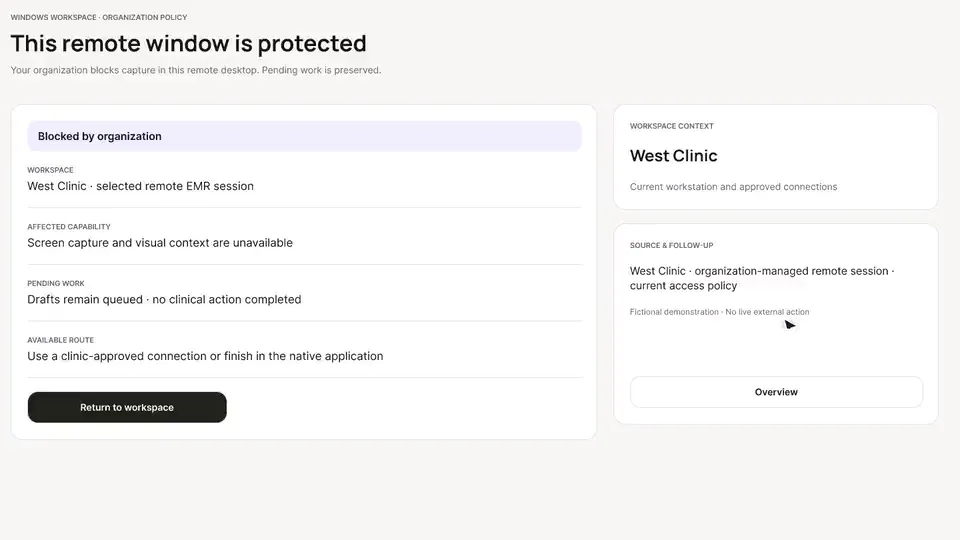
Beside a modeled Artisan view, the companion compares Dr. Priya Shah's approval with the unchanged Artisan fields, stops on Maya's open chart, and won't assume an update it didn't see.
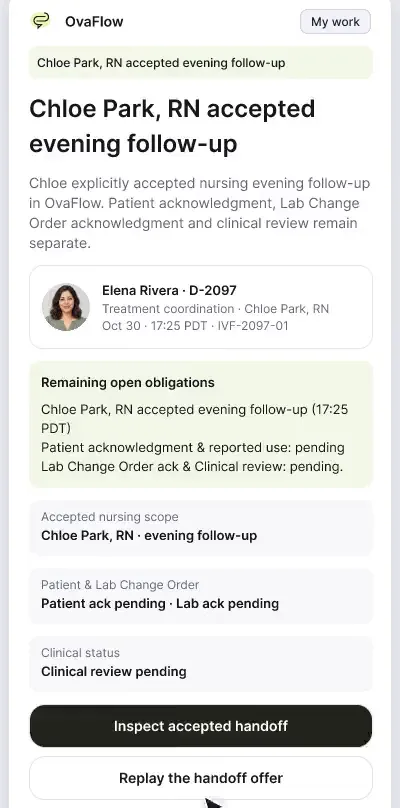
Saving a trigger doesn't tell the patient or the lab. Portal distribution, the lab change order and a message that was read but not accepted are each tracked separately.
Next step
We'll replay this flow against your roles and handoffs, using fictional records. Please don't send patient data.