nAbleIVF: allergy check, monitoring note, save check, specimen stop
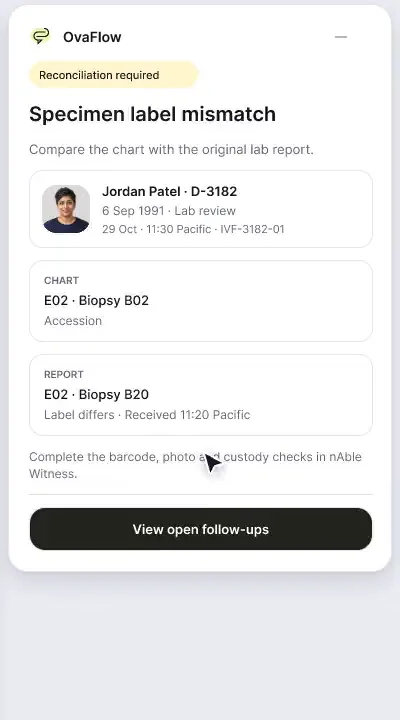
A patient-reported penicillin rash is surfaced against the chart, a monitoring note is confirmed saved rather than assumed, and a specimen label mismatch stops review.
Product preview · Fictional patient data
Walkthrough 27 of 29 · Desktop
Consult notes captured with consent, paused for private moments, reviewed, then checked as saved rather than assumed.
nAbleIVF: consult capture, pause, save check and a nursing task, muted recording of the design prototype. Fictional patient data.
Chapter 1 of 5: Placed isn't saved
Recorded from an interactive design prototype. Every patient, clinician and clinic is fictional, EMR screens are modeled reconstructions, and nothing shown is a live connection to any clinic or vendor system.
Clinical & operational context
Beside a modeled nAbleIVF view, dictated text is placed and the companion waits until Save Draft is confirmed. Monitoring follow-up becomes a nursing task. Then Maya Chen's consultation is captured with her consent, paused for a personal moment, reviewed and placed, and the save is checked.
New-patient and follow-up reproductive endocrinology consultations cover complex history, ultrasound findings, genetic screening plans, and nursing action items in a single 30-to-45-minute conversation. When using a consultation capture tool beside an EMR like nAbleIVF, two failures often occur: first, sensitive personal conversation during a physical exam or emotional moment gets recorded because pausing is awkward; second, the clinician pastes the finished note into the EMR form and closes the window before noticing the EMR save button failed or required a secondary confirmation.
This desktop walkthrough beside a modeled nAbleIVF consultation screen demonstrates the complete consult-to-task loop: showing why 'placed in the field' is not the same as 'saved in the chart', converting approved consultation follow-ups into owned nursing tasks, starting consultation capture only after explicit patient consent, pausing cleanly during a private moment, and stepping through review, placement, and post-save verification in the modeled nAbleIVF chart.
Dr. Priya Shah
Confirms patient consent; pauses capture for private moment
Dr. Priya Shah
Reviews draft and places text into consult note field
OvaFlow safeguard
Confirms the note saved in the committed EMR record
Nora Ruiz, RN
Receives structured post-consult follow-up tasks
From consent-first consultation capture and privacy pause to verified EMR save check and nursing task creation.
Guardrail: Placing text into a modeled nAbleIVF form keeps the status 'Placed — not yet saved' until the committed record is verified.
What to watch for
Beside a modeled nAbleIVF view, dictated text is placed and the companion waits until Save Draft is confirmed. Monitoring follow-up becomes a nursing task. Then Maya Chen's consultation is captured with her consent, paused for a personal moment, reviewed and placed, and the save is checked.
Follow the exact timestamps, UI status changes, and coordination safeguards as the recording plays.
What to watch for: The companion highlights the critical difference between text sitting in an unsaved form box ('Placed') and a committed EMR note ('Saved').
Boundary rule: OvaFlow never marks documentation complete at the moment of text placement.
On-screen narration: Dictated text is placed in a modeled nAbleIVF field. The companion marks the save as not yet verified. The clinician presses Save Draft in nAbleIVF, and the companion waits for confirmation. The clinician confirms the saved draft.
What to watch for: Approved plan items from the consultation generate structured nursing follow-up tasks with named owners.
Boundary rule: Post-consult orders and checklists don't depend on a coordinator re-reading a 600-word prose note.
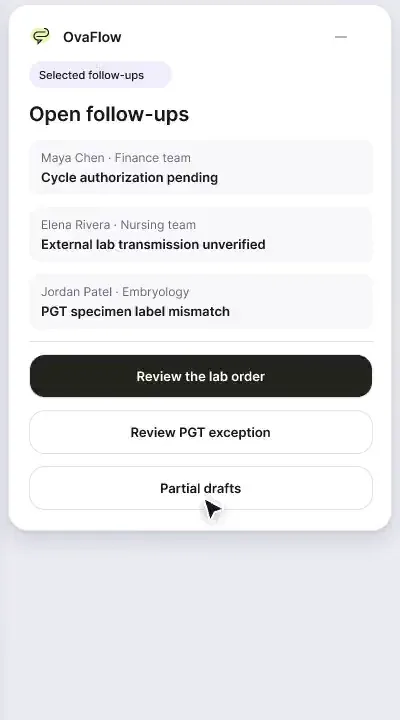
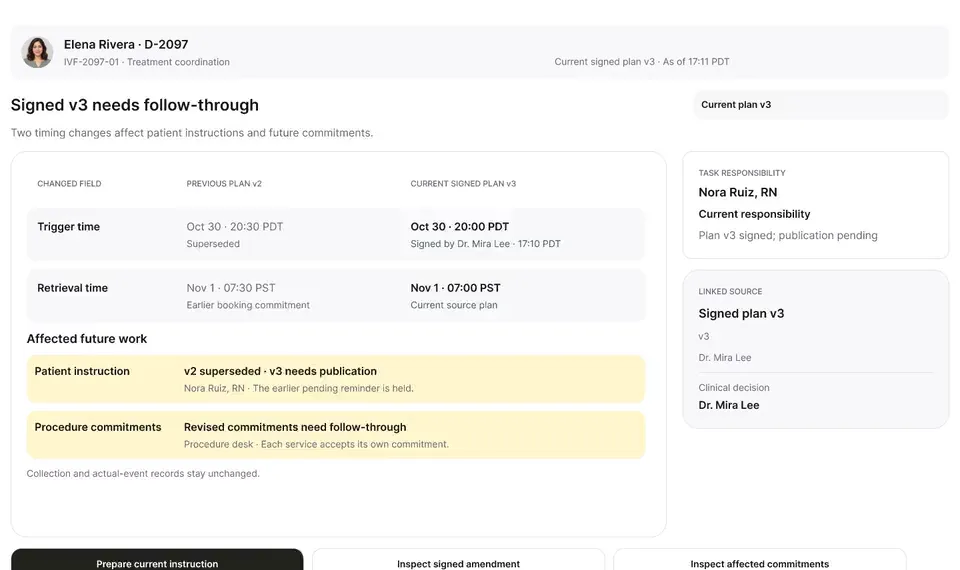
On-screen narration: Elena Rivera's monitoring review opens. Care-team follow-up is prepared from the monitoring review. The nursing task draft is reviewed before it goes to the nAbleIVF worklist.
What to watch for: Before consultation capture begins, patient identity and consent are confirmed on screen.
Boundary rule: No audio is captured before the consent check.
On-screen narration: Maya Chen's identity and her verbal consent to record are confirmed. Consultation capture begins beside the open chart.
What to watch for: When the patient shares a private concern or steps into the exam area, capture pauses with a single click.
Boundary rule: Off-record moments stay completely off the transcript.
On-screen narration: The microphone pauses during a personal, off-record moment.
What to watch for: After reviewing the draft beside the transcript, the clinician places the note into the modeled nAbleIVF screen and verifies the save.
Boundary rule: The workflow closes only after the saved record is read back.
On-screen narration: The consultation draft is reviewed, including an allergy follow-up it picked up. The reviewed note is placed in the nAbleIVF editor, waiting for Save Draft. Save Draft runs and the clinician is asked to verify. The saved consultation draft is confirmed, and the open allergy follow-up is shown.
OvaFlow never makes the clinical call in these recordings. Physicians sign, the person taking a handoff accepts it, and the lab keeps its own holds. The companion tracks, checks and stops; staff decide.
In this walkthrough
Every patient, family member, clinician and clinic in these stories is fictional. Names, times and screens come from prototype walkthroughs, not from real care.
 Maya ChenPatient
 Elena RiveraPatient
Named or shown on screen. An EMR here is a modeled workflow example built for the prototype, not the vendor's own software. OvaFlow is designed to work beside these systems.
 Modeled workflow exampleFertility EMR & practice management
 Microsoft TeamsClinician calls & collaboration
Systems a clinic running this workflow often uses. They do not appear in this recording.
 Microsoft EdgeManaged browser
 Google ChromeManaged browser
Third-party names and logos are trademarks of their respective owners, shown to illustrate systems commonly used in IVF clinics. No affiliation, endorsement or live integration is implied. nAbleIVF, eIVF and Artisan appear as modeled workflow examples.
Where this appears
This recording is part of these pages. Each one explains the step in more depth.
Questions & answers
What clinicians, coordinators, practice leaders, and patients ask when reviewing Walkthrough 27.
In web-based EMRs, pasting or placing text into a textarea does not save it to the database. If the browser tab closes or times out before the clinician clicks Save inside the EMR, the note is lost unless 'Placed' is tracked separately from 'Saved'.
When the clinician reviews the consult summary, proposed follow-up items (such as scheduling a saline sonogram or ordering partner bloodwork) are presented for approval and then routed to the nursing queue with a named owner.
No. It is a modeled nAbleIVF screen with fictional patient data built to show how the companion is designed to work beside the chart.
Related
A patient-reported penicillin rash is surfaced against the chart, a monitoring note is confirmed saved rather than assumed, and a specimen label mismatch stops review.
A note isn't done until it's saved, a cycle doesn't start with prior authorization unresolved, dose changes go to eIVF's own e-prescribing, and a PGT label mismatch stops the review.
A late estradiol result, a newly signed trigger time, the wrong chart caught before publishing, and a lost confirmation checked rather than blindly resent.
Next step
We'll replay this flow against your roles and handoffs, using fictional records. Please don't send patient data.