nAbleIVF: allergy check, monitoring note, save check, specimen stop
A patient-reported penicillin rash is surfaced against the chart, a monitoring note is confirmed saved rather than assumed, and a specimen label mismatch stops review.
Product preview · Fictional patient data
Walkthrough 6 of 29 · Desktop
A note isn't done until it's saved, a cycle doesn't start with prior authorization unresolved, dose changes go to eIVF's own e-prescribing, and a PGT label mismatch stops the review.
eIVF: note save, financial blocker, e-prescribing handoff, PGT stop, muted recording of the design prototype. Fictional patient data.
Chapter 1 of 6: Confirm where the note goes
Recorded from an interactive design prototype. Every patient, clinician and clinic is fictional, EMR screens are modeled reconstructions, and nothing shown is a live connection to any clinic or vendor system.
Clinical & operational context
Beside a modeled eIVF (V6 reference) view, a consultation note is placed and its save is checked. An unresolved financial authorization is visible before the cycle starts, a dictated dose change is handed to eIVF's own e-prescribing workflow, and a PGT biopsy label mismatch stops review.
Before a patient starts gonadotropin injections or undergoes embryo biopsy and transfer, several cross-departmental gates must align: clinical note placement in the right chart section, prior authorization or financial clearance for specialty medications, electronic prescribing inside the EMR, tracking of outside diagnostic labs, and exact identifier matching on preimplantation genetic testing (PGT) reports. In clinics using comprehensive EMRs such as eIVF, each of those activities lives in a different module.
Recorded beside a modeled eIVF interface, this walkthrough shows six distinct safeguards in sequence: confirming the exact chart destination before placing a note, verifying the saved note, holding cycle start when a required financial authorization item is still pending, routing gonadotropin dose changes back to eIVF's own e-prescribing module rather than handling prescriptions in the companion, tracking overdue outside lab follow-ups with named owners, and stopping immediately when a PGT report label does not match the patient's chart identifiers.
Nora Ruiz, RN
Confirms chart destination and checks save
OvaFlow safeguard
Holds start on pending prior authorization
Dr. Mira Lee
Completes dose order inside the EMR
OvaFlow safeguard
Stops on sample identifier mismatch
Four coordination boundaries demonstrated beside a modeled eIVF workspace.
Guardrail: Prescribing always returns to the EMR's own e-prescribing module, and PGT identifier mismatches halt review immediately.
What to watch for
Beside a modeled eIVF (V6 reference) view, a consultation note is placed and its save is checked. An unresolved financial authorization is visible before the cycle starts, a dictated dose change is handed to eIVF's own e-prescribing workflow, and a PGT biopsy label mismatch stops review.
Follow the exact timestamps, UI status changes, and coordination safeguards as the recording plays.
What to watch for: Before placing a clinical note, the companion confirms the target chart and note category in the modeled eIVF screen.
Boundary rule: Notes are never placed into an ambiguous or unconfirmed chart tab.
On-screen narration: The destination for the consultation note is confirmed before anything is placed. The reviewed draft is placed in the eIVF note editor.
What to watch for: Once saved in eIVF, the companion verifies the committed note record.
Boundary rule: Save verification prevents silent loss of documentation during busy clinic mornings.
On-screen narration: Staff press Save in eIVF. The task stays open until the saved draft is checked. The saved draft is confirmed in the eIVF record itself.
What to watch for: A pending financial/prior-authorization requirement holds the cycle-start readiness gate open.
Boundary rule: Financial holds are visible to the care team early so patients are not surprised at the pharmacy counter.
On-screen narration: Maya Chen's cycle readiness checklist opens. An unresolved financial authorization blocks cycle start and is shown before anything begins. Back to the clinical and financial readiness overview.
What to watch for: When a medication dose change is needed, the companion hands the clinician straight to eIVF's e-prescribing screen.
Boundary rule: OvaFlow never acts as an e-prescribing system or calculates medication doses.
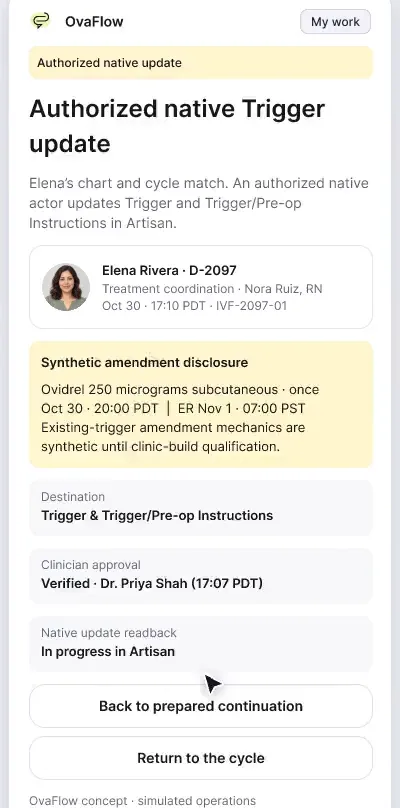
On-screen narration: A monitoring review includes a dictated medication change. The details of the dose change are clarified before anything is prescribed. The change is handed to the clinic's own eIVF e-prescribing workflow. OvaFlow does not prescribe. Back to the monitoring overview.
What to watch for: Pending outside laboratory results appear with expected dates and a single named nurse owner.
Boundary rule: External diagnostic orders cannot age silently without a responsible owner.
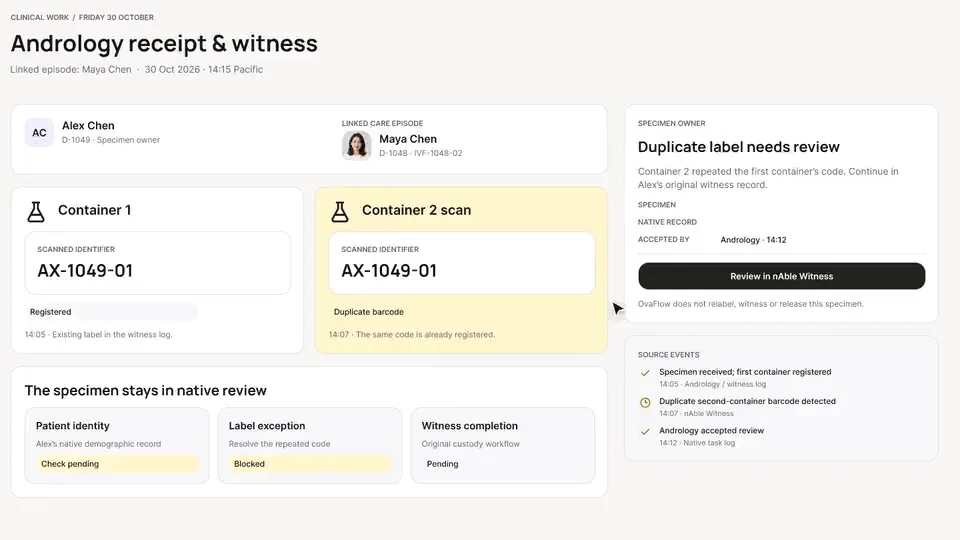
On-screen narration: The eIVF follow-up queue opens. An order handed to an outside reference lab is tracked. Back to the follow-ups.
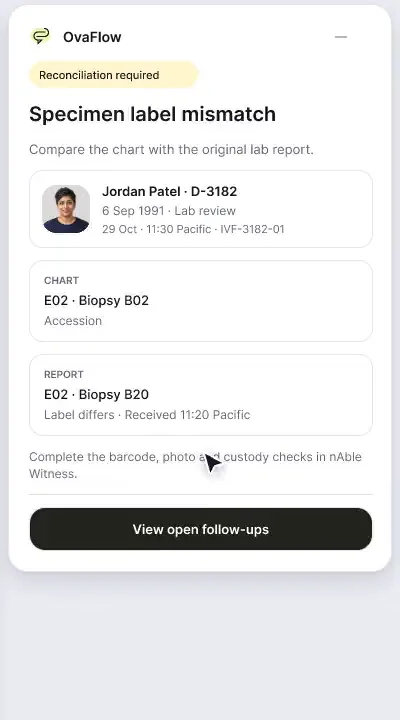
What to watch for: A PGT report whose sample identifier disagrees with the chart triggers an immediate stop banner.
Boundary rule: Embryo genetics documents cannot be attached or cleared when identifiers conflict.
On-screen narration: A PGT biopsy label doesn't match its source, so review stops.
OvaFlow never makes the clinical call in these recordings. Physicians sign, the person taking a handoff accepts it, and the lab keeps its own holds. The companion tracks, checks and stops; staff decide.
In this walkthrough
Every patient, family member, clinician and clinic in these stories is fictional. Names, times and screens come from prototype walkthroughs, not from real care.
 Maya ChenPatient
Named or shown on screen. An EMR here is a modeled workflow example built for the prototype, not the vendor's own software. OvaFlow is designed to work beside these systems.
 Modeled workflow exampleFertility EMR & practice suite
eIVF: V6 reference.
Systems a clinic running this workflow often uses. They do not appear in this recording.
 Electronic witnessing (RI Witness) & PGT genetics
 PGT & reproductive genetics lab
 E-prescribing network
 Fertility benefits manager
 Microsoft EdgeManaged browser
 Google ChromeManaged browser
Third-party names and logos are trademarks of their respective owners, shown to illustrate systems commonly used in IVF clinics. No affiliation, endorsement or live integration is implied. nAbleIVF, eIVF and Artisan appear as modeled workflow examples.
Where this appears
This recording is part of these pages. Each one explains the step in more depth.
Questions & answers
What clinicians, coordinators, practice leaders, and patients ask when reviewing Walkthrough 6.
Electronic prescribing requires formulary checks, drug-interaction screening, and clinician signature inside the clinic's system of record. OvaFlow tracks the follow-up task around the change but never replaces e-prescribing.
No. Readiness gates surface missing financial clearance before routine cycle start so coordinators can resolve coverage or counsel the patient; clinicians always control clinical care.
Review stops immediately and the discrepancy is flagged for embryology and clinical verification in the source laboratory record.
Related
A patient-reported penicillin rash is surfaced against the chart, a monitoring note is confirmed saved rather than assumed, and a specimen label mismatch stops review.
Beside a modeled Artisan view, the companion compares Dr. Priya Shah's approval with the unchanged Artisan fields, stops on Maya's open chart, and won't assume an update it didn't see.
From duplicate barcodes to cold-chain delivery and the patient's own “received”, every handoff to the clinic's own system has an owner and a confirmation.
Next step
We'll replay this flow against your roles and handoffs, using fictional records. Please don't send patient data.