Daily care: a changed trigger, the wrong chart and an unknown outcome
A late estradiol result, a newly signed trigger time, the wrong chart caught before publishing, and a lost confirmation checked rather than blindly resent.
Product preview · Fictional patient data
Walkthrough 4 of 29 · Desktop
Saving a trigger doesn't tell the patient or the lab. Portal distribution, the lab change order and a message that was read but not accepted are each tracked separately.
Artisan: portal distribution, lab change order, read vs accept, muted recording of the design prototype. Fictional patient data.
Chapter 1 of 5: Starting from a verified readback
Recorded from an interactive design prototype. Every patient, clinician and clinic is fictional, EMR screens are modeled reconstructions, and nothing shown is a live connection to any clinic or vendor system.
Clinical & operational context
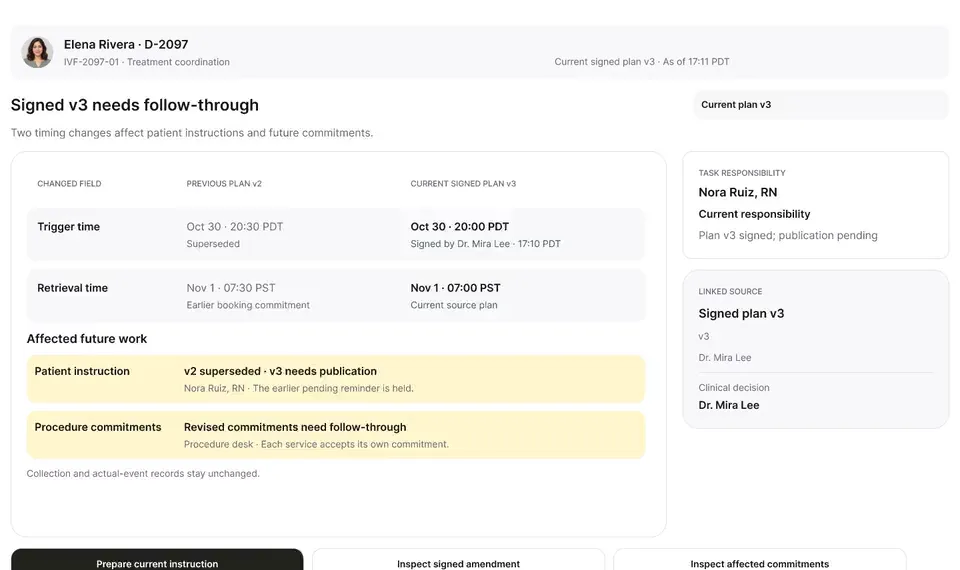
In the separate Artisan clinic example, after the trigger update is verified, three separate things still need to happen: the patient portal copy, the embryology lab's schedule change order, and the evening nursing handoff. Chloe Park, RN reads the message at 17:22 PDT, but Nora stays responsible until Chloe accepts at 17:25 PDT.
After a trigger change is saved in the EMR, the update still has to reach two separate destinations: the patient through the clinic portal and the embryology/procedure team preparing the retrieval bench. In busy clinics, staff often paste a patient's name into an internal instant-message channel and assume someone else has picked up the lab and patient notifications — even when colleagues have only glanced at the message.
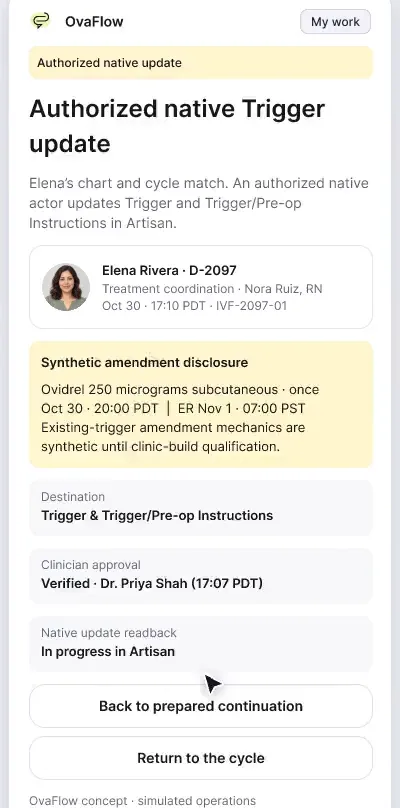
Starting from Elena Rivera's verified Cycle Sheet readback beside a modeled Artisan screen, this walkthrough tracks patient portal publication and embryology lab notification as two distinct rows. When a revised order arrives, the outdated instruction is retired immediately. In the clinic's instant-message handoff channel, Chloe Park, RN reads Nora Ruiz's handoff message at 17:22 PDT — which leaves Nora Ruiz, RN explicitly responsible — until Chloe clicks Accept at 17:25 PDT for her specific task while all other open items keep their existing owners.
Nora Ruiz, RN
Starts from verified Cycle Sheet readback
OvaFlow companion
Tracks portal notice and lab notice separately
Chloe Park, RN
Reads handoff at 17:22 PDT without accepting
Chloe Park, RN
Accepts assigned item at 17:25 PDT
Separating portal distribution from lab notice, and keeping Nora Ruiz, RN responsible after Chloe reads the message at 17:22 PDT until Chloe accepts at 17:25 PDT.
Guardrail: A chat read receipt never transfers ownership, and accepting one item leaves sibling tasks with their current owners.
What to watch for
In the separate Artisan clinic example, after the trigger update is verified, three separate things still need to happen: the patient portal copy, the embryology lab's schedule change order, and the evening nursing handoff. Chloe Park, RN reads the message at 17:22 PDT, but Nora stays responsible until Chloe accepts at 17:25 PDT.
Follow the exact timestamps, UI status changes, and coordination safeguards as the recording plays.
What to watch for: The companion begins from the verified Cycle Sheet readback rather than an unverified draft.
Boundary rule: Downstream distribution starts only after the EMR source value is confirmed.
On-screen narration: The story starts from the verified Artisan trigger and egg retrieval schedule. The readback evidence opens. The evidence view closes.
What to watch for: Patient portal publication and lab schedule notification appear as two independent rows.
Boundary rule: Notifying the patient never marks the embryology lab notified, or vice versa.
On-screen narration: Portal distribution at 17:12 PDT and the lab's schedule change order are tracked as separate items. The schedule change order and portal distribution evidence open. The evidence view closes.
What to watch for: Chloe reads the handoff message at 17:22 PDT; the badge explicitly states 'Read at 17:22 PDT — Nora still responsible'.
Boundary rule: Viewing a message never transfers clinical responsibility.
On-screen narration: Chloe Park, RN reads the instant message at 17:22 PDT. Nora Ruiz, RN remains responsible. My work confirms Nora is still the active owner while the offer is pending. Back to the handoff.
What to watch for: At 17:25 PDT Chloe clicks Accept on the handoff item, moving ownership to her name.
Boundary rule: Ownership changes only on an explicit accept action with a recorded timestamp.
On-screen narration: Chloe Park, RN explicitly accepts the evening nursing follow-up at 17:25 PDT.
What to watch for: Sibling tasks for Elena Rivera remain assigned to their existing owners.
Boundary rule: Accepting one task never sweeps unrelated open tasks into a single bucket.
On-screen narration: The accepted handoff shows that the patient, lab and physician items each stay open with their own owners. The handoff view closes.
OvaFlow never makes the clinical call in these recordings. Physicians sign, the person taking a handoff accepts it, and the lab keeps its own holds. The companion tracks, checks and stops; staff decide.
In this walkthrough
Every patient, family member, clinician and clinic in these stories is fictional. Names, times and screens come from prototype walkthroughs, not from real care.
Named or shown on screen. An EMR here is a modeled workflow example built for the prototype, not the vendor's own software. OvaFlow is designed to work beside these systems.
Artisan: Rebuilt from public help articles; how an existing instruction is edited is our own stand-in.
Third-party names and logos are trademarks of their respective owners, shown to illustrate systems commonly used in IVF clinics. No affiliation, endorsement or live integration is implied. nAbleIVF, eIVF and Artisan appear as modeled workflow examples.
Where this appears
This recording is part of these pages. Each one explains the step in more depth.
Questions & answers
What clinicians, coordinators, practice leaders, and patients ask when reviewing Walkthrough 4.
Because a patient can receive her updated trigger time while the procedure room or lab bench still has the previous timestamp, or vice versa. Each recipient group requires its own confirmation.
Nora Ruiz, RN remains the visible owner on the board and in escalation rules so the task cannot fall between two stools.
No. Each open commitment keeps its own named owner.
Related
A late estradiol result, a newly signed trigger time, the wrong chart caught before publishing, and a lost confirmation checked rather than blindly resent.
Beside a modeled Artisan view, the companion compares Dr. Priya Shah's approval with the unchanged Artisan fields, stops on Maya's open chart, and won't assume an update it didn't see.
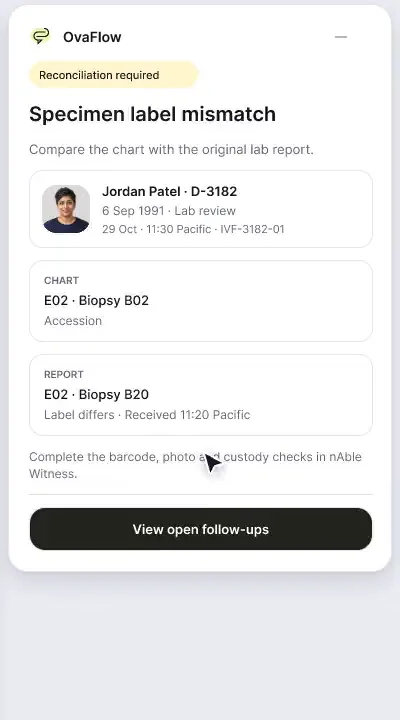
A patient-reported penicillin rash is surfaced against the chart, a monitoring note is confirmed saved rather than assumed, and a specimen label mismatch stops review.
Next step
We'll replay this flow against your roles and handoffs, using fictional records. Please don't send patient data.