Daily care: a changed trigger, the wrong chart and an unknown outcome
A late estradiol result, a newly signed trigger time, the wrong chart caught before publishing, and a lost confirmation checked rather than blindly resent.
Product preview · Fictional patient data
Walkthrough 14 of 29 · iPhone
On the on-call phone, seeing a handoff isn't accepting it, declining leaves the original nurse responsible, and the physician's decision stays with the physician.
On-call nurse iPhone: seeing isn't accepting, declining leaves no gap, muted recording of the design prototype. Fictional patient data.
Chapter 1 of 5: On call: seeing isn't accepting
Recorded from an interactive design prototype. Every patient, clinician and clinic is fictional, EMR screens are modeled reconstructions, and nothing shown is a live connection to any clinic or vendor system.
Clinical & operational context
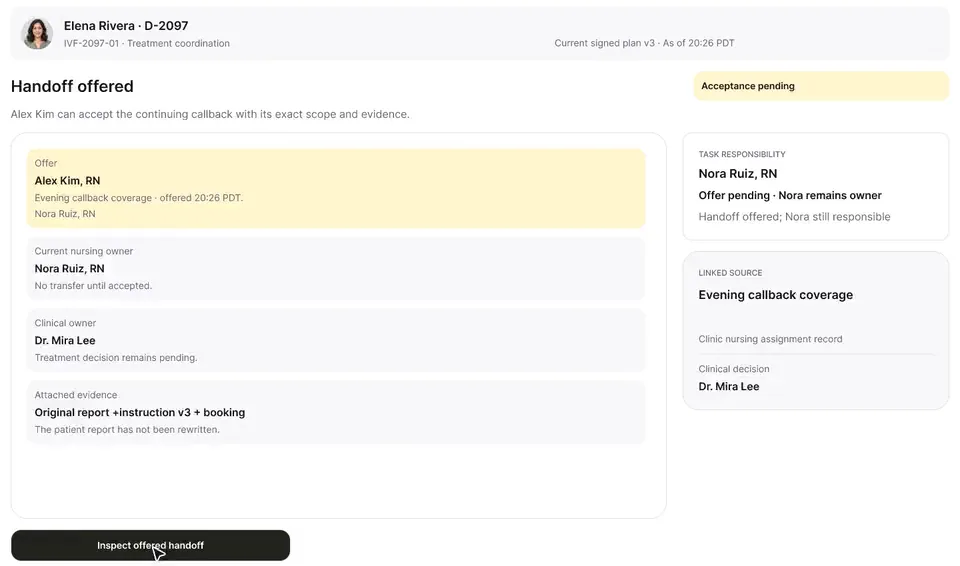
Alex Kim, RN reviews the evening callback offer on the on-call phone, next to Elena's 8:20 PM report. Declining would leave Nora responsible; accepting moves only the nursing callback, and Dr. Mira Lee's clinical review can't be edited from the phone.
After 5:00 PM, IVF nursing coverage shifts to an on-call nurse working from a clinic iPhone. Evening handoffs fail in two predictable ways: the day nurse assumes that because the on-call nurse opened the app, she has taken over every pending callback; or the on-call nurse is in the middle of an urgent post-retrieval triage call and cannot take a routine handoff, leaving the task in limbo.
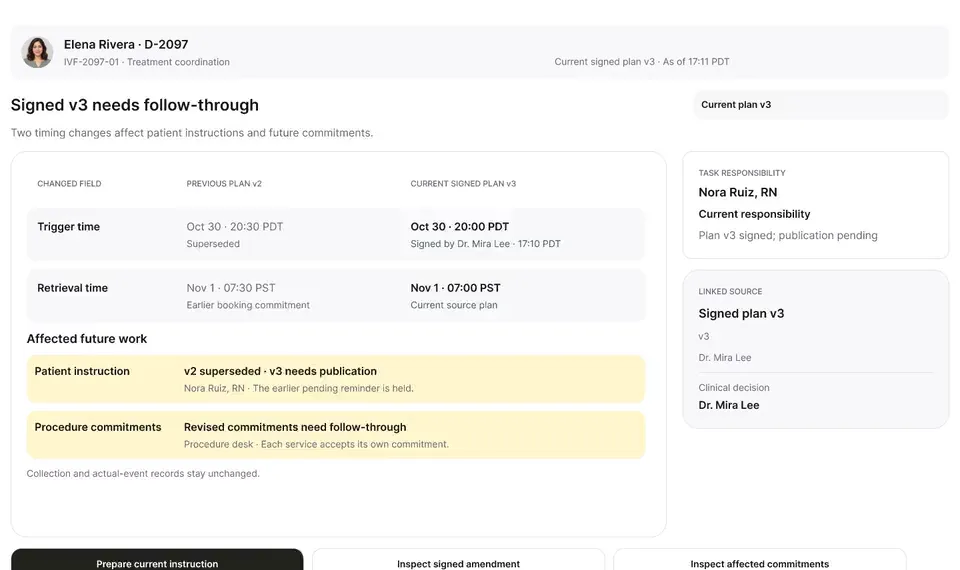
This iPhone walkthrough follows on-call nurse Alex Kim, RN: opening the handoff queue shows explicitly that viewing an item does not accept it. Alex reviews Elena Rivera's signed 20:00 PDT trigger order beside her 20:20 PDT patient-reported administration. We see what happens when an on-call nurse declines a handoff (Nora Ruiz, RN remains the named owner and is alerted immediately), and then how Alex accepts specifically the nursing callback while leaving Dr. Mira Lee's physician review on its own track, with the completed callback note syncing back to the desktop workspace.
Alex Kim, RN
Opens handoff queue and reads Elena's timeline
Alex Kim, RN
If declined, ownership stays with Nora Ruiz, RN
Alex Kim, RN
Accepts Elena's nursing callback at 20:28 PDT
Alex Kim, RN
Logs callback note; syncs to desktop workspace
How ownership behaves on the on-call nurse's iPhone so no task is ever ownerless during evening coverage.
Guardrail: Opening the app or declining an offer keeps Nora Ruiz, RN responsible until Alex Kim, RN explicitly accepts.
What to watch for
Alex Kim, RN reviews the evening callback offer on the on-call phone, next to Elena's 8:20 PM report. Declining would leave Nora responsible; accepting moves only the nursing callback, and Dr. Mira Lee's clinical review can't be edited from the phone.
Follow the exact timestamps, UI status changes, and coordination safeguards as the recording plays.
What to watch for: The on-call iPhone header states clearly that viewing a handoff offer does not transfer ownership.
Boundary rule: Opening a mobile screen never silently accepts clinical responsibility.
On-screen narration: Alex Kim, RN opens the evening on-call queue. Nora is still the owner.
What to watch for: Alex sees Dr. Mira Lee's signed 20:00 PDT order right beside Elena's 20:20 PDT reported injection.
Boundary rule: Clinician surfaces use 24-hour time and preserve the distinction between signed orders and patient reports.
On-screen narration: The callback offer and Elena's 8:20 PM report (35h 40m) are reviewed side by side.
What to watch for: When a handoff is declined with a reason, Nora Ruiz, RN remains the active owner without a gap.
Boundary rule: Declining an offer returns a clear signal to the offering nurse rather than leaving the task unassigned.
On-screen narration: Declining is tried: there is no gap, and Nora stays responsible. The offer reopens so it can be accepted explicitly.
What to watch for: Alex accepts the nursing callback while Dr. Mira Lee's clinical review remains separately owned.
Boundary rule: Nursing acceptance covers the nursing callback only, not the physician's schedule disposition.
On-screen narration: Alex accepts the evening nursing callback. Dr. Mira Lee's clinical review stays open and can't be edited here.
What to watch for: After calling Elena, Alex's structured callback note syncs back to the clinic's desktop queue.
Boundary rule: Morning staff see the exact evening resolution without chasing text messages.
On-screen narration: A callback note at 20:34 PDT syncs to the desktop without writing to EMR schedule fields.
OvaFlow never makes the clinical call in these recordings. Physicians sign, the person taking a handoff accepts it, and the lab keeps its own holds. The companion tracks, checks and stops; staff decide.
In this walkthrough
Every patient, family member, clinician and clinic in these stories is fictional. Names, times and screens come from prototype walkthroughs, not from real care.
 Elena RiveraPatient
Named or shown on screen. An EMR here is a modeled workflow example built for the prototype, not the vendor's own software. OvaFlow is designed to work beside these systems.
Third-party names and logos are trademarks of their respective owners, shown to illustrate systems commonly used in IVF clinics. No affiliation, endorsement or live integration is implied. nAbleIVF, eIVF and Artisan appear as modeled workflow examples.
Where this appears
This recording is part of these pages. Each one explains the step in more depth.
Questions & answers
What clinicians, coordinators, practice leaders, and patients ask when reviewing Walkthrough 14.
Nora Ruiz, RN remains the named owner without interruption and receives an immediate notification that the offer was declined so she can complete it or offer it to backup coverage.
20:00 PDT is Dr. Mira Lee's signed version-3 order; 20:20 PDT is the time Elena Rivera reported taking the dose. Keeping both visible prevents confusion during the callback.
It syncs to the desktop coordination workspace as a structured draft ready for EMR placement and morning huddle review.
Related
A late estradiol result, a newly signed trigger time, the wrong chart caught before publishing, and a lost confirmation checked rather than blindly resent.
Elena says she injected at 8:20, not 8:00. Her words are kept as she said them, the signed instruction stays as signed, and the evening callback changes hands only when Alex accepts it.
Next step
We'll replay this flow against your roles and handoffs, using fictional records. Please don't send patient data.