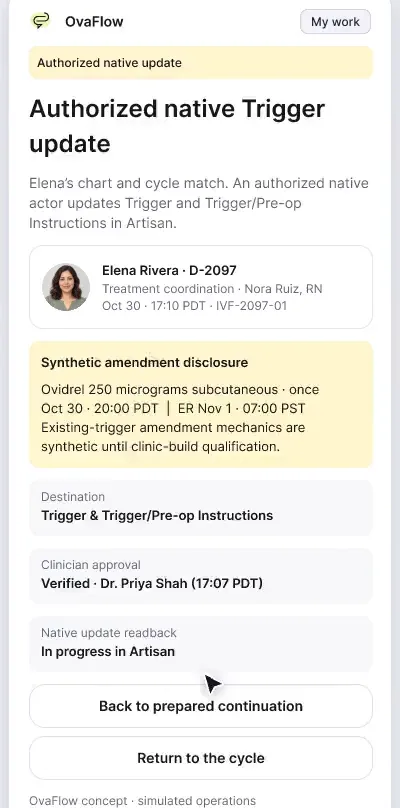
Daily care: a changed trigger, the wrong chart and an unknown outcome
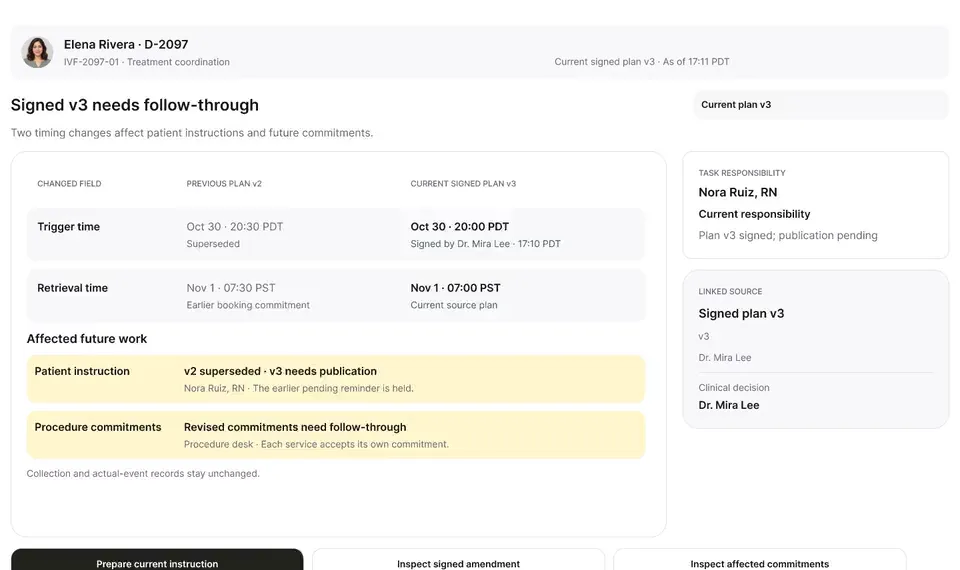
A late estradiol result, a newly signed trigger time, the wrong chart caught before publishing, and a lost confirmation checked rather than blindly resent.
Product preview · Fictional patient data
Walkthrough 2 of 29 · Desktop
Elena says she injected at 8:20, not 8:00. Her words are kept as she said them, the signed instruction stays as signed, and the evening callback changes hands only when Alex accepts it.
Daily care: the 8:20 PM report and the evening handoff, muted recording of the design prototype. Fictional patient data.
Chapter 1 of 6: After the instruction is published
Recorded from an interactive design prototype. Every patient, clinician and clinic is fictional, EMR screens are modeled reconstructions, and nothing shown is a live connection to any clinic or vendor system.
Clinical & operational context
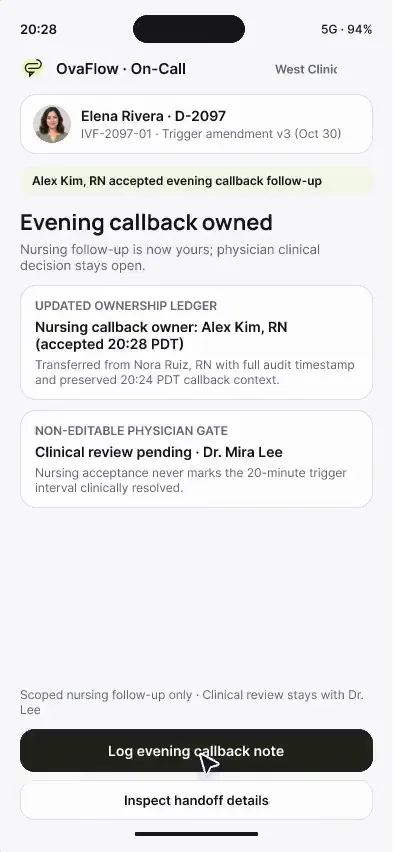
The same evening, Elena's questions and reports arrive. A question before her dose doesn't mark the medication as taken, and her report of an 8:20 PM injection is kept exactly as she said it. The evening callback moves to Alex Kim, RN only when Alex accepts, while Dr. Mira Lee's clinical review stays open.
Publishing a revised trigger instruction does not end the evening's coordination work. Patients preparing subcutaneous injections at home frequently have last-minute questions about needles, mixing, or timing, and occasionally administer the dose slightly late. If a patient portal tap on 'I have a question' is accidentally logged as medication confirmation, or if a late administration report sits unread until morning retrieval, the operating room and embryology laboratory can begin aspiration on the wrong schedule.
Following Elena Rivera's version-3 trigger publication (20:00 PDT), Elena first requests a nursing callback without marking the dose taken. At 20:22 PDT she honestly logs in the patient companion that she injected at 20:20 PDT — twenty minutes after her signed 20:00 PDT order. Nora Ruiz, RN accepts the immediate patient callback while keeping Dr. Mira Lee's clinical review of the 20-minute discrepancy as a separate open task, then hands the evening check-in to on-call nurse Alex Kim, RN, who accepts at 20:28 PDT.
Elena Rivera
Reports dose taken at 8:20 PM PDT (ordered 8:00 PM)
Nora Ruiz, RN
Accepts patient reassurance callback
Dr. Mira Lee
Reviews 20-min difference against OR slot
Alex Kim, RN
Accepts evening follow-up at 20:28 PDT
Elena Rivera's 20:20 PDT administration report creates two independent responsibilities so nursing support never closes the physician's retrieval-timing decision.
Guardrail: Answering the patient's phone call cannot close the clinician's review of a 20-minute trigger discrepancy.
What to watch for
The same evening, Elena's questions and reports arrive. A question before her dose doesn't mark the medication as taken, and her report of an 8:20 PM injection is kept exactly as she said it. The evening callback moves to Alex Kim, RN only when Alex accepts, while Dr. Mira Lee's clinical review stays open.
Follow the exact timestamps, UI status changes, and coordination safeguards as the recording plays.
What to watch for: The workspace shows version 3 published and waiting for Elena's confirmation.
Boundary rule: Delivery to the portal is tracked separately from patient confirmation of administration.
On-screen narration: The story picks up after the version 3 instruction was verified in the portal.
What to watch for: Elena requests a callback; the medication status stays 'Unconfirmed' rather than flipping to taken.
Boundary rule: A patient question never counts as a completed dose.
On-screen narration: At 17:24 PDT Elena asks a question before her dose. It is logged without marking the medication as taken.
What to watch for: At 20:22 PDT Elena reports taking her trigger at 20:20 PDT alongside the signed 20:00 PDT order.
Boundary rule: OvaFlow records the exact patient-reported time without overwriting the signed 20:00 PDT order.
On-screen narration: At 20:22 PDT Elena reports “8:20 tonight”. Her report is kept as she said it: 35h 40m before retrieval, against 36h 00m planned.
What to watch for: Nora accepts the callback while the clinical discrepancy review for Dr. Mira Lee stays open on its own row.
Boundary rule: Completing a nursing phone call never closes a physician's clinical review item.
On-screen narration: Nora accepts the first callback. Dr. Mira Lee's clinical review stays open and separate.
What to watch for: Nora offers the remaining evening follow-up to on-call nurse Alex Kim, RN; Nora's name remains attached while pending.
Boundary rule: Shift-change offers never create an ownerless gap between day and on-call staff.
On-screen narration: Nora offers the evening callback to Alex Kim, RN. Nora stays the owner while the offer is open.
What to watch for: Alex Kim, RN accepts at 20:28 PDT with the full history of v2, v3, and the 20:20 PDT report in view.
Boundary rule: The accepting on-call nurse sees the complete timeline without hunting through chat threads.
On-screen narration: Alex Kim, RN accepts the evening nursing follow-up at 20:28 PDT. The handoff history shows exactly what Alex accepted, and that the physician review is still open. The handoff details close.
OvaFlow never makes the clinical call in these recordings. Physicians sign, the person taking a handoff accepts it, and the lab keeps its own holds. The companion tracks, checks and stops; staff decide.
In this walkthrough
Every patient, family member, clinician and clinic in these stories is fictional. Names, times and screens come from prototype walkthroughs, not from real care.
 Elena RiveraPatient
Where this appears
This recording is part of these pages. Each one explains the step in more depth.
Questions & answers
What clinicians, coordinators, practice leaders, and patients ask when reviewing Walkthrough 2.
OvaFlow opens a callback request for the nursing team while leaving the medication confirmation status unconfirmed until she logs what she actually took.
One row tracks the immediate nursing callback to reassure Elena; the second row tracks Dr. Mira Lee's clinical review of whether the 20-minute difference affects the retrieval schedule.
No. It is labeled 'Patient-reported use' beside the signed 20:00 PDT clinician order.
Related
A late estradiol result, a newly signed trigger time, the wrong chart caught before publishing, and a lost confirmation checked rather than blindly resent.
Beside a modeled Artisan view, the companion compares Dr. Priya Shah's approval with the unchanged Artisan fields, stops on Maya's open chart, and won't assume an update it didn't see.
On the on-call phone, seeing a handoff isn't accepting it, declining leaves the original nurse responsible, and the physician's decision stays with the physician.
Next step
We'll replay this flow against your roles and handoffs, using fictional records. Please don't send patient data.